
No-Code vs. Generative Code for IT Service Management: What's the Difference in February 2026?

You're automating ITSM workflows, and the options are AI-written code or visual builders where you drag nodes around. The generative approach looks faster because you describe what you want and get working code immediately. No-code requires constructing each workflow step in a canvas editor. The real question isn’t initial build time. It’s what happens when workflows need updates because your tool stack changed, approval chains shifted, or someone left without documenting why the automation works the way it does.
TLDR:
No-code uses visual drag-and-drop builders; generative code uses AI to write scripts.
AI-generated code creates maintenance issues when workflows break months after deployment.
Visual workflows let your entire IT team update automations without debugging scripts.
Ravenna automates ITSM workflows using visual builders with AI Agents that execute tasks across your SaaS stack.
What Is No-Code for IT Service Management?
No-code for IT service management refers to workflow automation built through visual interfaces instead of scripting. Modern no-code platforms use structured builders to replace custom scripts. IT teams use drag-and-drop builders to automate common requests like access provisioning, password resets, or device management without writing code. The approach relies on structured workflow design. You map out each process step using pre-built nodes and conditional logic. A software request needing department-specific approvals gets an approval node with defined conditions and next actions. The entire workflow stays visible in a canvas-style editor.
This structure creates transparency. When a workflow breaks or needs updates, any team member can open the builder and see what's happening at each step. There's no parsing through lines of code or tracing execution paths. The logic appears in visual form, making maintenance straightforward for IT teams without developers.
What Is Generative Code for ITSM?
Generative AI (GenAI) code for IT service management works differently from visual builders. You describe what you want in natural language, and AI writes the actual code. This approach gets called "vibe coding" because you're vibing with the AI to produce scripts and functions. In practice, you type something like "create a workflow that provisions Okta access when someone joins engineering," and the AI generates Python or JavaScript to handle that request. You might review the code, or you might just accept what the AI produced and deploy it.
The output is real code that executes your ITSM workflows using GenAI logic. Teams attracted to this approach see it as faster than learning a workflow builder or writing code manually. You describe the intent, the AI handles implementation, and the automation runs. The catch comes later: when that AI-generated code breaks or needs updates, someone has to debug scripts they didn't write and may not fully understand.
The Core Difference: Visual Structure vs. AI-Generated Code
The architectural difference comes down to control and visibility. No-code systems give you predetermined components that snap together in ways you can always see and trace, unlike low-code platforms that still require custom scripting. Generative code systems give you custom scripts that do exactly what you asked for, but in ways you might not fully understand.
With visual workflow builders, every automation exists as a series of connected nodes. You see the approval step, the integration with Okta, and the notification sent to Slack. If something breaks, you open the canvas and walk through each node until you find the problem. The structure stays consistent across every workflow your team builds.
Generative code produces unique implementations for each prompt. Two similar workflows might use completely different functions and logic patterns depending on how the AI interpreted your request. When you need to modify one of these workflows six months later, you're reading through code you didn't write, trying to understand why the AI chose this particular approach.
This matters for IT teams running dozens or hundreds of automations. Visual workflows create institutional knowledge. Anyone on your team can open a workflow and understand what's happening. Generative code creates individual scripts that require developer-level understanding to modify safely.
Why Maintainability Matters in ITSM Workflows
ITSM workflows evolve as your organization changes. When you add a SaaS tool, your access provisioning needs updates. When HR switches systems, onboarding breaks. Team turnover means losing the context behind specific automations, especially when logic isn’t documented in a shared knowledge base. AI-generated code compounds these challenges. You inherit scripts with logic you didn't design and may not understand immediately. Each AI prompt produces different coding styles across workflows. Bugs surface in production under conditions you didn't anticipate during testing.
Visual workflow systems, on the other hand, keep logic transparent and accessible. Anyone on your team sees what happens at each step. Updates mean adjusting nodes instead of rewriting code. As your tool stack expands, automations need to stay maintainable across the entire IT organization, not just by whoever wrote the original prompt.
The Hidden Costs of Vibe Coding in Production ITSM Environments
While vibe coding speeds up the initial build, the real cost appears when those workflows run in production. AI-generated code works fine in testing, then fails under edge cases you didn't anticipate because you didn't write the logic yourself. In addition, security vulnerabilities hide in generated scripts. An AI might pull sensitive data from one system and pass it through an API without proper encryption. You won't catch this during a quick review because the code looks functional. The vulnerability only surfaces during a security audit or, worse, after a breach.
Debugging becomes a different challenge entirely. When a visual workflow breaks, you trace the path node by node. When AI-generated code breaks, you read through functions and conditionals, trying to reconstruct why the AI made specific choices. In practice, vibe coding maintenance challenges accumulate as technical debt that slows IT operations over time. The initial speed advantage often reverses after deployment. You may save hours building workflows, but lose days maintaining them.
When No-Code Makes Sense for ITSM Teams
No-code workflow automation works when your entire IT team, including citizen developers within IT, needs to build and modify automations. Visual builders make workflow automation accessible without requiring development skills.
Take self-service access provisioning workflows as an example. You build the logic once: an employee requests access, approval routes to the right manager based on department, and provisioning happens automatically through identity providers like Okta or Google Workspace. When your organization adds a new approval tier or changes which roles get auto-approved, any IT team member can update the workflow in minutes.
Another example is employee lifecycle automations. In this workflow, onboarding sequences involve multiple systems like HRIS, email, access management, and device assignment. A visual workflow shows every step across every integration. Offboarding follows the same pattern: suspend accounts, reclaim licenses, and remove group memberships.
When Generative Code Could Be Useful for ITSM
Generative code can serve a role in specific ITSM scenarios. Consider these use cases where vibe coding can be helpful:
Rapid prototyping: Organizations with developer teams can use AI-generated scripts for rapid prototyping before building production-ready automations. Testing a complex multi-system workflow becomes faster when you generate code to validate the concept.
Custom integrations: When you need to connect legacy systems without API support or handle proprietary data formats, generated code offers flexibility that pre-built connectors can't match. Your developers review and refine the output, treating AI as a starting point instead of a finished solution. Edge cases that fall outside standard workflow patterns may make sense for custom code approaches. A unique compliance requirement or specialized data transformation might need logic that visual builders don't support natively.
Teams using generative code successfully treat it as developer-assisted tooling, not a replacement for structured automation. They maintain the code, test thoroughly, and document extensively.
The Business Case: Speed vs. Stability in ITSM Automation
The ROI equation for ITSM automation looks straightforward on paper. Workflow automation delivers 25-30% productivity increases in automated processes, with 60% of organizations seeing returns within 12 months. But these numbers assume your automations continue working without escalating maintenance costs and support long-term scalability.
Generative code frontloads speed. You describe workflows in plain language and deploy faster than building visual automations from scratch. This appeals to IT leaders facing pressure to show quick wins. The problem surfaces in months two through twelve of that ROI calculation, when AI-generated scripts need updates for new tools, changed business rules, or security patches.
No-code systems, though, distribute the ROI timeline differently. Initial setup takes longer because you're building structured workflows instead of prompting an AI. But those workflows stay maintainable by your entire IT team, not simply whoever wrote the original prompts. The productivity gains compound instead of eroding, helping optimize processes over time.
The business case favors stability when you're automating core ITSM functions that will run for years. Speed matters for prototypes and one-off projects. For access provisioning, employee lifecycle management, and high-volume support workflows, you need automations that IT teams can own without becoming code maintainers.
How Ravenna Combines No-Code Structure with AI Intelligence
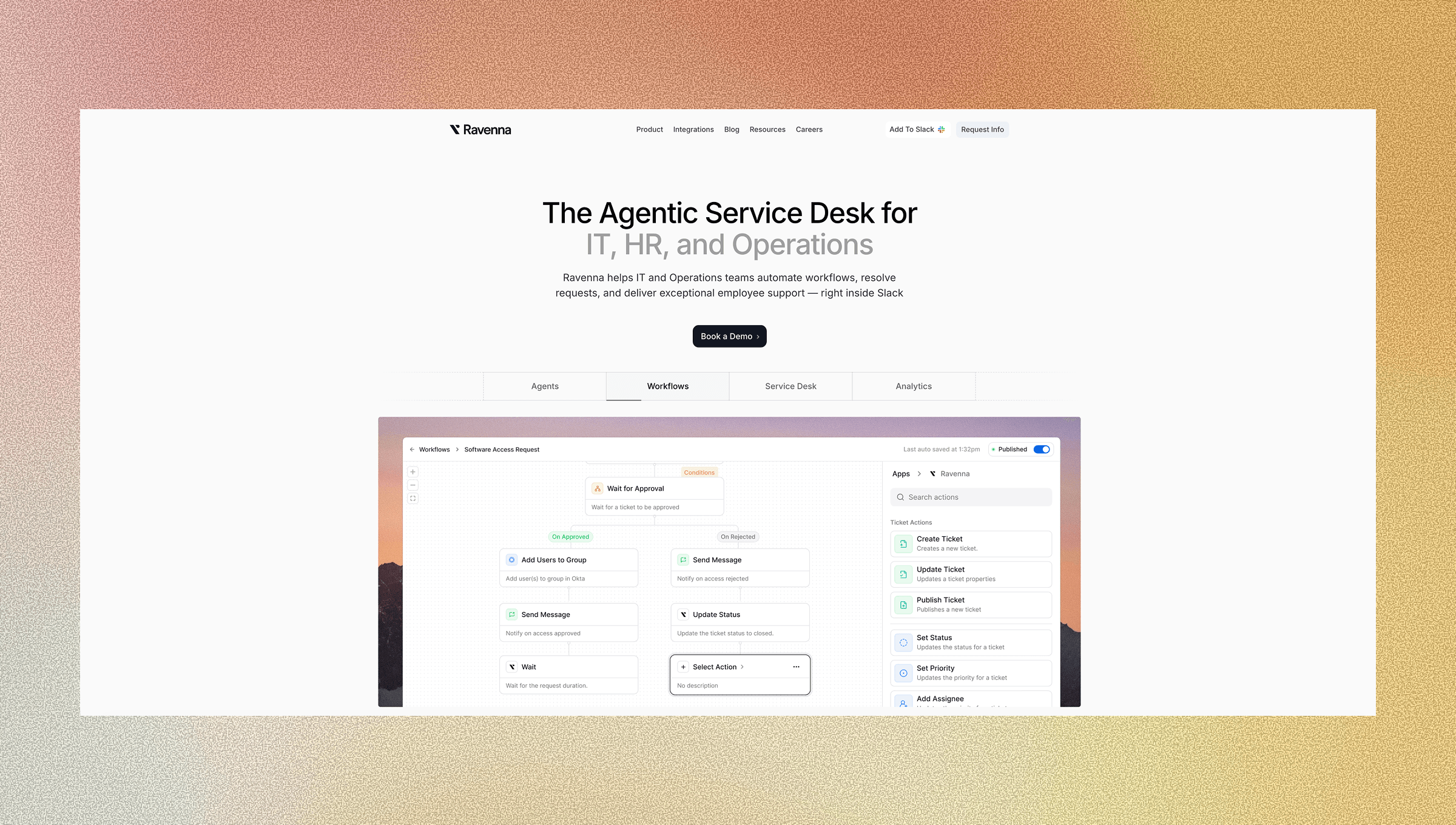
Ravenna layers AI Agents on top of visual workflow automation. You build workflows using a drag-and-drop interface where each step, condition, and action appears as nodes you can see and modify. When someone messages "I need access to Figma" in Slack, Ravenna Agents parse the request, route it to the appropriate workflow, and execute provisioning across your SaaS stack.
The AI operates within the workflows you build, using AI-driven execution instead of generating new code for each request. This keeps your automations maintainable while handling complex ITSM processes across identity management, employee lifecycle, and device management. You control the logic visually, and the AI handles execution. Your workflows scale without accumulating technical debt from generated scripts that later fail in production.
Final Thoughts on the No-Code Versus Generative Code Debate in ITSM
Speed at deployment doesn't matter if your automations become unmaintainable six months later and disrupt stable service delivery. ITSM workflow automation built with visual builders stays accessible to your entire team, while AI-generated code creates technical debt that compounds with every new tool and business rule change. Your access provisioning and employee lifecycle automations will evolve constantly. Build them in ways your team can own without becoming code maintainers. Contact us to see how Ravenna handles complex ITSM workflows without generating code.
FAQ
How do you maintain AI-generated code when workflows break in production?
You need to read through the generated scripts to understand the logic the AI chose, then debug code you didn't write yourself. This creates maintenance bottlenecks, especially when the person who created the original prompt isn't available or when the AI used different approaches across similar workflows.
What's the main difference between no-code and generative code for ITSM automation?
No-code uses visual workflow builders where you see every step as connected nodes you can modify, while generative code produces actual scripts from text prompts that execute your workflows. No-code keeps logic visible and maintainable by your entire team, whereas generative code creates custom scripts that require developer-level understanding to modify safely.
When should you choose visual workflow builders over AI-generated scripts?
Choose visual builders when you're automating core ITSM functions like access provisioning, employee lifecycle management, or high-volume support workflows that will run for years. These need to stay maintainable by your entire IT team without requiring code debugging skills.
Can non-technical IT team members modify workflows built with no-code systems?
Yes. Visual workflow builders let any IT team member open the canvas and update approval logic, add integration steps, or adjust routing conditions without writing code. The structure stays transparent, so changes happen in minutes instead of requiring developers to rewrite scripts.
Why does generative code create security risks in ITSM workflows?
AI-generated scripts may handle sensitive data in ways you don't catch during quick reviews, like passing credentials through APIs without proper encryption or exposing employee information through logging. These vulnerabilities surface during security audits or after breaches because you didn't design the underlying logic yourself.



