

You've probably tried multiple ITSM solutions that promise to simplify your IT support, only to watch them gather dust because employees refuse to leave Slack for yet another service desk or help desk portal. The reality is that traditional ITSM tools create more friction than they solve, forcing teams into complex workflows that nobody actually wants to use.
Fortunately, things have shifted dramatically with AI-native solutions that work where teams already collaborate. In 2025, the best ITSM software platforms are built to operate inside existing communication tools. Modern workflow automation tools like Ravenna now manage conversational ticketing and end-to-end automation directly in Slack, eliminating the adoption barriers that plague traditional systems.
TLDR:
ITSM software in 2026 has evolved from portal-based systems to AI-native solutions that work within existing communication tools like Slack.
Modern AI-native workflow automation platforms deliver end-to-end automation entirely within Slack, enabling conversational ticketing and automatic knowledge capture from conversations.
Open source ITSM software like GLPI and iTop offer cost savings but require substantial technical expertise for deployment and maintenance.
Modern AI-native workflow automation platforms like tools deliver end-to-end automation entirely within Slack, allowing conversational ticketing and automatic knowledge capture from conversations.
What is ITSM?
ITSM, which stands for IT Service Management, represents how IT teams manage the complete delivery of IT services to customers using IT service management platforms. ITSM software helps organizations manage IT services efficiently. This strategic approach encompasses all policies, processes, and tools involved in designing and delivering IT services that align with business objectives.
At its core, ITSM changes IT departments from reactive support centers into proactive service providers. Instead of simply fixing problems as they arise, ITSM focuses on preventing issues, improving service delivery, and continuously improving the user experience and the overall IT service delivery experience.
The framework covers everything from incident management and change management to service catalog management, asset management, knowledge management, and performance monitoring. These practices are often aligned with ITIL frameworks for consistent service delivery. But traditional ITSM relies heavily on rigid processes and manual workflows. More modern approaches focus on user-centric design, conversational interfaces, and AI-driven automation. These newer solutions integrate ticketing systems, knowledge management, workflow automation, and analytics to create a complete service delivery ecosystem.
This evolution has made ITSM more accessible to organizations of all sizes, including large enterprises with dedicated IT service management teams.
Understanding ITSM basics is important because it directly impacts employee productivity, customer satisfaction, and how smoothly things run. Organizations implementing effective ITSM strategies see reduced downtime, faster issue resolution, and better alignment between IT services and business requirements.
Leading ITSM Software Solutions
The ITSM software market has evolved dramatically, with top ITSM tools in 2025 offering everything from ITIL-based IT asset management to advanced AI automation and Slack integration. Here are the top ITSM tools defining the market in 2025:
Ravenna
ServiceNow
Jira Service Management (Atlassian)
Freshservice
Moveworks
As you consider ITSM solutions, keep in mind that modern approaches are moving away from portal-based systems toward conversational, AI-driven interfaces that meet users where they work. This shift spans enterprise ITSM platforms like ServiceNow and lightweight, cloud-based ITSM software options. Each solution serves different organizational needs, but the trend clearly favors AI-native approaches that integrate smoothly with existing workflows.
When comparing ITSM software solutions, focus on integration, scalability, and user adoption rates.
Ravenna
Ravenna leads the pack as the first truly AI-native workflow automation tool for IT, HR, and Operations teams. Built for Slack-centric teams, Ravenna allows conversational ticketing and smart categorization without forcing users into separate portals. The system automatically captures knowledge from conversations and turns resolutions into searchable articles, making it ideal for organizations that live in Slack.
ServiceNow
ServiceNow remains the enterprise heavyweight ITSM tool, offering complete ITSM features with extensive customization options. However, its complexity and cost make it challenging for mid-sized organizations to implement effectively.
Jira Service Management (Atlassian)
Jira Service Management provides solid ITSM functionality with strong integration to Atlassian's ecosystem. While popular among development teams for agile IT service management, its Slack integration can seem limited compared to native solutions.
Freshservice
Freshservice delivers user-friendly cloud ITSM with decent automation features. The tool works well for traditional help desk scenarios but lacks the deep workplace integration that modern teams expect.
Moveworks
Moveworks focuses on AI-powered IT operations automation through conversational intelligence, but it requires extensive setup and functions primarily as an overlay rather than a complete ITSM solution.
The service management view for 2025 clearly shows a shift toward AI-native workflow automation platforms that integrate into the communication tools teams use daily, moving beyond traditional ticketing to autonomous execution.
AI-Powered ITSM Tools Changing Service Management
Artificial intelligence is fundamentally reshaping ITSM in 2025, moving beyond simple chatbots to deliver intelligent automation that changes how organizations run day-to-day IT operations and manage IT services. AI is evolving IT service management with advanced features that deliver machine learning-driven ticket routing and intelligent automation to improve user experience.
The 2025 Gartner Magic Quadrant for AI Applications in ITSM shows the rise of AI-powered service management platforms. It reveals a clear distinction between vendors offering bolt-on AI features versus those built with AI at their core. Traditional ITSM tools are retrofitting AI features, while next-generation solutions like Ravenna are designed as AI-native systems from the ground up.
Modern AI-powered ITSM tools excel in three key areas: intelligent request categorization, predictive analytics, and autonomous problem resolution. These features allow organizations to deflect routine requests, predict potential issues before they impact users, and automatically fulfill common requests without human intervention.
The difference between chatbots and intelligent agents becomes important here. While chatbots follow scripted responses, AI agents understand context, learn from conversations, and take autonomous actions to resolve issues. This evolution in ITSM automation enables faster response times and a better user experience across organizations.
Best Open Source ITSM Software Options
Open source options make sense only for organizations with dedicated technical resources and specific customization needs that justify the implementation complexity. These systems provide core ITSM functionality without licensing fees, making them attractive for budget-conscious teams and organizations with specific technical requirements. The top open source options include:
GLPI
iTop
OTRS
Open source ITSM solutions require substantial technical expertise for deployment and maintenance, but offer great flexibility and cost savings for organizations with the right resources. You should consider open source options only when you have dedicated technical resources and specific customization needs that make the implementation complexity worthwhile.
The main challenge with open source ITSM tools is the total cost of ownership. While the software is free, organizations must invest in technical expertise for deployment, customization, and ongoing maintenance. For teams seeking modern IT tools without these overhead costs, managed solutions like Ravenna provide enterprise-grade features with minimal technical requirements.
ITSM Software for Small and Mid-Sized Businesses
Small and mid-sized businesses need simple and scalable ITSM solutions that deliver key functionality without enterprise complexity or costs. The key is finding tools that provide immediate value while scaling alongside organizational growth. Below are several of the leading solutions targeting this size of enterprise:
Ravenna
Freshservice
Startly and Atera
The best ITSM solution for small businesses is one that employees actually use, with a user-friendly interface that improves day-to-day IT support without added complexity. Self-service features in Slack often prove more valuable than complex portal-based systems that create adoption barriers. Here are the best ITSM software options for small and mid-sized teams in 2025.
Ravenna
Ravenna excels for mid-sized teams that live in Slack, automating mission-critical workflows across their existing tech stack including identity providers like Okta and Google Workspace, HRIS systems, and MDM tools. The system eliminates the learning curve by working entirely within Slack, making it perfect for organizations that can't afford lengthy implementations or dedicated ITSM administrators.
Freshservice
Freshservice offers a user-friendly approach with reasonable pricing for smaller teams. Its intuitive interface and pre-built workflows help organizations get started quickly, though it lacks the deep workplace integration that modern teams expect.
Modern ITSM Features and Functions in 2025
Modern ITSM solutions have evolved far beyond traditional ticketing systems, introducing features that fundamentally change how organizations deliver IT services. The best modern ITSM tools now offer full deployment in under 90 days, with buyers focusing on implementation experience over brand recognition.
Modern ITSM tools now focus on usability, automation, and real-time analytics versus legacy reporting. Take a look at how modern, AI-native ITSM solutions have changed the core features of traditional ITSM platforms.
Feature | Traditional ITSM | Modern AI-Native ITSM |
Ticket Creation | Web portal forms | Conversational interface |
Knowledge Management | Static documentation | AI-updated, live content |
Automation | Rule-based workflows | Intelligent, context-aware |
User Experience | Separate systems | Integrated communication tools |
These changes in AI ITSM features redefine how teams deliver and measure IT service quality. Understanding how these newer features operate will help you make a more informed decision when selecting a modern ITSM solution.
Conversational Ticketing
Conversational ticketing represents the biggest shift from legacy systems. Instead of forcing users into a traditional ticketing system or self-service portal, modern solutions like Ravenna provide Slack-native automation where employees make requests through natural conversation, and AI agents execute complete workflows autonomously. This approach eliminates friction and increases adoption rates substantially.
AI-Driven Automation
AI-driven Automation goes beyond simple rule-based workflows. Modern ITSM tools use intelligent categorization and automated ticket assignment that learns from patterns and context. Ravenna's AI agents, for example, automatically classify intent, understand context, and execute complete workflows like resetting passwords in Okta or provisioning software access without requiring tickets or manual intervention.
Smart Knowledge Management
Smart knowledge management continuously evolves based on actual conversations and resolutions, replacing static knowledge base articles with live, AI-updated content. More importantly, platforms like Ravenna move beyond knowledge retrieval to perform the actual work, integrating with tools to execute tasks rather than just explaining how to do them.
Real-Time Analytics
Real-time Analytics provide actionable insights into service performance, user satisfaction, and how well things work. Ravenna tracks AI vs. human resolution rates, showing the percentage of requests fully resolved by AI agents versus those requiring human intervention. This provides quantifiable data on automation impact and time savings. Modern solutions track deflection rates, self-service success, and knowledge gap identification to drive continuous improvement.
Choosing the Right ITSM Solution for Your Organization
Selecting the right ITSM solution requires a strategic approach that aligns with your organization's specific needs and priorities. The top three buyer priorities for 2025 are: implementation speed, outcome-driven workflows, and embedded AI features.
The 2025 Market Guide focuses on strategic insights over vendor rankings, encouraging buyers to focus on outcomes instead of brand recognition. This shift favors solutions that show clear ROI through measurable improvements in employee productivity and satisfaction.
Implementation Speed
This has become the primary concern for organizations. Traditional enterprise solutions requiring 6-12 month deployments are losing ground to systems that deliver value within weeks. Ravenna is a perfect example of this trend by allowing full deployment in Slack within days, not months.
User Adoption
User adoption ranks very high in enterprise priorities as it determines ITSM success more than feature completeness. Solutions that integrate with existing communication tools see much higher adoption rates, allowing IT teams to deliver faster outcomes without relying on separate portals or complex training programs.
Total Cost of Ownership (TCO)
TCO extends beyond licensing fees and pricing to include implementation, training, and ongoing maintenance costs. When comparing Jira Service Management vs Freshservice or Jira Service Management vs ServiceNow, factor in hidden costs like customization requirements and technical expertise needs.
Integration Features
Now, more than ever, how systems integrate within the existing enterprise software ecosystem is a top priority. Check how well potential solutions connect with your identity providers, knowledge bases, and communication tools. The best choice aligns ITSM software capabilities with your existing workflows.
Ravenna: The Future of ITSM
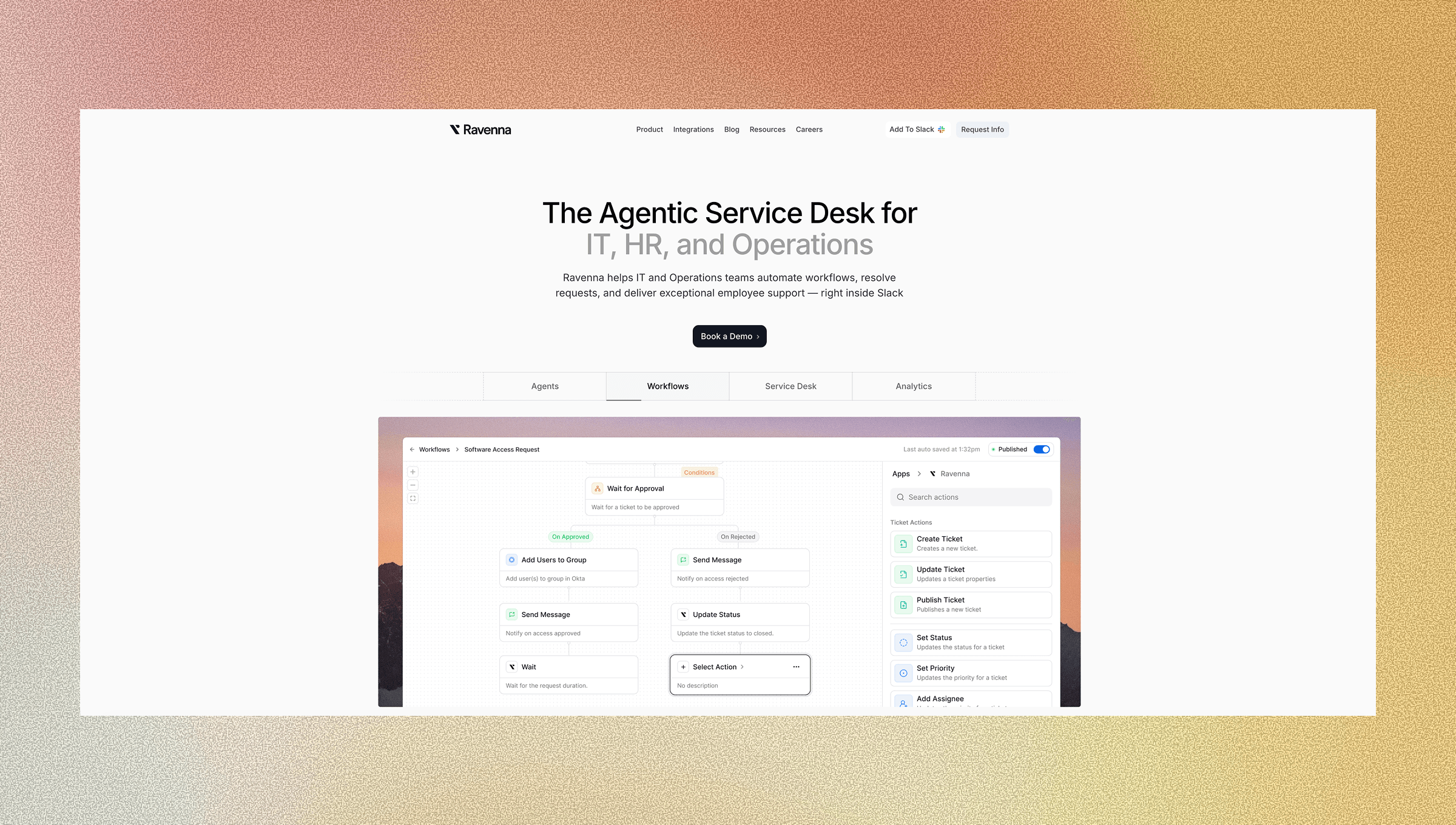
Ravenna represents a fundamental shift from traditional service desk design, built from the ground up as the first truly AI-native workflow automation tool for Slack-centric organizations. Unlike ITSM tools that focus on ticketing, Ravenna functions as an end-to-end automation engine that manages workflows across IT, HR, and Operations.
The tool's agentic approach changes how employees interact with support. Users make requests by simply adding an emoji to any Slack message, using natural language commands, or using Slack shortcuts. Ravenna's specialized AI agents (IT Agent, PeopleOps Agent, RevOps Agent) autonomously execute complete workflows from resetting passwords in Okta to managing complex onboarding sequences across multiple systems.
Ravenna's intelligence goes far beyond basic automation. The system interprets natural language requests, asks clarifying questions when needed, and automatically executes multi-step workflows across your existing tech stack. This eliminates the manual work that consumes 20-30% of IT time in traditional systems. When a request requires human judgment, the tool creates a ticket and routes it to the appropriate team member.
The tool's visual workflow builder allows non-technical teams to build automations through a drag-and-drop interface or simply by describing workflows in natural language. Unlike competitors that use "vibe coding" (AI-generated scripts that break and require debugging), Ravenna's structured workflow engine is maintainable, transparent, and easy for teams to manage long-term.
Ravenna's deep integrations with identity providers like Okta and Google Workspace, HRIS systems like BambooHR and Rippling, and MDM tools like Jamf manage true end-to-end automation. This positions Ravenna not as another helpdesk tool, but as the automation layer that augments and enhances IT teams, making them superstars who can focus on strategic work instead of routine requests. Schedule a demo today.
Final Thoughts on Choosing the Best ITSM Software
The ITSM world has shifted dramatically toward solutions that work within your existing communication tools instead of forcing teams into separate portals. AI-native approaches are proving far more effective than traditional systems because they remove the adoption barriers that kill most ITSM initiatives. For mid-sized teams that live in Slack, the choice becomes clear when you focus on user experience over feature complexity. Your employees will thank you for choosing a solution they'll actually want to use.
FAQ
What is ITSM and why does it matter for my organization?
ITSM (IT Service Management) changes IT departments from reactive support centers into proactive service providers that align technology services with business objectives. It includes all policies, processes, and tools for delivering IT services, helping organizations reduce downtime, improve employee productivity, and achieve better results.
How long does it typically take to implement modern ITSM software?
Modern ITSM solutions like Ravenna can be deployed within days or weeks. This is in stark contrast to the 6-12 months required by traditional enterprise solutions. Implementation speed has become the top priority for organizations in 2025.
What's the difference between traditional ITSM and AI-native solutions?
Traditional ITSM relies on web portals, static documentation, and rule-based workflows, while AI-native solutions offer conversational interfaces, adaptive knowledge management that learns from interactions, and intelligent automation that understands context. AI-native systems integrate directly with communication tools like Slack instead of requiring separate systems.
Should small businesses consider open source ITSM tools?
Open source ITSM tools like GLPI and iTop offer cost savings and extensive customization but require substantial technical expertise for deployment and ongoing maintenance. Small businesses should weigh the "free" software cost against the total cost of ownership, including technical resources needed for implementation and support.
How do I choose the right ITSM solution for my team?
Focus on user adoption potential over feature completeness: the best solution is one that your employees will actually use consistently. Focus on tools that integrate with existing workflows, offer quick implementation, and show clear ROI through measurable improvements in productivity and employee satisfaction.



