

Your service desk creates tickets. Agentic AI service desks complete workflows. That distinction matters when you're trying to free up IT teams from repetitive work. These systems don't just answer questions or route requests. They connect to your tools, execute actions in real-time, and handle errors without escalation to humans. This translates to password resets in seconds, access provisioning without approvals for standard requests, and onboarding workflows running across systems automatically. Here's what separates agentic ITSM from the tools you're using now.
TLDR:
Agentic service desks automate complete workflows without human intervention. They go beyond routing tickets.
69% of IT tickets can be resolved through automation, reducing resolution time by up to 40%.
AI agents execute multi-step tasks across your SaaS stack like Okta, BambooHR, and Google Workspace.
Focus automation on high-volume requests like password resets and access provisioning for quick wins.
Ravenna automates IT, HR, and Operations workflows directly in Slack with domain-specific AI agents.
What Is an Agentic Service Desk?
An agentic service desk uses autonomous AI agents to execute complex, multi-step workflows from start to finish without human intervention. Traditional ITSM tools focus on routing requests to the right person, while agentic service desks complete the work themselves. Basic AI help desk tools and chatbots deflect tickets by answering questions or pointing users to knowledge articles. Agentic service desks go further by taking secure, coordinated action across your SaaS stack to resolve requests end-to-end.
Here's a real-world example: when an employee asks to reset their password, an agentic service desk does more than explain how. It connects to Okta, performs the reset, confirms the change, and notifies the user. The same logic applies to access provisioning, software requests, and onboarding workflows. The AI agent coordinates actions across multiple systems, handling conditional logic and error states without escalating to a human unless something requires judgment.
How Agentic ITSM Differs from Traditional Service Desks
Traditional service desks operate as routing systems. A request comes in, gets categorized, lands in a queue, and waits for someone to act on it. The automation exists, but it's rigid: if someone selects "password reset" from a dropdown, the system routes the ticket to IT. That's where the automation stops.
Agentic ITSM changes the entire model. Instead of routing work to people, AI agents do the work. They interpret intent from natural language, pull context from connected systems, and execute multi-step workflows autonomously. A password reset doesn't become a ticket. It becomes a completed task.
Agentic ITSM learns from patterns, adapts to exceptions, and improves over time. Traditional service desks can't.
The table below provides a quick overview of the capabilities of service desks and how those capabilities are provided in traditional and agentic approaches.
Capability | Traditional Service Desks | Agentic Service Desks |
Automation Approach | Rigid rule-based routing that requires predefined workflows and dropdown selections. Automation stops after categorization and queue assignment. | AI agents interpret natural language requests, understand intent, and execute complete workflows autonomously without predefined scripts or human intervention. |
Request Handling | Creates tickets for every request, routes to the appropriate queue, and waits for human action. Even simple password resets require manual verification and execution. | Completes requests end-to-end by connecting to identity providers, HRIS systems, and SaaS tools to execute actions like password resets and access provisioning in seconds. |
Workflow Execution | Single-system actions require manual coordination across tools. Each system interaction needs separate human input and verification steps. | Multi-system orchestration handles dependencies, sequences actions across your tech stack, and manages error states without escalation to humans. |
Resolution Speed | Hours to days, depending on queue depth, staff availability, and manual processing time. High-volume periods create backlogs and longer wait times. | Seconds to minutes for routine requests. Organizations report up to 40% reduction in resolution time and 30% improvement in SLA adherence with autonomous execution. |
Scalability | Requires additional headcount to handle increased ticket volume. Each new workflow type needs manual process documentation and staff training. | Handles volume spikes without additional resources. New workflows get built through visual builders or natural language descriptions, scaling without hiring. |
Learning Capability | Static processes that require manual updates when policies or systems change. No adaptation to patterns or exceptions over time. | Learns from request patterns, adapts to exceptions, and improves accuracy over time. Context-aware reasoning pulls data from connected systems to inform decisions. |
Workflow Automation vs Ticket Deflection
Ticket deflection answers questions. Workflow automation completes work. The difference matters when you're trying to reduce IT workload.
Deflection tools cut ticket volume by pointing users to knowledge base articles or answering common questions through AI. When someone asks about PTO policy or how to submit expenses, the system retrieves the answer. The ticket never gets created. But deflection only works for informational queries. It doesn't work for requests that require action.
Workflow automation solves a different problem. When someone requests software access or needs a password reset, they don't need information. They need action. Self-service deflection fails because no documentation will provision a Figma license or reset an Okta password. These requests still become tickets that consume IT time.
Agentic service desks automate the work itself. The request gets resolved without creating a ticket or waiting for human intervention. That's where real gains happen.
The Technology Behind Agentic Service Desks
Agentic service desks operate through four core capabilities of modern AI systems: intent classification, context-aware reasoning, multi-system orchestration, and autonomous execution.
Intent classification
Intent classification analyzes incoming requests to determine what the user needs. When someone says "I can't access the design files," the AI agent identifies this as an access issue requiring action instead of a general question needing an answer.
Context-aware reasoning
Context-aware reasoning pulls relevant data from connected systems before acting. The agent checks the user's role in your HRIS, reviews their current permissions in Google Workspace, and confirms group membership policies to inform their next steps.
Multi-system orchestration
Multi-system orchestration coordinates actions across your tech stack. A single onboarding request might trigger account creation in Okta, license assignment in Google Workspace, and access provisioning in Vanta, sequencing these steps while handling dependencies and managing failures.
Autonomous execution
Autonomous execution completes the work without predefined scripts or rigid decision trees. The agent adapts to each specific request and takes appropriate action.
Key Features of Agentic Service Desk Automation
Agentic service desks share a core set of capabilities that separate them from traditional ITSM tools. These AI-driven features work together to automate end-to-end workflows instead of managing ticket queues.
Autonomous Workflow Execution
AI agents act on requests without waiting for human approval or intervention. They sequence tasks across systems, handle dependencies, and manage error states. When a request comes in for software access, the agent checks license availability, routes to the right approver based on department policy, provisions access once approved, and confirms completion with the user.
Visual Workflow Builders
Non-technical teams build and modify automations through drag-and-drop interfaces. Conditional logic lets you route requests based on role, department, or request type. Some systems accept natural language descriptions and generate workflow structures automatically.
Intelligent Triage and Routing
The system decides whether a request needs information or action. Questions about PTO policies get answered instantly from the knowledge base. Requests to change a direct deposit route to the right workflow. If intent is unclear, the agent asks clarifying questions before proceeding.
Cross-System Integration and Failure Diagnostics
Agents connect to identity providers, HRIS systems, device management tools, and communication systems to coordinate work. When workflows fail, detailed error messages show exactly where and why, helping teams fix issues without guesswork.
Benefits of Automating ITSM with AI Agents
Agentic ITSM delivers measurable gains across resolution speed, cost reduction, and employee satisfaction in IT support. 69% of tickets can be resolved through automation, covering password resets, access requests, and software provisioning that would otherwise consume IT capacity. Here is a rundown of the major benefits agentic ITSM can provide:
Resolution time drops when AI agents handle requests end to end. Organizations deploying AI agents in ITSM have reported up to a 40% reduction in ticket resolution time and a 30% improvement in SLA adherence. Faster resolution means fewer follow-ups, less context switching for IT staff, and better service delivery metrics without adding headcount.
Cost savings compound over time. Automating repetitive workflows reduces the hours IT teams spend on routine requests, freeing them to work on infrastructure improvements, security initiatives, and projects that move the business forward. The same team handles more volume without burnout or backlog buildup.
Employee experience improves when requests resolve in minutes instead of days. No portal logins, no ticket tracking, no waiting in a queue. Agents complete work where end-users already collaborate, removing friction from internal support.
Agentic ITSM augments your staff by handling the repetitive work. Your team moves from executing routine tasks to designing better workflows, improving systems, and solving problems that require human judgment.
Common Use Cases for Service Desk Automation
Service desk automation targets the most common use cases: repetitive, high-volume requests that consume IT team capacity. Password resets and access provisioning consistently rank as the most frequent tickets. Without automation, each request requires verifying the user's identity, reviewing permission policies, updating identity systems, and confirming completion. Agentic service desks automate this sequence: they authenticate requesters, execute resets or grant access according to predefined role policies, and notify users within seconds.
Employee lifecycle events require coordinated actions across multiple systems. Offboarding requires suspending accounts, reclaiming software licenses, removing group memberships, and updating access records. AI agents handle these workflows across your HRIS, identity provider, and SaaS applications in the correct sequence, preventing security gaps from missed revocations. Software provisioning follows the same pattern: agents verify license availability, route approvals based on department policies, provision access after approval, and resolve device lockouts through MDM integrations without manual intervention.
Implementing Agentic ITSM: What IT Leaders Need to Know
Deploying agentic ITSM starts with identifying workflows that deliver quick wins. Target high-volume, repeatable requests like password resets, access provisioning, and software requests. These workflows reduce ticket load while building team confidence in the system. Here's what to keep in mind when implementing agentic ITSM:
Over 60% of organizations now rank implementation experience higher than brand familiarity when selecting ITSM solutions. Speed matters. Choose systems that integrate with your stack without requiring data migration or rip-and-replace projects.
Data quality directly affects automation success. Clean, up-to-date records in your HRIS and identity systems give AI agents the context they need to act correctly. Review role definitions, department hierarchies, and access policies before turning on automation.
Governance comes next. Define which workflows require approval versus autonomous execution. Set guardrails for sensitive actions. Most teams start conservatively and expand automation scope as they validate results.
Change management requires showing value early. Run automation in parallel with manual processes for the first few workflows. Share metrics on time saved and tickets avoided. Let IT staff experience fewer interruptions before rolling out to the entire organization.
Ravenna: The Agentic ITSM Solution Built for Workflow Automation
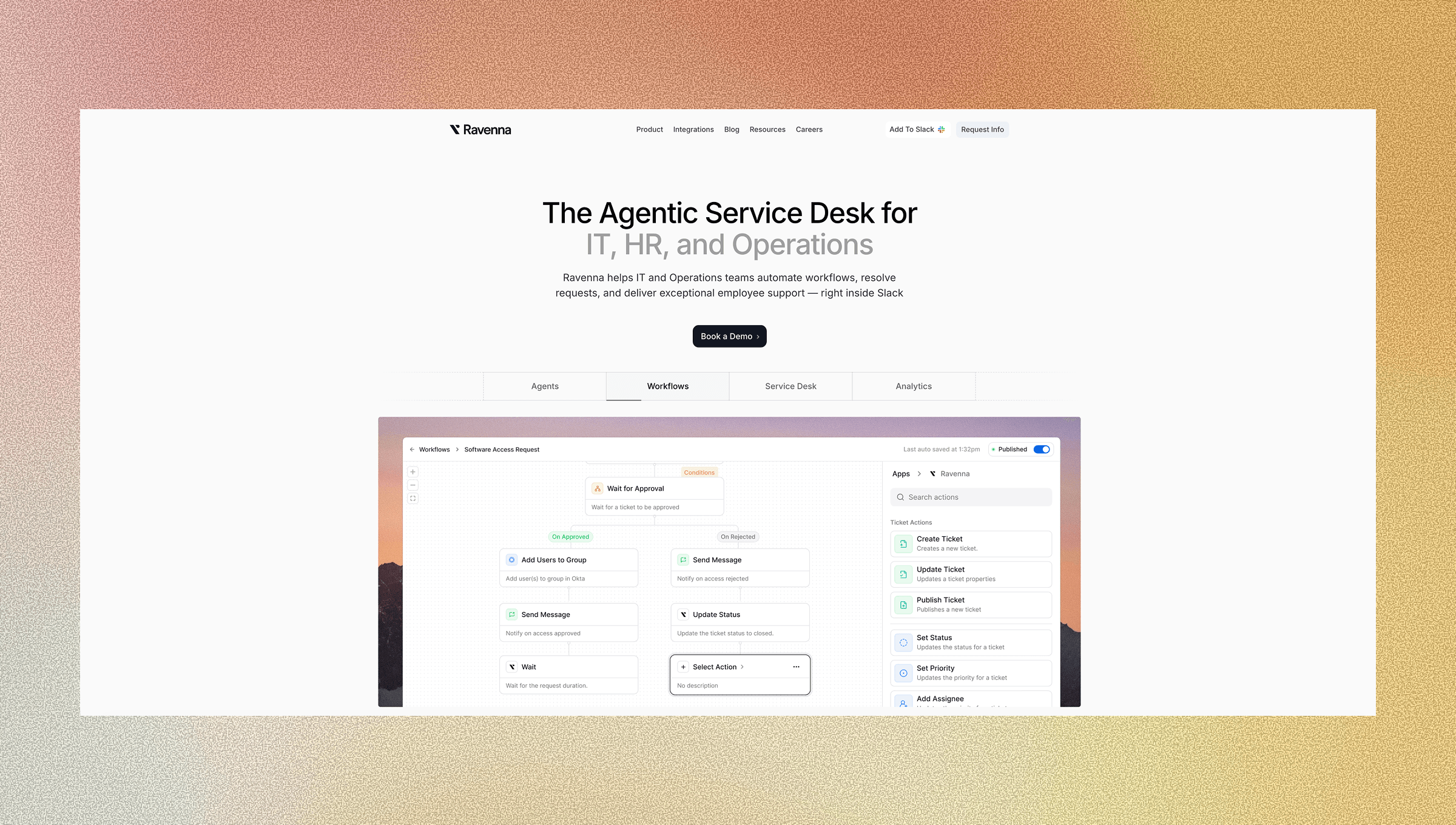
Ravenna operates as a Slack-native workflow automation solution built from the ground up for agentic ITSM. Instead of layering AI on top of legacy ticketing systems, we provide the full stack: the conversational interface, the automation engine, and the workflow orchestration layer. Autonomous AI agents handle IT, HR, and Operations requests where employees already work. When someone asks to reset their password or provision software access, our domain-specific agents execute the complete workflow across your SaaS stack. They connect to Okta, BambooHR, Jamf, Google Workspace, and other systems to perform the actual work. They complete it instead of routing it. The visual workflow builder lets non-technical teams create and modify automations through a drag-and-drop canvas. Conditional logic routes requests based on department, role, or request type.
This architecture delivers what agentic ITSM promises: workflows that run end to end without human intervention, reducing ticket volume while augmenting your team's capacity to focus on work that requires judgment.
Final Thoughts on Building an Agentic ITSM Strategy
AI agents for ITSM work best when you target high-volume, repeatable workflows first. Your service desk moves from managing ticket queues to completing actual work across your SaaS stack. IT teams get time back to focus on infrastructure, security, and projects that need human expertise. Pick your first workflow, set it live, and build from there.
FAQ
How do agentic service desks handle requests that require human judgment?
AI agents execute routine workflows autonomously but escalate to your IT team when a request falls outside defined parameters or requires policy decisions. The system flags these cases with full context, so your team can review and act without needing to reconstruct what happened.
What's the difference between workflow automation and ticket deflection in ITSM?
Ticket deflection answers informational questions through knowledge base articles, while workflow automation completes actual work across your systems. Deflection can't reset passwords or provision access. It only reduces tickets for "how-to" questions, leaving action-based requests for your team to handle manually.
Can non-technical teams build and modify automation workflows?
Yes. Visual workflow builders use drag-and-drop interfaces that let you create automations without writing code. You can set conditional logic based on department or role, and some systems generate workflow structures from natural language descriptions, making it accessible for HR and Ops teams to build their own automations.
How long does it take to see measurable results from agentic ITSM?
Start with high-volume workflows like password resets and access requests to see immediate ticket reduction. Most organizations report measurable gains in resolution time and ticket volume within the first few weeks, with broader impact as you expand automation to more workflow types.



