

Access requests arrive through Slack, email, and your service desk, just like laptop issues and software questions. But they often get routed to a separate identity access management system that employees never see, forcing IT teams to constantly context-switch. This split exists because vendors built specialized tools, not because the workflow makes sense. When automation executes identity changes directly from your service desk interface, that separation becomes unnecessary overhead.
TLDR:
Consolidating IAM and ticketing reduces tool sprawl costs within 90 days.
Access requests make up a significant amount of service desk volume, but get split across systems.
Workflow automation executes IAM changes directly vs creating manual tickets.
Ravenna automates identity workflows in Slack by connecting to Okta, Google Workspace, and Azure AD.
What Identity Access Management and Ticketing Tools Do (And Why They're Separate)
Identity Access Management tools control who can access what across your organization. They handle authentication methods like single sign-on (SSO) and multi-factor authentication (MFA), along with authorization and the full lifecycle of user permissions. This includes identity governance, access policies, and enforcing least privilege across user identities. When someone joins, changes roles, or leaves your company, IAM systems manage onboarding, role changes, and offboarding across applications through user provisioning and de-provisioning workflows. Ticketing tools track and route work. They log incidents when something breaks, manage service requests when employees need help, and create workflows that guide requests through the right approval chains. These systems turn unstructured requests into structured queues that support teams can actually manage.
The separation exists because each category was developed to solve different problems. IAM vendors built expertise around security and compliance requirements. Ticketing vendors focused on work management and SLA tracking. This created a gap: access requests live at the intersection of both worlds, but neither system was designed to handle the full lifecycle from request to execution. And that gap forces IT teams to manually bridge the two systems, copying information from tickets into IAM tools and updating ticket status based on changes made elsewhere. The result is duplicate work and slower resolution times for one of the most common request types in any organization.
The Hidden Cost of Running Multiple Point Solutions
Every separate tool carries its own license fee, and those costs accumulate quickly. The average organization now runs 125+ SaaS applications, spending roughly $1,040 per employee each year on software and tools. What makes this worse: 5.4% of those apps sit underutilized, which translates to about $135,000 in wasted annual spend for a typical company.
Beyond licensing, there's the integration tax. Each connection between your IAM system and ticketing tool requires custom API work, ongoing maintenance, and monitoring. When vendors update their APIs or deprecate endpoints, your IT team drops other priorities to fix broken integrations.
Training can become a multiplier. Support agents need to learn two separate interfaces, remember where different data lives, and understand how changes in one system should reflect in the other. New hires take longer to ramp up, and mistakes happen more frequently when work spans multiple tools.
Finally, context switching reduces productivity. An agent starts in the ticketing system, switches to the IAM tool to provision access, returns to update the ticket, then checks back later to verify the change propagated correctly.
Why Access Requests Belong in Your Service Desk, Not a Separate Tool
Access requests arrive the same way every other request does: through Slack, email, or direct messages to your IT team. Employees don’t care about the technical distinction between identity management and service desk operations. They expect a simple, self-service experience that streamlines access to the tools they need. They just need access to do their jobs. Password resets and unlocks make up a significant amount of all service desk requests. These aren't edge cases or specialized workflows. They're the bread and butter of what your support team handles daily. Sending them to a separate IAM tool splits your highest-volume work across multiple systems.
When access requests live outside your service desk, you lose the unified view of employee issues. An agent can't see that the person requesting Salesforce access also has an open ticket about laptop problems and was just onboarded last week. That context matters for security decisions, preventing unauthorized access, and maintaining a strong security posture aligned with zero trust principles. Your service desk already has the approval routing, SLA tracking, and queue management that access requests need through service desk automation strategies. Building those capabilities again in a separate IAM tool duplicates what you already own. The smarter approach: bring IAM workflows into the system that already handles structured requests and automated routing.
The table below provides an overview of some of the business issues and how they are impacted by separate systems and a consolidated workflow.
Aspect | Traditional Separated Systems | Consolidated Workflow Automation |
Request handling | Employee submits a ticket in the service desk, the agent manually logs into a separate IAM tool to execute the change, returns to the ticket to update status, and close | Employee submits a request in Slack or the service desk, automation identifies intent and executes the change directly in the identity provider with real-time status updates |
Password resets | Ticket created, routed to queue, agent opens Okta or Azure AD separately, performs reset, updates ticket, average resolution time 2-4 hours | User requests a reset conversationally, the system validates identity, executes reset via API, confirms completion in under 2 minutes without ticket creation |
Access provisioning | Request logged as a ticket, routed for approval via email chains, approved ticket sits in the queue until the agent provisions access in the IAM tool, and updates ticket status manually | Request routes through configured approval workflow, auto-provisions access in connected identity provider upon approval, notifies requester automatically with full audit trail |
Tool costs | Separate licenses for the service desk system and IAM management console, plus integration middleware costs and maintenance overhead | Single automation layer connects existing identity providers to service desk interface, eliminating redundant IAM management licenses |
Agent workflow | Context switch between ticketing UI and IAM console for each request, manual data entry in both systems, separate training required for each tool | Agents work in a unified interface, automation handles execution, and intervention is only needed for exceptions or complex requests requiring judgment |
Compliance tracking | Audit logs scattered across the ticketing system and multiple IAM tools, manual reconciliation required for compliance reports | Unified audit trail captures request, approval, execution, and completion in a single system with automated compliance reporting |
The Automation Gap: What Traditional Ticketing Systems Miss
Traditional ticketing systems log work but don't execute it. When an access request comes in, these tools create a ticket, route it to the right queue, and maybe send approval notifications. Then they wait for a human to actually open Okta or Google Workspace and grant the access. The ticket tracks the work; it doesn't do the work. This ticket-first approach made sense when automation capabilities were limited. But treating every access request as a manual queue item creates unnecessary overhead. Your team spends time triaging, assigning, executing, and closing tickets for requests that follow the same pattern every time.
Workflow-first automation, on the other hand, changes the equation. Instead of creating a ticket that tells someone to add a user to a Google Group, the system identifies the request, validates the requirements, and executes the change directly. The request resolves without human intervention and without generating a ticket at all.
Organizations are moving towards automated AI agent interactions as they recognize that logging work isn't the same as completing it.
How Workflow Automation Platforms Handle Identity Management
Workflow automation handles identity management by connecting directly to your existing identity providers in cloud-based and on-prem environments, including systems like Microsoft Entra ID and Active Directory. Instead of maintaining a separate IAM tool, the automation layer sits between your service desk interface and systems like Okta, Google Workspace, or Azure AD. When a request comes in, the automation identifies the intent, determines what access is needed, and executes the change through API integrations.
The execution happens through pre-built workflows that map common requests to specific actions, including role-based access control (RBAC), entitlement assignment, and permission updates. A password reset request triggers an API call to your identity provider through request automation platforms, resets the credentials, and notifies the employee. An access request for Salesforce routes through the appropriate approval chain, then provisions the license and assigns the correct permission set once approved.
Intelligent routing handles the complexity. The system recognizes patterns in requests, applies conditional logic based on department or role, and determines whether a request needs approval or can auto-execute. This approach works because identity providers already expose the necessary APIs. The automation layer coordinates those capabilities without requiring a separate IAM management interface. You get full lifecycle management for access requests through the same conversational interface employees use for every other request type.
Key Integration Points Between IAM Systems and ITSM Automation
These two systems can integrate through several different points.
API connections form the backbone of IAM integration: Workflow automation connects to identity providers like Okta, Google Workspace, and Azure AD through REST APIs that handle user provisioning, deprovisioning, and permission updates in real time.
SCIM provisioning automates software access requests and user lifecycle management: When your HRIS system registers a new employee, SCIM protocols push that data to connected applications, creating accounts and assigning initial access rights without manual intervention.
Ticketing systems link directly to IAM workflows through bidirectional sync: When a user submits an access request through your ticketing tool, the approval workflow triggers IAM changes, updates the ticket status, and notifies requesters automatically. This eliminates the manual handoff between systems that creates delays and tracking gaps.
Audit logging bridges security and service management: Every access change generates entries in both IAM systems and ITSM tools, creating unified compliance records that satisfy SOC 2 and ISO 27001 requirements without duplicate documentation.
Building a Consolidation Strategy for Your Organization
If you have two different systems today, your goal should be to consolidate them into a single solution that improves automation and reduces costs. We've outlined the steps you should follow in such a consolidation strategy.
Step 1: Audit where identity work currently lives
Document every tool that touches access provisioning, password resets, or permission changes. A map that requests flow through your ticketing system versus going directly to IAM tools. This visibility shows you exactly where duplication exists and which workflows cross system boundaries most frequently.
Step 2: Analyze your access request volume by type
Pull the last 90 days of tickets and categorize them: password resets, application access, group membership, and offboarding tasks. The highest-volume categories become your consolidation priorities because they'll deliver the fastest return on your integration effort.
Step 3: Map your approval workflows before you touch any tech
Different access types require different approval chains. Document these rules clearly so your consolidated system can replicate them accurately.
Step 4: Choose IT workflow automation tools and integration points based on impact, not complexity
Connect your most-used identity providers first, even if they're not the easiest integrations. A Slack-to-Okta workflow that handles 200 requests per month matters more than a niche tool integration that processes five.
Step 5: Plan a phased rollout that starts with one request type
Get password resets working end-to-end before adding application provisioning. Most businesses see cost reduction within 60 to 90 days when consolidating overlapping tools.
How Ravenna Consolidates Identity Workflows and Service Desk Automation
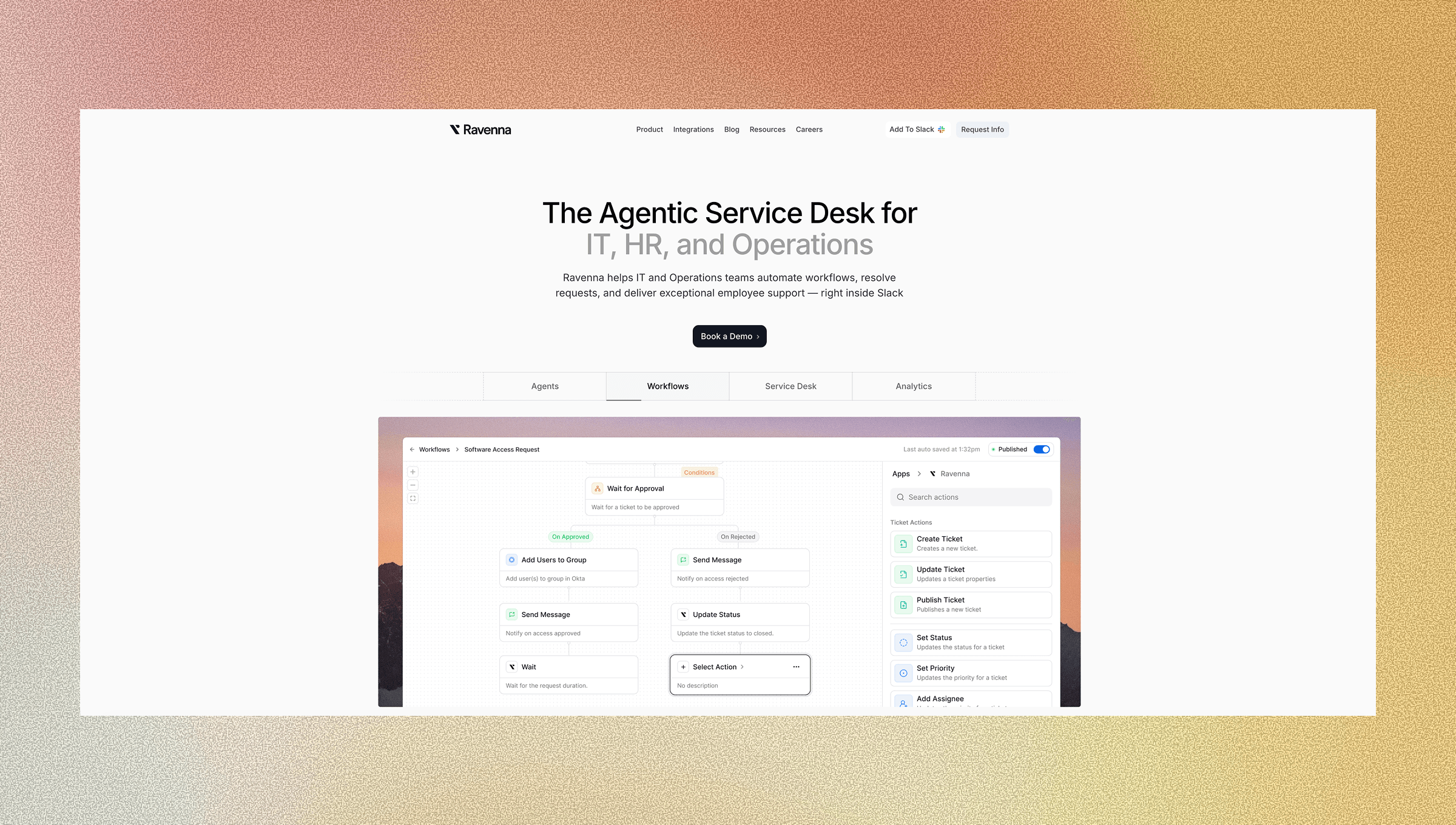
Ravenna acts as an automation layer that handles identity and access workflows without replacing your service desk. Ravenna Agents connect to Okta, Google Workspace, Vanta, and Cloudflare to execute password resets, access provisioning, and distribution management directly from Slack.
When an employee requests access to an application, the IT Agent classifies the request, routes it through your configured approval chain in the visual workflow builder, and provisions access automatically once approved. Password resets execute directly in your identity provider with confirmation sent to the requester. Distribution management works the same way: requests for Google Group or Slack channel access are resolved through automated workflows that make changes and update status in real time.
This augments your IT team with intelligent agents that handle routine work by handling high-volume identity requests autonomously while maintaining full audit trails. Every action generates compliance records tracking who requested what, who approved it, and when the change was executed.
Final Thoughts on Bridging Identity Access Management and Service Desk Operations
Consolidating ticketing solutions with identity workflows isn't about ripping out your existing tools. It's about connecting what you already have, so access requests flow through the same automated system that handles every other service request. Your team stops maintaining duplicate processes, improves operational efficiency, delivers faster resolutions, and keeps compliance audit trails in one place instead of scattered across multiple systems.
FAQ
How does consolidating identity and ticketing tools reduce costs beyond license savings?
Consolidation eliminates the integration tax of maintaining connections between separate systems, reduces training time for support agents learning multiple interfaces, and cuts the productivity loss from context switching between tools, which adds up to more savings than the license costs themselves.
What percentage of service desk requests are identity-related?
Password resets and account unlocks make up a significant amount of all service desk requests, making identity workflows the highest-volume category most IT teams handle daily.
When should I automate identity workflows instead of just tracking them in tickets?
If your access requests follow consistent patterns and don't require unique manual judgment each time, automation makes sense-the system can identify intent, route approvals, and execute changes in your identity provider without creating a ticket at all.
Can workflow automation handle complex approval chains for access requests?
Yes, workflow automation applies conditional logic based on department, role, or access type to route requests through the correct approval chains, then provisions access automatically once approved while maintaining full audit trails for compliance.
How long does it take to see cost reduction from tool consolidation?
Most businesses see IT cost reduction between 20 and 35 percent within 60 to 90 days when consolidating overlapping tools, with the fastest returns coming from automating high-volume request types like password resets first.



