

Every time your automation tool completes a task, someone must update the corresponding ticket in your ITSM ticketing system. In many IT support and help desk environments, this manual syncing slows support teams handling customer support requests. When approval workflows change, you modify the automation tool and then sync those changes back to ticketing forms. This is the integration tax of running separate systems. Modern IT workflow automation systems that unify ticketing and automation remove this overhead by sharing the same data layer, so workflow updates and ticket status stay synchronized without manual intervention.
TLDR:
Unified ticketing cuts resolution time 40-90% by removing handoffs between separate systems.
Visual workflow builders beat code generation because your team can troubleshoot without debugging.
Slack-native automation achieves near 100% adoption vs low engagement with separate portals.
Split systems create data conflicts when tickets and automation don't share the same state.
Ravenna automates IT, HR, and Operations workflows end-to-end from a single orchestration layer.
Why Unified Ticketing Beats Separate Tools for IT Operations
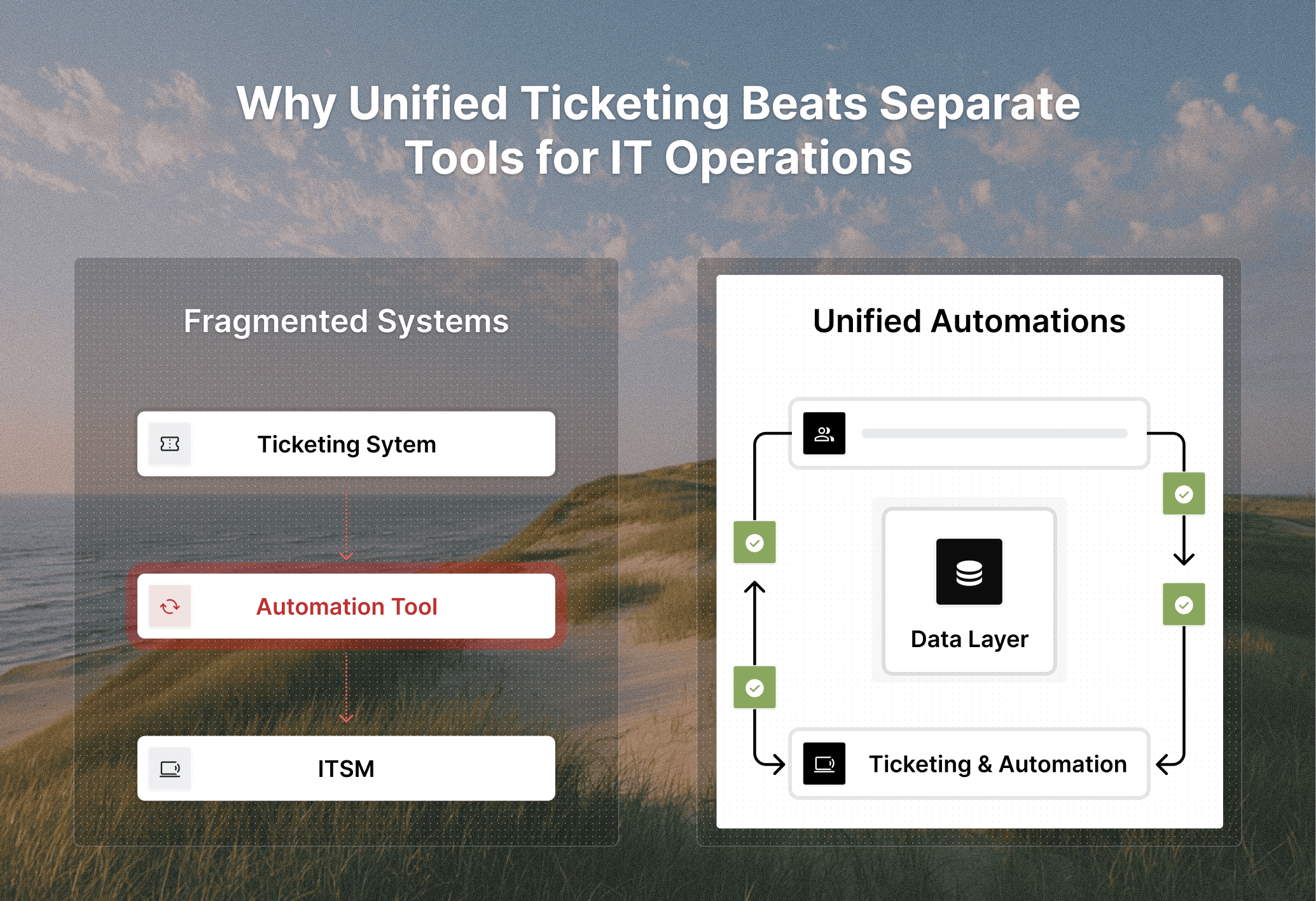
When you split ticketing from automation, you're asking two systems to maintain a single source of truth. One tracks the request state, the other executes the work. This architectural split creates data coherence problems across your entire support operation. Fragmentation appears immediately as context loss. Your automation tool triggers a password reset in Okta, but the ticket in your ITSM ticketing system may not show whether the reset completed or failed. Support agents open tickets to find incomplete information, outdated status fields, or conflicting data between systems.
Maintainability suffers further. When automation lives separately from ticketing, workflow changes require updates in multiple places. You modify an access request process in your automation tool, then manually sync form fields, approval routing, ticket routing logic, and status updates back to the ticketing system. Each integration point becomes a potential failure point for ticket automation.
Unified systems collapse this stack. The ticket and the automation share the same data layer, improving ticket management and allowing state changes to propagate automatically. When an AI agent executes a workflow step, the ticket updates in real time. When an approval occurs, both the automation engine and the ticket queue reflect it instantly. You get a single, coherent view of every request from submission through ticket resolution.
How Unified Automation Reduces Ticket Resolution Time
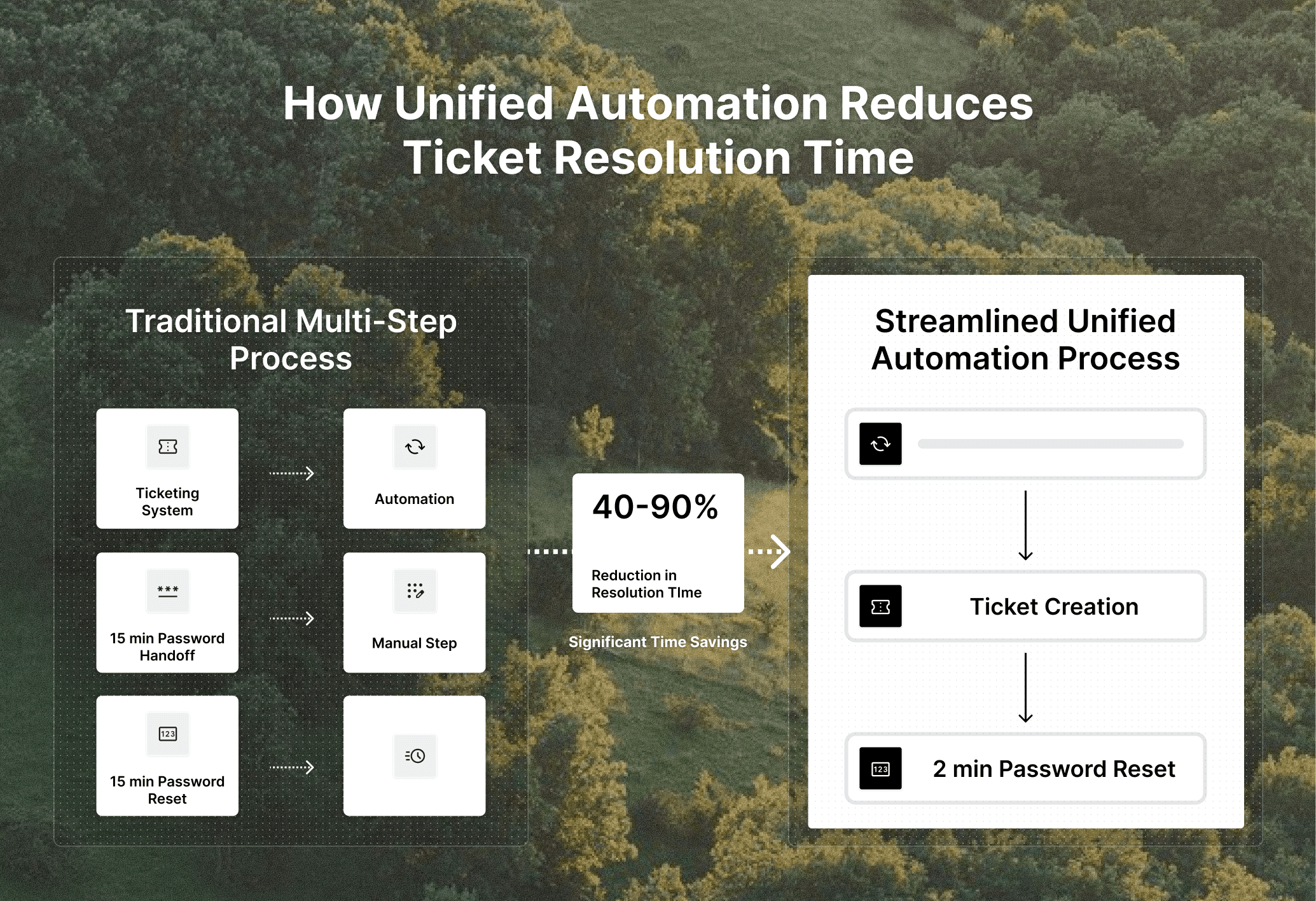
The primary KPI of any ticketing workflow is resolution time. This metric breaks down into two components: the actual work and the overhead between steps. Unified automation attacks the overhead by removing the gaps where requests stall between systems.
When automation runs inside the ticketing system, workflows execute without passing control to external tools. A software access request doesn't wait for someone to log into a separate automation tool, locate the right script, and trigger execution. The workflow fires automatically from the ticket itself, cutting out multiple handoff points that add minutes to every request.
Context switching disappears. Support agents no longer toggle between a ticket queue and an automation dashboard to check workflow execution. The ticket shows status directly. AI assistance saves 4 to 7 minutes per ticket, improving response times and driving faster resolution by 40 to 90%.
The speed gains compound across request types. Password resets drop to 2 minutes. Access provisioning that required multiple approvals and manual steps across three tools finishes in one automated sequence. These improvements help teams meet service level agreements and maintain reliable SLA management.
The Maintainability Gap: Why Code Generation Fails in Production
Code generation sounds appealing until something breaks at 2 AM and nobody on your team can read what the AI wrote. This is the core maintainability problem with prompt-based automation: you describe a workflow in natural language, the system generates scripts, and everything works until it doesn't. When generated code fails, diagnosis requires debugging skills your IT team may not have. You're looking at auto-generated Python or JavaScript trying to figure out why an Okta integration stopped working. The AI that wrote the code can't explain its own logic, and the original prompt doesn't map cleanly to the 200 lines of code it produced.
Updates create similar friction. You need to modify an approval workflow to add a new condition. Do you edit the generated code directly and risk breaking something else? Regenerate from a new prompt and hope the AI maintains your existing customizations?
Visual workflow builders solve this by making automation transparent. You see every step, every conditional branch, and every integration point. When something fails, the system shows exactly which node broke and why. When you need changes, you drag new steps into place without touching code.
Business Impact Overview
The table below provides a quick overview of business concerns, like data coherence, and how they are impacted when they are separate systems versus being part of a unified system.
Separate Systems | Unified System | |
Data Coherence | Tickets and automation maintain separate states, requiring manual synchronization | A single data layer keeps ticket status and workflow execution automatically synchronized |
Context Switching | Agents toggle between the ticketing dashboard and the automation tool to check workflow status | All execution status visible directly in the ticket interface |
Workflow Updates | Changes require updates in the automation tool, then manual sync to ticketing forms and routing | Workflow changes propagate automatically across tickets, forms, and approvals |
Resolution Time | Handoffs between systems add minutes to every request | 40-90% reduction by eliminating system handoffs |
Troubleshooting | Requires checking logs and status across multiple tools | Complete execution history visible in a single interface |
Integration Maintenance | Each tool requires separate integrations; API changes break multiple connections | Pre-built integrations maintained by a single system |
The true power of a unified system is centralized orchestration: coordinating components from a single place, such as a dashboard, and building workflow execution steps that run across those components.
Centralized Workflow Orchestration Across IT, HR, and Operations
Support requests don't respect departmental boundaries. These support requests often originate in IT support environments but quickly expand across departments. Employee onboarding touches HR for role assignment, IT for account provisioning, and Finance for equipment budgets. When each department runs its own tools, these cross-functional requests fracture into separate tickets across disconnected systems. The integration tax becomes brutal. IT uses one tool to manage Okta access, HR uses another for BambooHR workflows, and Operations maintains a third for distribution list management. Each tool requires its own integrations, its own maintenance schedule, and its own queue monitoring. When an onboarding request spans all three departments, nobody has full visibility into where the request stalls.
Centralized orchestration collapses these silos into a single workflow engine. One system coordinates account creation in Okta, role assignment in your HRIS, and group membership in Google Workspace. The workflow executes across departments without handoffs between tools, and everyone sees the same request state in real time.
You build continuous workflows where requests flow from start to finish without waiting at departmental boundaries or getting lost between systems.
Automation Adoption Barriers and How Unified Systems Overcome Them
Adoption failures rarely come from technical limitations. They happen when the automation system becomes harder to manage than the manual work it replaced. Three barriers kill automation projects: integration sprawl, change resistance, and maintenance debt.
Integration sprawl
Integration complexity multiplies fast with point solutions. Each new workflow requires connecting multiple tools, each with its own API quirks, authentication methods, and rate limits. Your team spends weeks building integrations before they can automate a single request type. When tools update their APIs, integrations break and workflows stop working.
Change resistance
Resistance appears when automation feels like another system to learn. If building or modifying workflows requires technical skills your team doesn't have, adoption stalls. Teams revert to manual processes because changing an automated workflow takes longer than just doing the work.
Maintenance debt
Maintenance burden grows over time. Automated workflows require ongoing maintenance, monitoring, and optimization to remain effective as business processes evolve. When workflows break, someone needs to diagnose why, fix the issue, and verify the fix works across all affected integrations.
Unified systems solve all three barriers with pre-built integrations, visual workflow builders, and a single maintenance surface. Your team modifies workflows without writing code, integrations work out of the box, and troubleshooting happens in one interface instead of across multiple tools.
Analytics and Visibility: Measuring Automation ROI
ROI measurement falls apart when metrics scatter across disconnected systems. Your ticketing tool monitors resolution times while your automation tool logs executions, forcing you to manually piece together what's actually delivering value. When workflows and tickets run in the same system, though, you track complete resolution paths from one data source. The system shows which tickets AI Agents resolved independently, which needed human intervention, and exactly where handoffs occurred. This visibility pinpoints where automation saves time versus where your team's expertise remains irreplaceable.
Time savings shift from estimates to actual numbers. You measure the gap between manual resolution and automated execution for each request type. Password resets dropping from 15 minutes to 2 minutes generate calculable hours saved per week and month without manual tracking.
Deflection data reveals requests that never become tickets. AI agents answering questions directly from your knowledge base get tracked alongside resolved tickets, showing both deflection volume and which topics drive self-service success. This analysis also reveals patterns in ticket data and automation metrics.
Slack-Native Workflow Automation: Meeting Employees Where They Work
Portal adoption fails because asking employees to leave their work environment creates friction. When employees must open a separate ticketing system, log in, navigate unfamiliar interfaces, and fill out forms, submitting requests becomes work they avoid until necessary. This friction spawns shadow IT. Employees DM support staff directly because it's faster than opening a portal. Your ticketing system shows artificially low volumes while your team's Slack channels overflow with untracked requests. You lose visibility into demand patterns and can't measure resolution metrics accurately.
Slack-native automation eliminates this friction by meeting employees in the communication channels they already use every day. In high volume environments, this approach improves team collaboration while accurately reflecting real ticket volume. Requests happen in natural conversation without context switching. The same conversational interface that accepts requests also executes backend workflows across your SaaS stack, giving employees immediate feedback without leaving Slack.
The adoption difference becomes measurable. Legacy portals struggle with engagement rates while Slack-native systems achieve near-universal adoption. Every employee already knows how to send a Slack message. Training needs disappear and request volume reflects actual demand instead of portal avoidance behavior.
Ravenna's Full-Stack Approach to Workflow Automation
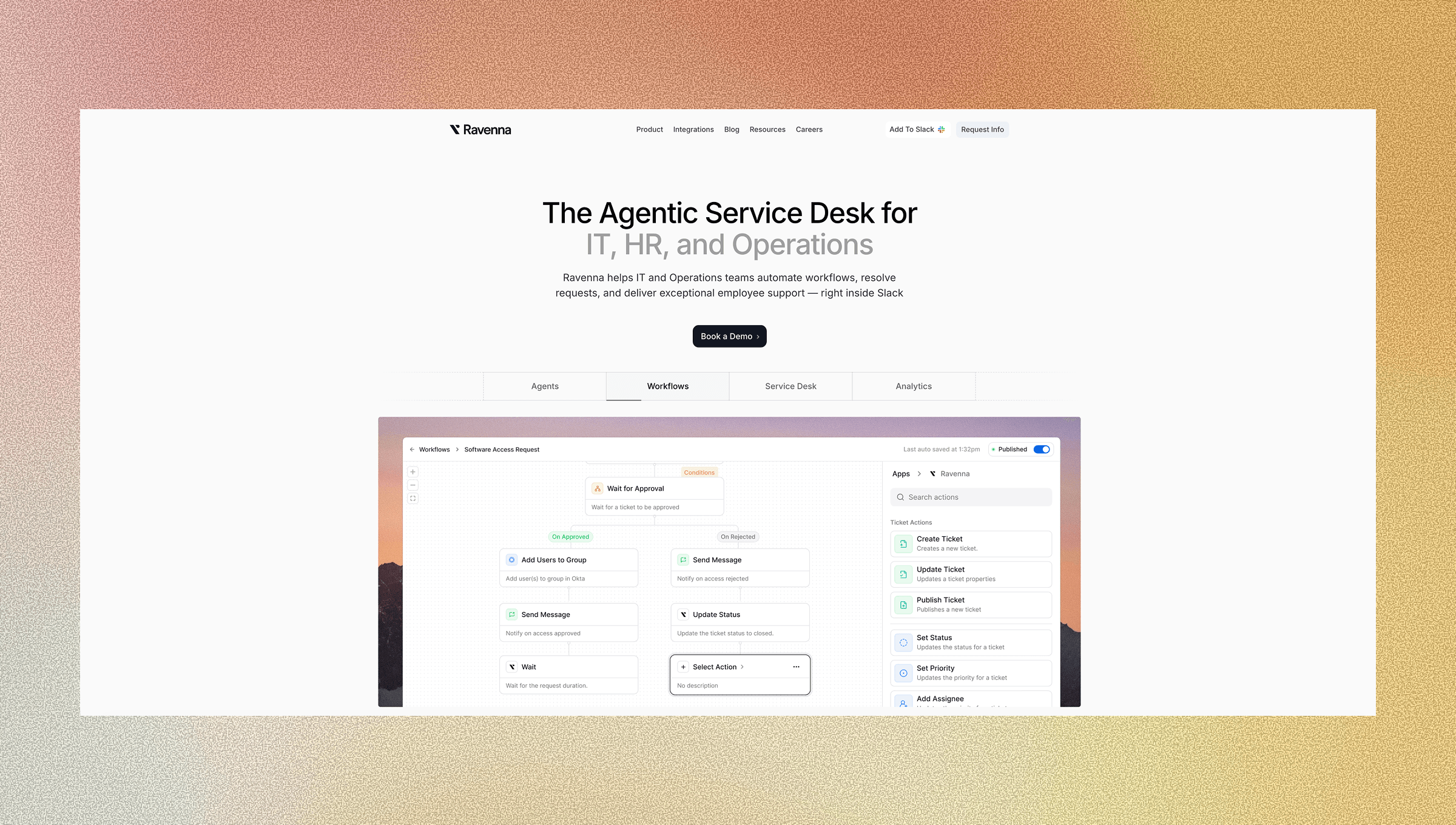
Ravenna owns the complete automation stack instead of adding AI-powered features to legacy ticketing systems. AI-driven intent detection and AI agents classify requests, remove repetitive tasks, and support IT teams with faster problem-solving. The architecture runs from Slack-based conversational interfaces through the orchestration engine that executes multi-step workflows across your SaaS environment. Two distinct layers work together. AI Agents classify intent and gather context, determining whether someone needs knowledge base information or workflow execution. After intent is clear, deterministic workflows take over, running the structured automations you've defined in the visual builder.
This separation protects reliability. AI handles natural language understanding and request categorization, then hands off to deterministic workflows for execution. Access provisioning runs identically every time, following your defined logic, while AI Agents manage the variability in how people phrase requests.
Integrations with Okta, BambooHR, Jamf, Google Workspace, and other core tools let workflows execute complete processes. An access request provisions the account, assigns groups, notifies managers, and updates employees in one automated sequence. This augments your IT team by handling repetitive work while keeping them in control of workflow design, approval gates, and exception handling.
Final Thoughts on the Move Toward Unified IT Operations
The gap between your ticketing system and automation tools creates more problems than it solves. ITSM workflow automation running inside your ticketing system removes handoffs, speeds up resolution, and makes workflows maintainable for your entire team. You stop debugging integrations and start measuring actual ROI from automation. When workflows and tickets share the same foundation, your support operation becomes predictable, scalable, and built to handle whatever comes next.
Schedule a demo with us to see how ITSM automation can be paired with your ticketing system.
FAQ
How does unified ticketing reduce resolution time compared to separate systems?
Unified systems remove the overhead between steps by keeping workflows and tickets in the same data layer, cutting out handoff points where requests stall between tools. Password resets that took 15 minutes drop to under 2 minutes because agents don't toggle between systems to check execution status; the ticket shows everything in real time.
What makes visual workflow builders more maintainable than code generation?
Visual builders let you see every step, conditional branch, and integration point without debugging AI-generated scripts. When something breaks, the system shows exactly which node failed and why, and non-technical teams can modify workflows by dragging new steps into place instead of editing code they can't read.
Can unified automation work across IT, HR, and Operations departments?
Yes, centralized orchestration runs multi-department workflows through a single engine. An onboarding request can provision Okta accounts, assign roles in BambooHR, and manage Google Workspace groups in one continuous workflow, giving all teams visibility into the same request state without handing off between separate tools.
Why does Slack-native automation get better adoption than traditional portals?
Employees already use Slack continuously, so submitting requests happens in natural conversation without logging into separate systems. Portal avoidance disappears because there's no friction; people just send a message instead of working through unfamiliar interfaces, which reflects actual demand instead of artificially low volumes from tools people avoid.
How does Ravenna's architecture differ from AI wrappers on legacy ITSM tools?
Ravenna owns the complete automation stack from the conversational interface through workflow execution, instead of layering AI features onto existing ticketing systems. AI Agents classify intent and gather context, then deterministic workflows execute structured automations across your SaaS stack, keeping the ticket and automation in the same data layer for real-time coherence.



