

The workflows that drain your IT team in 2026 aren’t complex edge cases. They’re repetitive tasks that span multiple systems and require manual handoffs at every step: access requests needing approval routing, MFA resets needing identity verification, and offboarding sequences across your SaaS stack. When you automate internal workflows like these, the process stops waiting on humans to connect the dots. Requests come in, your HRIS provides context, approval logic routes each case correctly, and actions execute across every system involved.
TLDR:
Automate software access, MFA resets, and offboarding to eliminate a significant amount of IT's manual work
Only a small number of companies have fully automated offboarding, creating major security gaps
Device diagnostics and HR verifications run autonomously when tied to your MDM and HRIS
Ravenna connects these workflows across Okta, Google Workspace, and your SaaS stack from Slack
Workflows You Can Automate
There are many workflows you can automate, but some are better suited for workflow automation and deliver more value than others. The table below gives a high-level view of workflow types that make the most business sense to automate, helping reduce time and cost. After that, we’ll break each one down in more detail.
Workflow Type | Automation Trigger | Systems Involved | Key Outcome |
Software Access Requests | Employee submits access request through Slack | HRIS, Okta, department-specific SaaS applications, approval routing engine | Automatic role-based approval routing and provisioning based on department, location, and license availability |
Okta MFA Resets | Employee requests MFA reset due to lockout | Okta, identity verification system, registered device push notifications | Automated identity verification via push notification with conditional escalation for failed attempts |
Employee Offboarding | Departure logged in HRIS system | HRIS, Okta, Google Workspace, MDM, SaaS stack, file storage systems | Coordinated account suspension, license reclamation, file transfer, and access revocation across all systems |
Device Diagnostics | Employee reports device issue through support channel | MDM platforms like Jamf or Kandji, remote diagnostic tools, VPN systems | Automated health checks and common fix application with intelligent escalation for complex issues |
Employment Verification Letters | Employee requests verification for mortgage, lease, or other purpose | HRIS, document template system, approval chain, electronic signature tool | Automatic data pull from HRIS, template population, approval routing, and document delivery |
Google Group Creation | New project, department formation, or hire triggers group need | HRIS, Google Workspace, role and department mapping logic | Automated group creation with correct membership and permissions based on employee role and department data |
Google Inbox Delegation | Employee departure or leave of absence logged in HRIS | HRIS, Gmail, permission management system, audit logging | Automatic delegation setup with proper permissions and compliance-ready access documentation |
Software Access Requests
Every IT team has a backlog of software access requests sitting in a queue. Someone needs Salesforce. Someone else needs read-only access to a Confluence space. Each request requires a human to review, approve, and provision, and that loop adds up quickly.
When you automate this workflow using modern workflow automation tools, the process runs on its own and helps streamline repetitive tasks. An employee submits a request, the system reads their role, department, and location from your HRIS, then routes it through the right approval chain automatically. A sales rep requesting HubSpot gets approved differently than an engineer requesting AWS. No manual triage needed.
You can set department-specific approval rules, license availability thresholds, and auto-provisioning logic in a no-code, drag-and-drop Visual Workflow Builder. Access gets granted when conditions are met. When someone leaves, it gets revoked.
Okta MFA Resets
MFA resets are one of the highest-volume, lowest-complexity tickets in any IT queue. An employee gets locked out, submits a request, then waits for someone to manually verify their identity and reset their authenticator. It's repetitive work that pulls IT away from more strategic initiatives.
The better approach is to build identity verification directly into the workflow automation, enabling real-time responses without manual effort. When a request comes in, an Okta Verify push notification goes to the employee's registered device. If they confirm, the reset executes automatically. No agent needed, no back-and-forth.
What keeps this secure is conditional branching. If verification fails, the workflow escalates and flags the request for human review. You get the speed of automation without loosening your security posture.
Employee Offboarding
When someone leaves, every minute their accounts stay active creates a security gap and increases the risk of human error. Yet only a handful of organizations have partially automated offboarding, and even a smaller portion have a fully automated process. The work is straightforward: suspend accounts, revoke access, reclaim licenses, transfer files, and remove the employee from groups. The problem is that it spans multiple systems with no single owner, so things get missed.
An automated offboarding workflow ties all of it together. Once a departure is triggered in your HRIS, whether BambooHR, HiBob, or Workday, the workflow kicks off automatically. Accounts get suspended in Okta, Google Drive files transfer to the manager, and licenses get reclaimed before the next billing cycle hits.
Nothing waits on a human to start the chain.
Device Diagnostics
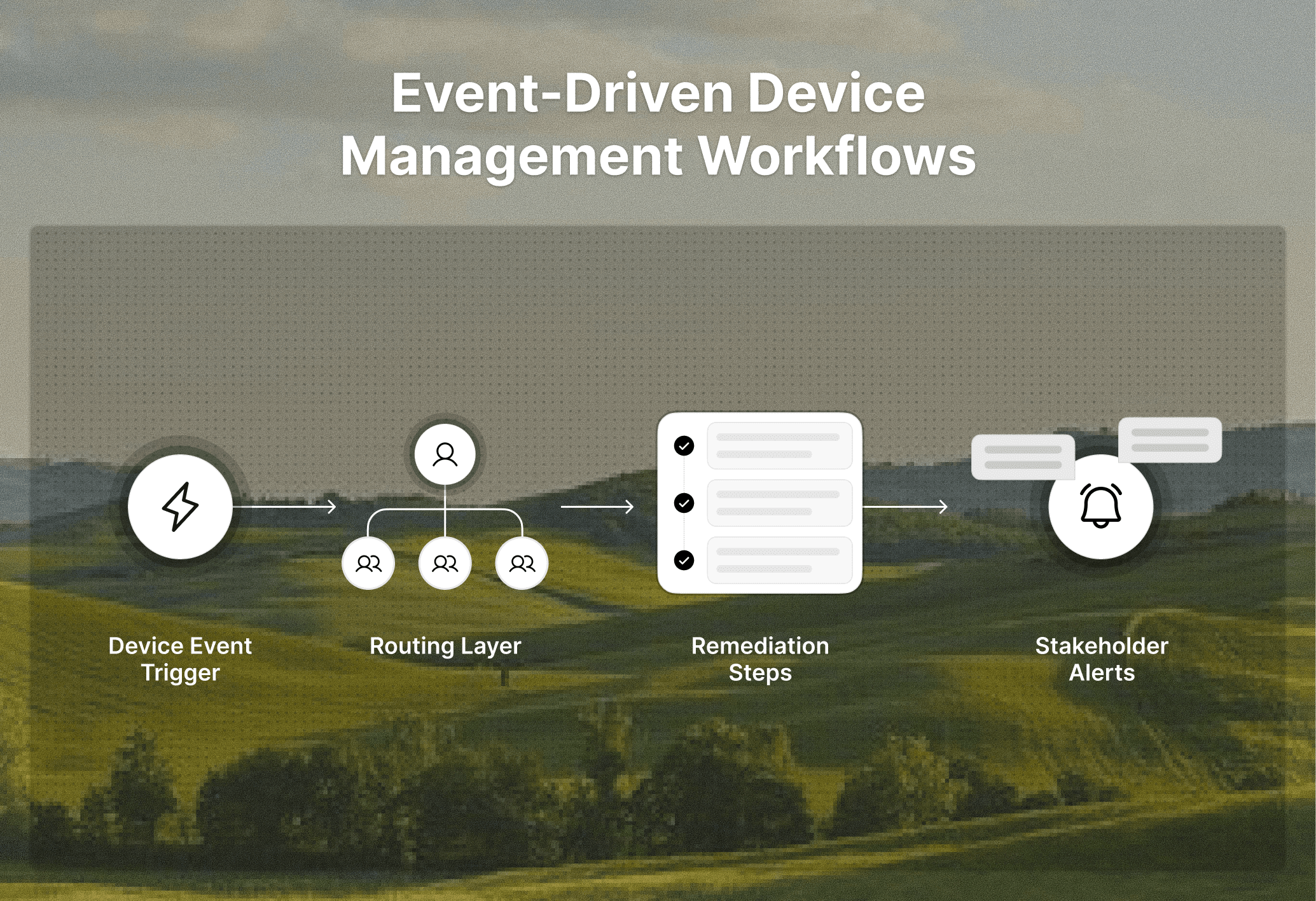
Device issues follow a predictable pattern. An employee reports a slow laptop, VPN failure, or lockout. An agent manually triages, asks questions, then either resolves or escalates. Multiply that by hundreds of tickets a week and it becomes a significant time drain.
Automating device diagnostics starts with your MDM stack and helps optimize routine tasks across your IT environment. Integrations with tools like Jamf and Kandji let you run remote diagnostics the moment a request comes in, checking device health, connectivity status, and known configuration issues without a human in the loop. When a common fix applies, the workflow applies it automatically.
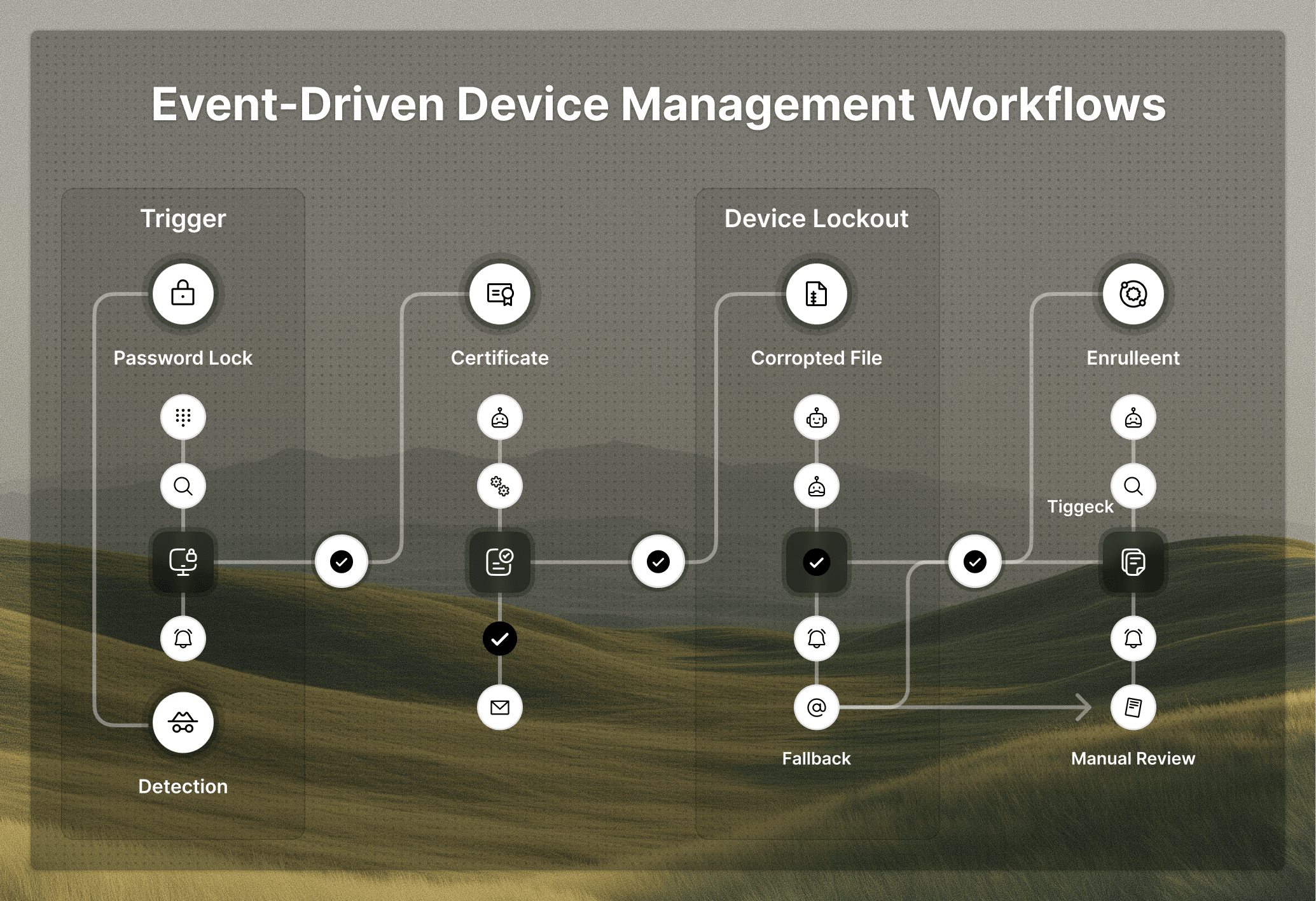
The escalation logic is what makes this practical. Complex issues that can't be resolved remotely get flagged and routed to an agent with diagnostic data already attached, so your team only touches the tickets that genuinely need them.
Employment Verification Letters
HR teams field employment verification requests constantly. Banks need them for mortgages, landlords need them for lease applications, and the employee is stressed with a real deadline while the request sits in a queue waiting for someone to pull records, populate a template, get a signature, and send it.
That process doesn't need a human. When the request comes in through Slack, the workflow pulls employment dates, title, and status directly from your HRIS, whether Workday, BambooHR, or ADP, and populates the verification template automatically. No copy-pasting, no digging through records.
From there, the document routes through the appropriate approval chain, gets signed, and delivers to the employee without anyone assembling it by hand.
Google Group Creation
Every new project, department, or hire that can seem comes with a Google Groups request sitting in someone's queue. It's too routine to be worth hands-on admin time, yet too easy to skip until something breaks.
When you automate this workflow, requests come in through Slack and the system reads department and role data from your HRIS to set group membership and permissions automatically. A new engineering hire gets added to the right Google Groups without anyone curating the list by hand.
The same logic covers ongoing changes. Role transitions, new team formations, and departures all trigger automatic membership updates, so your groups stay accurate without relying on someone to remember.
Google Inbox Delegation
Inbox delegation requests tend to surface at the worst moments. An employee goes on parental leave or exits the company, and suddenly their manager needs access to their inbox before an important email gets missed. Someone has to manually configure permissions, verify the right accounts are connected, and document who got access and when.
Automating this removes the scramble. When offboarding or a leave of absence is triggered in your HRIS, the workflow identifies the correct delegated account, applies the right Gmail permissions, and logs the access grant with a timestamp. No manual configuration, no guessing who was given access three weeks later when someone asks.
The audit trail piece matters more than most teams realize. Delegated inbox access creates compliance exposure if it goes untracked, and an automated workflow handles that documentation without anyone having to remember to do it.
How Ravenna Coordinates Internal Workflow Automation
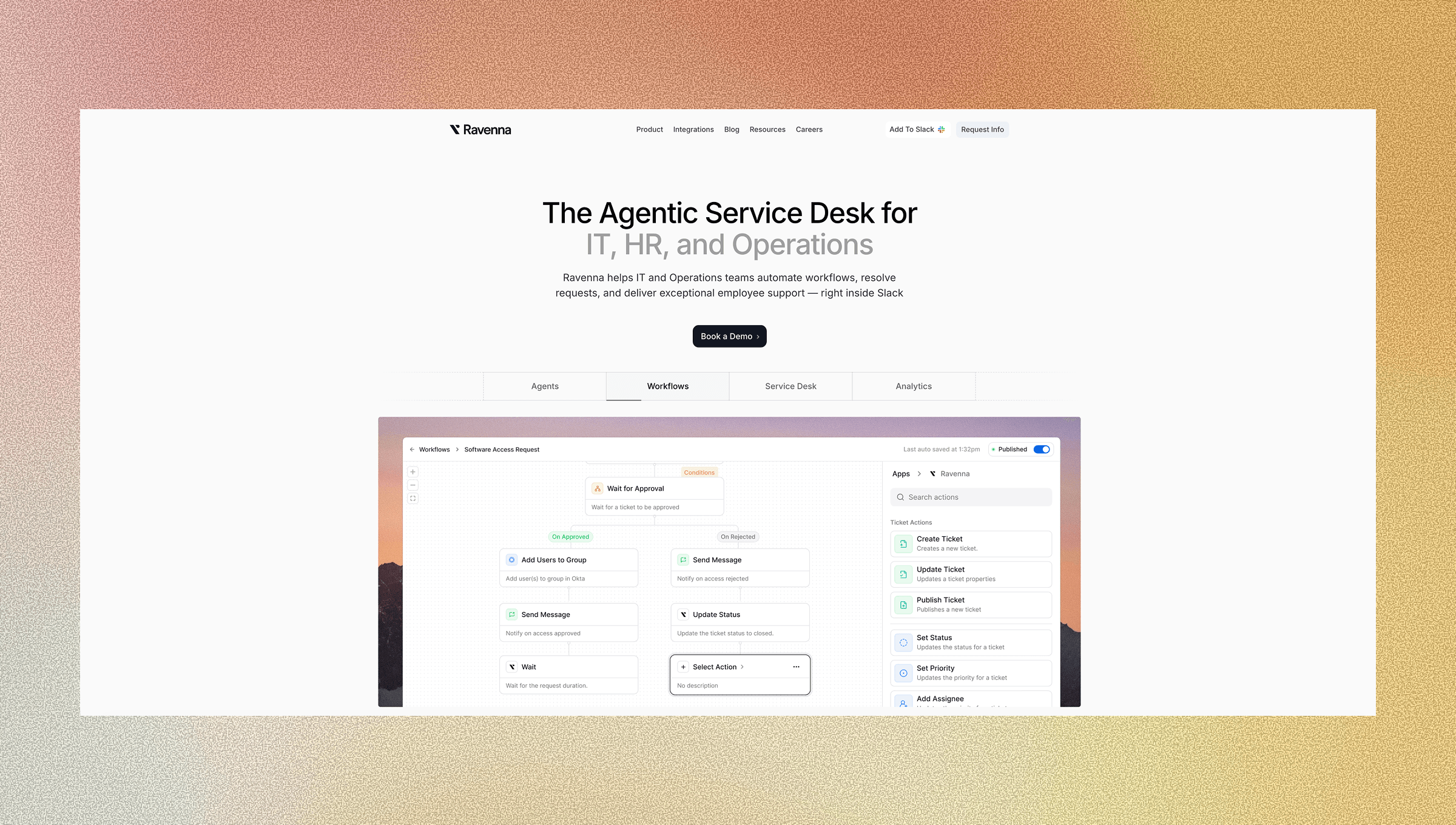
Every workflow covered above shares the same problem: too many manual handoffs across disconnected systems, creating bottlenecks in critical business processes. Ravenna is a workflow automation engine that closes that gap by connecting your HRIS, identity layer, and SaaS stack into a single automation engine that runs directly from Slack.
Requests come in, context gets pulled from your HRIS automatically, logic routes each case through the right approval chain, and actions execute across systems using API-based orchestration, reducing manual processes. Your IT team only gets involved when something genuinely needs human decision-making.
That is the shift worth making in 2026.
Final Thoughts on Automating Repetitive IT Work
Your team already knows which requests eat up the most time without requiring real decision-making. The question is whether you have a system that can automate those internal workflows end-to-end, pulling context from your HRIS and executing actions across Okta, Google Workspace, or your MDM without manual intervention. The workflow automation market is projected to grow from $26.5 billion in 2024 to over $78 billion by 2030, reflecting how critical this shift has become for IT teams managing distributed systems. Ravenna does exactly that, turning Slack into the interface where requests come in and workflows run themselves. Talk to us if you want to map out what automation looks like for your specific stack.
FAQ
Can I automate software access requests without building custom code?
Yes. Modern workflow automation tools let you build approval chains, license checks, and auto-provisioning logic through visual builders without writing any code. The workflow reads employee data from your HRIS and routes requests based on department, role, and context automatically.
What's the fastest way to automate employee offboarding in 2026?
Connect your HRIS to a workflow automation engine that triggers account suspension, file transfers, and license reclamation automatically when a departure is logged. Tools like Ravenna pull context from BambooHR, Workday, or HiBob and execute across Okta, Google Workspace, and your MDM stack without manual handoffs.
How does automated MFA reset stay secure?
Automated MFA resets use identity verification through push notifications to the employee's registered device before executing the reset. If verification fails, the workflow escalates to human review instead of completing automatically, preserving security while removing manual work from routine cases.
What percentage of companies have automated offboarding workflows?
Only 32% of organizations have partially automated offboarding processes, and just 5% have fully automated employee exit procedures. Most teams still handle account suspension, file transfers, and access revocation manually across disconnected systems.
Should I automate device diagnostics or keep them manual?
Automate device diagnostics when you have an MDM integration that can run remote checks and apply common fixes without agent involvement. Your team should only handle cases that need genuine troubleshooting, not repetitive VPN resets or configuration issues that follow predictable patterns.



