

You know exactly which Google Workspace groups each new hire needs based on role and department, but you're still adding them manually because connecting your HRIS to group management felt too complicated to set up. Every Monday brings five onboarding tickets, and every Friday brings three offboarding requests. The time spent clicking through the Admin Console adds up to a full workday each month. The bigger risk isn't the time. It's the lag between when someone leaves and when you finish removing their group memberships, leaving former employees with access to internal communications longer than they should. This guide walks through three automation approaches that work for lifecycle-driven group management, from APIs you build yourself to workflow platforms that help streamline user management without scripts.
TLDR:
Manual Google Workspace group management costs IT teams 35+ hours annually per admin on repetitive work.
Automated lifecycle workflows sync HRIS changes to group memberships, eliminating delays and security gaps.
Delayed offboarding access removal exposes internal communications and data to former employees.
Ravenna manages group operations across Google Workspace and connected systems from Slack without custom code.
Understanding Google Workspace Group Management Challenges
Every time an employee joins, changes roles, or leaves your organization, their Google Workspace group memberships need to change too. Sales reps need access to the sales distribution list. Engineers need the engineering team group. Department heads need leadership groups. When someone moves from marketing to product, you're adding them to new groups and removing them from old ones. The challenge is scale. A 500-person company might have 200+ Google Workspace groups across departments, projects, locations, and functions. Every hire means 5-10 group additions. Every departure means tracking down every group they belong to and removing access. Every internal transfer means both.
Most IT teams handle this through a mix of manual Admin Console updates and support tickets. An HR system might trigger a notification that someone started, but you're still logging into Google Workspace to add them to groups one by one. When someone leaves, you're checking group memberships manually to make sure nothing gets missed. The process is time-consuming, and the time adds up fast. If each group change takes 2 minutes and you're processing 20 requests per week, that's 40 minutes spent on repetitive work that could be automated. Over a year, that adds up to 35+ hours of manual group administration.
Worse than the time cost is the security risk. Delayed removals mean former employees retain access to internal communications and shared resources longer than they should. Missed additions mean new hires can't do their jobs on day one.
The Hidden Cost of Manual Group Administration
The hours spent clicking through the Google Workspace Admin Console have a real dollar value attached. Managers spend at least eight hours per week on manual data tasks, with 25% devoting 20 or more hours weekly to them. For IT admins managing Google Workspace groups, that can translate to 400-1,000 hours annually per team member spent on work that could run automatically.
Break that down by task type and the impact becomes clearer:
Onboarding delays mean new employees wait hours or days for the group access they need to start working.
A developer who can't access the engineering distribution list on day one misses team announcements and planning discussions.
A sales rep without the regional sales group misses pipeline updates and customer handoff notifications.
The offboarding side carries greater risk. When you're manually removing someone from groups after their last day, every hour of delay is an hour they retain access to internal communications, Gmail messages, shared drives, and potentially sensitive business data.
Core Google Workspace Group Operations IT Admins Need to Automate
Three categories of group operations dominate your queue: membership changes, group creation, and permission updates. When you rank them by frequency and security impact, user additions and removals come first because they happen daily and carry the highest risk when delayed.
New hires need immediate access to role-specific groups. A marketing coordinator joining your team needs the marketing distribution list, the all-company announcements group, and any project-specific groups they'll contribute to. That access also helps them stay aligned with team members from day one. Internal transfers trigger the same need when someone moves from customer success to sales and requires access to different regional and functional groups.
Offboarding creates the highest-stakes removal scenario. When someone leaves, you need to identify every group they belong to and revoke access before their last day. Role changes require selective removal, taking someone out of old department groups while adding them to new ones.
New departments, offices, or projects each need dedicated groups for communication, file sharing, shared drives, Gmail collaboration, and Docs access. These requests usually come from managers who need distribution lists and a group email set up before their teams can collaborate. Each group needs proper naming conventions, security settings, and initial membership configured correctly from the start.
Partner access and vendor collaboration require adding external email accounts to specific groups. Each addition needs approval and monitoring because you're granting outsiders visibility into internal communications.
Security Risks of Unmanaged Google Workspace Groups
Unmanaged group memberships create direct security exposures. When access removal depends on manual processes, timing becomes unpredictable. Only 5% of organizations have fully automated offboarding, which means most still rely on manual checklists that miss groups or process removals days after someone's departure. The risk isn't theoretical. Former employees who retain group access can still see strategic discussions, customer data, user data, financial planning, product roadmaps, and in some cases, Google Cloud information tied to internal operations. A departed sales director still in the leadership group sees reorganization plans. An ex-engineer in the product team group receives feature specifications and release timelines.
External collaborators in groups amplify the problem. Vendor contacts added to project groups often stay there long after contracts end. Partner accounts granted temporary access to shared resources can become permanent unless someone audits membership lists and reviews external group members regularly. Each external email account in a group becomes a potential point of data leakage if access isn't monitored through identity provider integrations.
Orphaned groups without active owners accumulate members over time with no one responsible for reviewing who belongs. 76% of IT leaders strongly agree that offboarding represents a major security threat, yet most groups lack ownership structures that trigger access reviews when people change roles or leave.
Automation Approaches for Google Workspace Group Management
Three automation paths exist for Google Workspace group management, each with different technical requirements and maintenance overhead:
Google Admin SDK Directory API
Google Apps Script
Workflow Automation Solutions
Google Admin SDK Directory API
The Directory API gives you programmatic control over groups, memberships, and settings, though workflow automation solutions can be easier to maintain. You can write scripts that add users to groups, remove them, create new groups, or bulk update permissions. This works well when you have developers who can build and maintain custom code. The trade-off is ongoing maintenance. API endpoints change, authentication requirements evolve, and error handling needs constant attention. A script that works today might break after a Google Workspace update six months from now.
Google Apps Script
Apps Script offers a simpler entry point for teams without dedicated developers. You can write JavaScript that runs directly inside Google Workspace, triggered by spreadsheet changes or time-based schedules. This approach works for basic automation, such as adding users to a group when they appear in a tracking sheet, often through a simple function. The limitation is the scope. App Script works for simple, single-step tasks but struggles with multi-step workflows that need conditional logic, approval chains, or integration with systems outside Google Workspace, scenarios where request automation services excel.
Workflow Automation Solutions
Purpose-built workflow automation connects your HRIS, identity provider, and Google Workspace into automated sequences. When someone joins in BambooHR, the workflow automatically adds them to department-specific groups based on role and location, including dynamic groups driven by employee attributes. When they leave, group access is revoked across all memberships at once.
Ravenna handles these multi-system workflows without custom code. The visual workflow builder lets you map employee lifecycle events to group operations, add approval steps where needed, and execute changes across your stack from one automation.
Approach | Technical Requirements | Best Use Cases | Maintenance Overhead | Multi-System Integration |
Google Admin SDK Directory API | Requires developers with Python, Node.js, or similar languages. OAuth 2.0 authentication setup. Custom error handling and logging implementation. | Organizations with dedicated engineering resources who need highly customized group management logic or want to integrate with proprietary internal systems. | High. API endpoint changes require code updates. Authentication tokens need monitoring. Scripts break after Google Workspace updates and require debugging. | Possible but requires custom code for each integration point. You build and maintain connections to HRIS, identity providers, and other systems yourself. |
Google Apps Script | Basic JavaScript knowledge. Runs inside Google Workspace environment. Triggered by spreadsheet changes or time-based schedules. | Simple, single-step tasks like adding users from a tracking sheet to specific groups. Suitable for small teams with straightforward group structures. | Low to Medium. Simpler than API development but still requires script maintenance. Limited debugging tools compared to full development environments. | Limited. Works well within Google Workspace but struggles with external system connections. No native HRIS or identity provider integration. |
Workflow Automation Platforms | No coding required. Visual workflow builder with pre-built connectors. Point-and-click configuration for triggers, conditions, and actions. | Lifecycle-driven automation across multiple systems. Handles complex multi-step sequences with approval chains, conditional logic, and cross-system provisioning. | Minimal. The solution maintains integrations and adapts to API changes automatically. IT teams focus on workflow logic instead of code maintenance. | Native integrations with HRIS systems, identity providers, Google Workspace, Slack, and other enterprise tools. Changes propagate across all connected systems from one workflow. |
Building Automated Workflows for Employee Lifecycle Events
Employee lifecycle events are the highest-value automation target because they happen predictably and affect multiple groups at once. When you connect your HRIS directly to Google Workspace group management, membership changes run automatically based on employee data changes:
Onboarding workflows trigger when a new employee record appears in your HRIS. The automation reads department, role, and location, then adds that person to the corresponding Google Workspace groups. A new engineer in the San Francisco office gets added to engineering-team, sf-office, all-employees, and any project groups their manager specifies.
Role change workflows monitor for department or title updates in your HRIS. When someone moves from customer success to sales, the workflow removes them from cs-team and support-dist while adding them to sales-team and the right regional sales group. The automation executes both additions and removals in one sequence.
Offboarding workflows respond to termination dates or status changes in your HRIS. The day someone leaves, the workflow identifies all their Google Workspace group memberships and removes them systematically. Lifecycle automation can deliver measurable time savings, with teams reporting an average of 20 hours saved weekly on repetitive access management tasks.
Ravenna runs these workflows by connecting BambooHR, Rippling, or HiBob directly to Google Workspace. Changes in your HRIS trigger group operations automatically, with no scripting or API maintenance required.
Automate IT Operations with Workflow Automation for Google Workspace
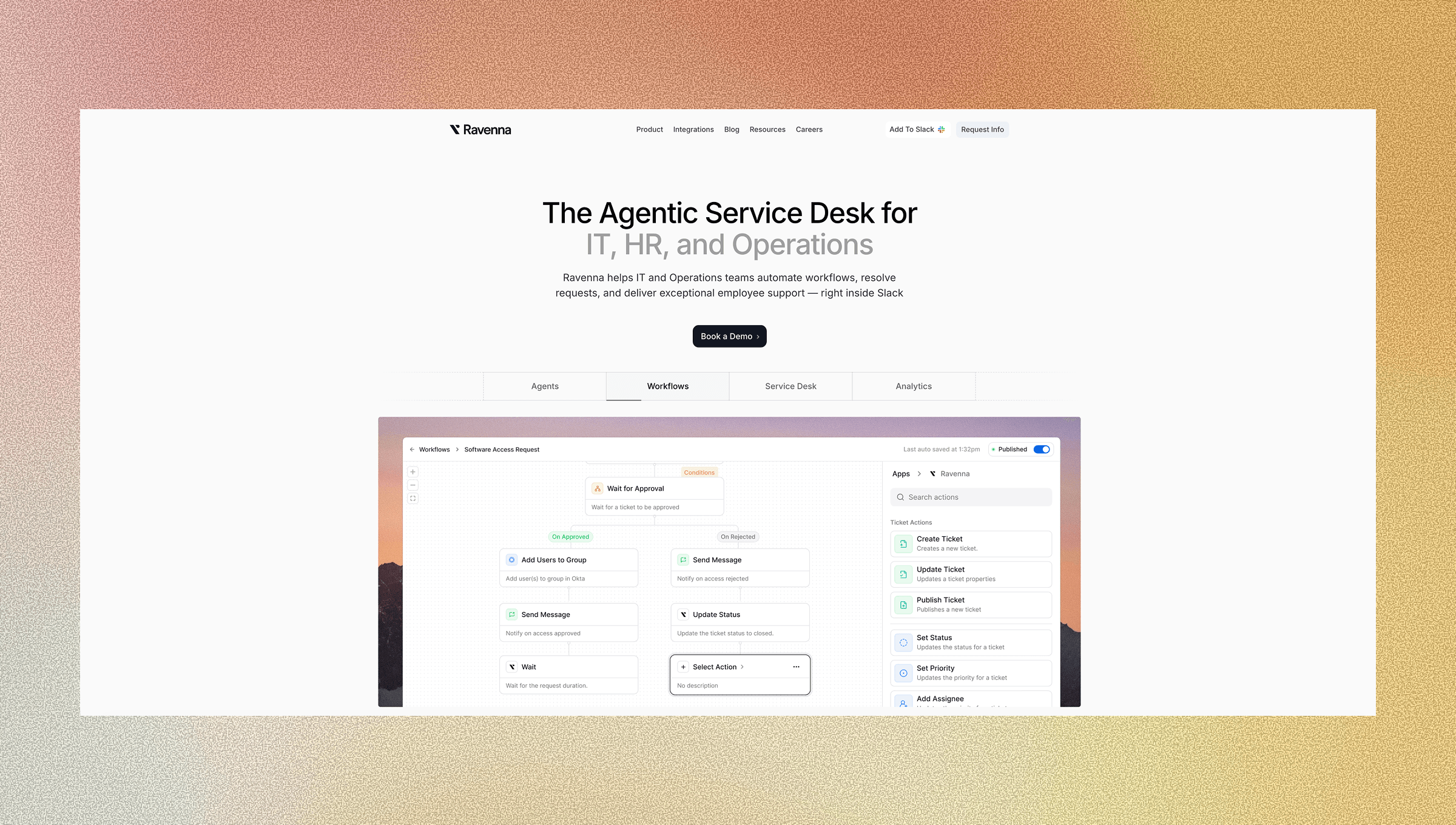
Ravenna automates Google Workspace group management by running workflows from request to execution. When an employee joins, changes roles, or leaves in your HRIS, group memberships update automatically based on rules you define once in the visual workflow builder, with reusable templates for common lifecycle actions. The Slack-native interface lets employees request access where they already work, following a self-service adoption approach that reduces IT burden. They ask for a distribution list or project group in Slack, and Ravenna handles approval routing and group updates without anyone opening the Admin Console. For lifecycle events, the automation runs hands-off. Your HRIS triggers the workflow, and group memberships update across Google Workspace and connected systems in one sequence.
Ravenna integrates directly with Google Workspace for identity management, Cloud Identity alignment, user accounts, and distribution group operations. The same workflow that provisions an Okta account also adds users to the right Google Groups, Slack channels, and other access points. When they leave, all memberships are revoked at the same time.
You maintain full visibility into every change through the ticketing interface. You can see what was automated, what required approval, and what failed, all from one queue.
Final Thoughts on Google Workspace Group Operations
Group management doesn't need to consume your IT team's time. When you add Google users to groups automatically based on HRIS data, membership changes happen the day someone joins, switches roles, or leaves. You avoid the security exposure of delayed removals, reduce admin workloads, and get back the hours your team currently spends clicking through the Admin Console.
Contact us to see how you can automate your workflows with Ravenna.
FAQ
How long does it take to set up automated group management workflows?
Most IT teams configure core lifecycle workflows, including onboarding, offboarding, and role changes, in 2-3 hours using a visual workflow builder. Full deployment across all departments is typically complete within one week.
What happens if someone changes departments mid-year?
Role change workflows detect department or title updates in your HRIS and automatically remove the employee from old groups while adding them to new ones in a single sequence, preventing access gaps.
Can I automate external vendor access to Google Workspace groups?
Yes, you can build approval-based workflows that add external email accounts to specific groups after manager authorization and automatically remove them when contracts end or project timelines expire.
How do automated workflows handle employees who belong to 15+ different groups?
Offboarding workflows scan all group memberships for a departing employee and remove them systematically across every group at once, eliminating the manual work of tracking down each one individually.
What's the difference between using Google Apps Script vs workflow automation?
Apps Script handles simple single-step tasks triggered by spreadsheet changes, while workflow automation supports multi-step sequences across your HRIS, identity provider, and Google Workspace with conditional logic and approval chains built in.



