

You can't revoke access you don't track. When an employee offboarding workflow runs manually, IT races to remember every application, shared drive, and API credential before auditors ask why accounts stayed active after departure. In many organizations, the offboarding process relies on manual steps and scattered records. The real challenge isn't suspending SSO, it's catching non-federated tools, external file shares, and legacy systems that create blind spots where access persists. Automation tools solve this by connecting your HRIS directly to deprovisioning actions across your stack, so terminations trigger immediate revocation instead of delayed discovery.
TLDR:
Poor offboarding creates data breach risks costing $4.9M per incident on average.
63% of companies have former employees with active access to organizational data.
Automate account suspension within minutes of termination to close security gaps.
Build workflows that revoke SSO, non-integrated apps, and external file sharing automatically.
Ravenna automates offboarding across your SaaS stack through Slack-native automation.
Why Security Risks Make Offboarding a Business-Critical Priority
When employees leave, every hour their access remains active creates a window for data theft, credential misuse, or accidental breaches. 85% of IT professionals cite offboarding as a high-risk cybersecurity event, yet only 44% of companies revoke all access rights within 24 hours.
Over 20% of data breaches involve former employees within six months of departure. Each overlooked application login, shared drive, or API key becomes an entry point for unauthorized access that threatens compliance audits, intellectual property, and customer trust.
The Financial and Compliance Costs of Poor Offboarding
Data breaches cost companies an average of $4.9 million per incident in the United States. Insider threats account for 60% of all data breaches, and former employees with retained access represent a disproportionate share of these incidents.
Beyond breach remediation, organizations often absorb additional costs from unreturned hardware, unused software licenses, and emergency incident response. Delays in offboarding can also raise compliance concerns. Many regulatory and security frameworks treat lingering access after an employee’s departure as a control gap, and audits such as SOC 2 may flag accounts that remain active past termination dates as exceptions. In regulated environments, standards like HIPAA and data protection laws such as GDPR require organizations to terminate access when a person’s role ends, and failures to do so can result in regulatory scrutiny or financial penalties.
The Hidden Access Problem: What Gets Missed in Manual Offboarding
63% of businesses may have former employees with access to organizational data. The gap between what IT deprovisioned and what remains accessible grows with each SaaS app added to your stack.
Manual offboarding assumes you know every access point. That assumption breaks down when employees provision their own tools, share credentials across teams, or access company data from personal devices. Shadow IT bypasses your identity provider. Shared team credentials for vendor accounts or social tools persist in password managers after termination. Personal devices with email, Slack, or downloaded files remain outside MDM control.
Non-SSO tools create blind spots where access continues after departure. Each missed application represents credentials that auditors flag and attackers probe.
Complete Offboarding Workflow Timeline
The table below outlines the critical offboarding steps, their recommended timelines, and the systems involved to complete full access revocation:
Step | Timeline | Systems Involved | Priority |
Identity Provider Suspension | 0-5 minutes | Okta, Azure AD, Google Workspace | Critical |
Email & Communication Revocation | 0-15 minutes | Email, Slack, Microsoft Teams | Critical |
SSO-Integrated App Access | 0-30 minutes | All SAML/SCIM applications | Critical |
Device Lock & Remote Wipe | 0-1 hour | MDM (Jamf, Kandji, Intune) | Critical |
Non-SSO Application Revocation | 1-4 hours | GitHub, AWS, CRM, project tools | High |
External Sharing Revocation | 4-8 hours | Google Drive, Dropbox, SharePoint | High |
File Ownership Transfer | 8-24 hours | File storage, project management | Medium |
License Reclamation | 24-48 hours | All SaaS platforms with per-seat pricing | Medium |
Asset Recovery | 3-7 days | Physical devices, access badges | Medium |
Legacy System Deprovisioning | 1-3 days | Non-integrated vendor portals, legacy HR tools | Low |
The 10 Steps to Employee Offboarding
We've compiled a step-by-step framework to help you automate employee offboarding and build a structured employee offboarding process. These steps maintain security compliance while allowing IT teams to focus on higher-impact work.
Step 1: Set Up HR and IT Coordination Triggers (the first item in your offboarding checklist and foundation for all offboarding tasks)
Step 2: Build a Complete Access Inventory Across Your SaaS Stack
Step 3: Implement Immediate Account Suspension
Step 4: Automate Access Revocation Across Integrated Applications
Step 5: Handle Non-Integrated and Legacy Systems
Step 6: Revoke External Sharing and Data Access
Step 7: Automate Device Management and Asset Recovery
Step 8: Transfer Ownership and Preserve Business Continuity
Step 9: Generate Audit Trails and Compliance Documentation
Step 10: Monitor and Reclaim Unused Licenses
Step 1: Set Up HR and IT Coordination Triggers
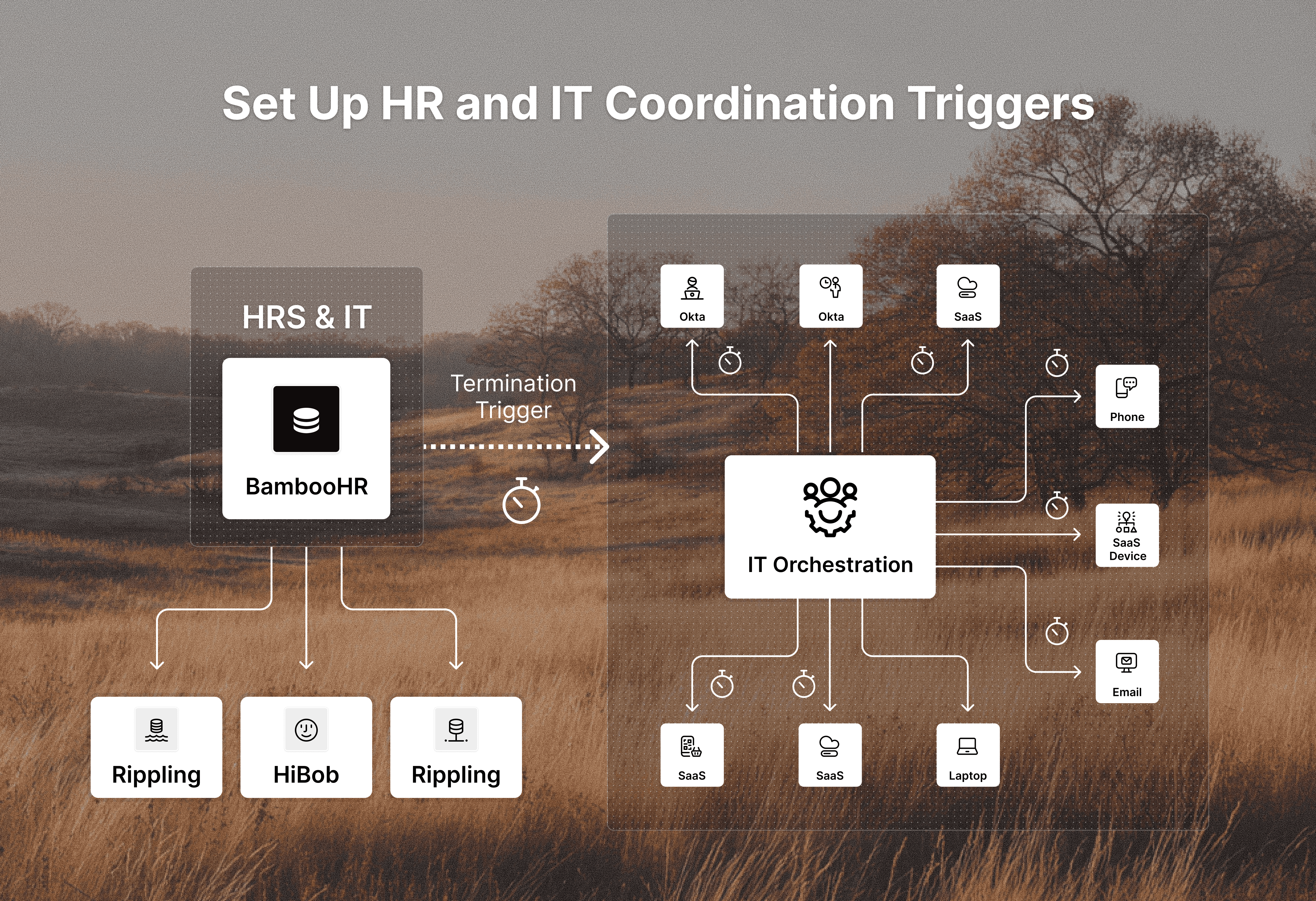
Offboarding automation fails when human resources and IT operate on different timelines. The fix starts with synchronized triggers that alert IT the moment an employee’s departure is finalized in your HR systems or HRIS.
Connect your HRIS (BambooHR, HiBob, Rippling) to your IT workflow automation so termination records automatically initiate offboarding sequences. This removes manual handoffs where delays accumulate. When HR marks an employee as "terminated" or updates their departure date, IT receives an immediate notification with employee details, role, department, and last working day.
Define clear ownership boundaries. HR owns separation decisions and departure dates. IT owns access revocation, device recovery, and license reclamation.
Step 2: Build a Complete Access Inventory Across Your SaaS Stack
You cannot revoke access you don't see.
Start by cataloging every application connected to your SSO provider (Okta, Google Workspace, Azure AD). These federated apps represent your visible layer, but they're incomplete.
Map non-SSO tools next. Survey department heads for applications purchased with corporate cards or expensed directly. Check finance records for recurring SaaS charges. Review browser extensions and installed software across managed devices through your MDM.
Finally, document contractor access separately. Third-party vendors often receive temporary credentials that outlive project timelines.
Step 3: Implement Immediate Account Suspension
Account suspension must happen before you start the detailed revocation process. The goal is to close the primary attack surface within minutes of HR finalizing termination, not hours or days later.
Your workflow automation should suspend identity provider accounts first. When your HRIS sends the termination trigger, the workflow immediately deactivates user accounts in Okta, Google Workspace, or Azure AD. This cuts off SSO access to every federated application in one action. Disable email access, revoke VPN credentials, and invalidate MFA tokens simultaneously to prevent data exfiltration and backdoor entry.
Step 4: Automate Access Revocation Across Integrated Applications
SSO suspension stops federated access, but your SaaS stack includes applications with their own permission layers. Slack channels, GitHub repositories, AWS IAM roles, and project management boards require direct revocation within each application's native access controls.
Set your workflow automation to execute application-specific deprovisioning steps after identity provider suspension. Engineering offboarding should trigger GitHub and AWS access removal. Sales departures should revoke CRM access and remove users from customer communication channels. HR terminations require payroll system and benefits portal deprovisioning. However, remember to test your integrations before you need them.
Step 5: Handle Non-Integrated and Legacy Systems
Not every system in your stack supports SCIM provisioning or API-based deprovisioning. Legacy HR tools, vendor portals, and departmental applications built before identity standards leave you with manual login requirements that break automation.
Build workflows that treat UI-based deprovisioning as a structured task. When an employee leaves, the workflow generates a checklist of non-integrated systems with instructions for manual revocation. Track completion status in real time so nothing gets marked done without actual confirmation.
For recurring legacy systems, document exact deprovisioning steps directly in the workflow task. This removes ambiguity during offboarding.
Step 6: Revoke External Sharing and Data Access
Account suspension stops an employee from logging in, but it doesn't revoke access to files they've already shared externally. Public links, external collaborators, and shared drives remain accessible long after departure, creating persistent data exposure.
Automate external sharing discovery through your file storage APIs. Google Drive, Dropbox, SharePoint, and Box each maintain sharing metadata that shows which files have public links, external collaborators, or domain-wide access. Your workflow should query these APIs immediately after account suspension.
Revoke public links first since anyone with the URL can access the file without authentication. Next, remove external emails from shared file permissions. Finally, audit collaborative workspaces like shared drives or team folders where the employee had ownership rights.
Step 7: Automate Device Management and Asset Recovery
Your offboarding workflow should trigger remote device actions through your MDM (Jamf, Kandji) the moment HR confirms termination to secure company assets, including laptops and mobile devices. Lock corporate laptops and phones immediately to prevent data access while the device is still in the employee's possession.
For devices that won't be returned within 24 hours, initiate remote wipe commands. Corporate devices get full wipes. Personal devices require selective wipes that remove only company email, Slack, and managed applications.
Automate asset recovery by generating prepaid shipping labels sent directly to the employee’s personal email.
Step 8: Transfer Ownership and Preserve Business Continuity
Revoking access protects data, but breaks workflows. Departing employees often own files, manage projects, and hold institutional knowledge that active teams need after they leave.
Automate file ownership transfer through storage APIs. When an employee departs, scan Google Drive, Dropbox, or SharePoint for files they own and reassign ownership to their manager or designated successor.
Set temporary email forwarding for 30 to 60 days so managers receive customer communications, vendor replies, and internal requests that would otherwise disappear. Archive forwarded messages for compliance.
Reassign open tickets, project tasks, and calendar events through workflow automation. CRM opportunities, support tickets, and sprint tasks need new owners assigned automatically to maintain business continuity.
Step 9: Generate Audit Trails and Compliance Documentation
Auditors need timestamped logs showing what happened, when it happened, and who initiated each action. Your offboarding workflow should automatically capture every revocation, suspension, and transfer as structured data that survives compliance reviews.
Configure your workflow automation to log each completed step with timestamps, the affected employee, the system accessed, and the action taken. When IT suspends an Okta account at 2:47 PM or revokes AWS access at 3:12 PM, that record becomes your audit evidence. Export these logs as compliance reports that map directly to SOC 2 controls, GDPR mandates, or HIPAA requirements.
Step 10: Monitor and Reclaim Unused Licenses
Offboarding closes security gaps and reclaims budget. When you suspend an account, your workflow should trigger license deprovisioning across Slack, Microsoft 365, Adobe Creative Cloud, and other per-seat applications. Each reclaimed license stops recurring charges that month.
Set automated monitoring to scan for orphaned accounts quarterly. Former employees whose SSO access was revoked but whose application-specific licenses remain active show up as unused seats in SaaS admin panels. Flag these accounts for review and reclamation to prevent wasted spend that compounds over time.
How Ravenna Automates Complex Offboarding Workflows Across Your Stack
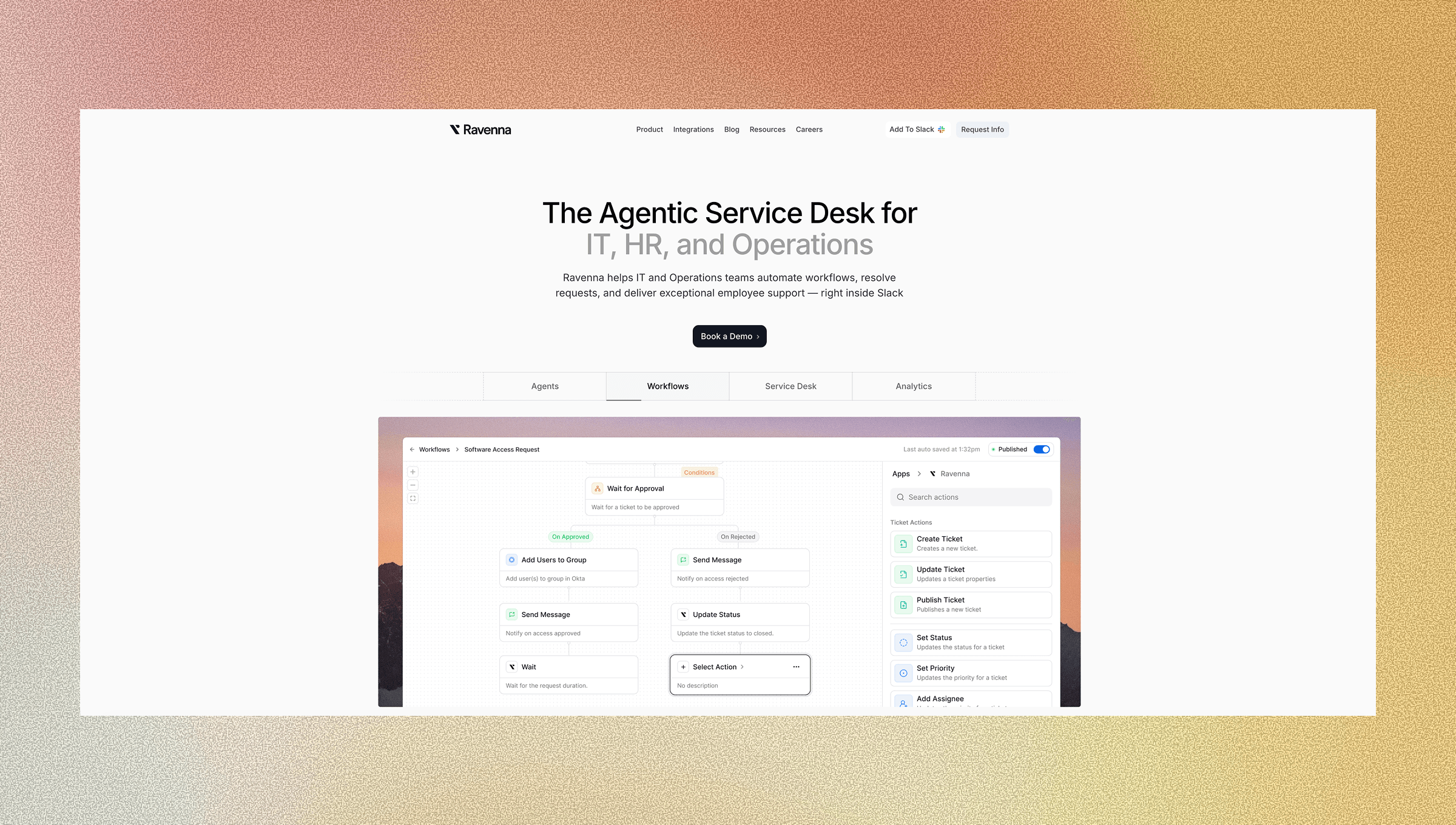
Ravenna acts as your workflow automation platform that connects offboarding triggers to actions across every system in your stack using native integrations and connectors. When HR marks an employee as terminated in your HRIS, Ravenna executes your predefined workflow: suspending accounts in Okta, revoking Slack access, removing Google Workspace permissions, and creating device recovery tasks in your MDM tool without IT touching individual admin consoles.
Your team builds the workflow once using the visual builder, then Ravenna executes it consistently for every departure. Set conditional logic based on role or department so engineering departures automatically revoke GitHub and AWS access while sales offboarding triggers Salesforce deprovisioning. Add approval steps for exceptions without breaking the automated sequence.
Ravenna's agents handle time-sensitive access revocations while your IT team monitors execution through audit logs and dashboards instead of manually processing each termination. You're augmenting your team to close security risks of offboarding at the speed departures demand.
Final Thoughts on Protecting Your Business During Departures
You can't close offboarding security risks fast enough when IT manually processes terminations across fragmented tools. Automation helps streamline the offboarding process and reduces the human error that manual processes introduce. Every hour between departure notification and complete access revocation creates exposure that threatens compliance status and opens doors for data theft. Ravenna builds that bridge between your HRIS and every application in your environment, running workflows that suspend accounts, transfer ownership, and reclaim licenses while generating the audit trails your next SOC 2 review will demand.
Contact us to see how offboarding and other employee workflows can be automated with Ravenna.
FAQ
How quickly should you revoke access when an employee leaves?
Account suspension should happen within minutes of HR finalizing termination, not hours or days later. Start by immediately disabling identity provider accounts (Okta, Google Workspace, Azure AD) to cut off SSO access, then work through application-specific revocations and device management within the first 24 hours.
What access points get missed most often in manual offboarding?
Non-SSO tools, shadow IT applications, shared team credentials in password managers, and personal devices with company data create the biggest blind spots. External file shares with public links or external collaborators also persist after departure since they remain accessible without authentication.
Can you automate offboarding for legacy systems without API integrations?
Yes, but it requires structured task workflows instead of direct automation. Build workflows that generate checklists with specific deprovisioning instructions for manual completion, then track execution status in real time to prevent steps from being marked complete without actual confirmation.
When should you transfer file ownership versus revoking access completely?
Transfer ownership immediately for files, projects, and communications that active teams need for business continuity. Revoke access completely for personal documents, draft files, or outdated materials. Set temporary email forwarding for 30-60 days so managers can receive critical customer or vendor communications without creating permanent access.
How does workflow automation reduce offboarding costs beyond security?
Automated workflows reclaim unused software licenses the same month you suspend accounts, stopping recurring per-seat charges for Slack, Microsoft 365, Adobe, and other SaaS tools. You also reduce incident response fees, breach remediation costs, and compliance violation penalties by closing access gaps that manual processes miss.



