

Every AWS access request hitting your team through Slack follows the same pattern: check whether it's approved, manually grant the permission set, add a reminder to revoke it later, then forget that reminder when work gets busy. When you automate temporary access directly in Slack, requests route through approval chains based on who is asking and what they need, credentials are provisioned through IAM Identity Center, and sessions expire on schedule without anyone tracking them manually. This guide walks through building these workflows with conditional logic that balances security and speed.
TLDR:
Temporary AWS access cuts the attack surface by 99% vs permanent credentials that create year-round exposure.
Manual access workflows waste $55,000+ annually at 5,000-person orgs processing requests by hand.
Slack-native automation saves employees 3.6 hours per week by eliminating portal switching.
Ravenna automates AWS access from Slack requests through IAM Identity Center provisioning to auto-revocation.
Time-bound credentials expire automatically without manual tracking or revocation failures.
What Is Just-in-Time Access for AWS
Just-in-time access grants cloud permissions only when needed for a specific duration, then automatically revokes them. In identity and access management, this approach strengthens access management by replacing standing privileges with time-bound access. Instead of giving developers standing access to production AWS accounts, you provision temporary credentials that expire after hours or days. The model flips the traditional approach. Permanent access creates constant exposure, where every credential becomes a potential attack vector, and every over-permissioned account increases blast radius. Temporary access shrinks that window. Users request access, receive time-bound permissions, and lose those privileges once the session expires.
AWS IAM Identity Center (formerly AWS SSO, or simply SSO) serves as the technical foundation. It acts as a central identity provider within your AWS identity and authentication layer, brokering temporary credentials across your AWS organization. When someone requests access to an AWS account, IAM Identity Center generates short-lived credentials tied to a specific permission set. Those credentials work for the defined period, then become invalid. This approach aligns with zero-trust principles. You're not eliminating access, you're making it contextual, auditable, and time-boxed.
The Security Risks of Permanent AWS Access
Permanent AWS credentials create a perpetual attack surface. When developers maintain standing access to production environments, every compromised laptop, stolen session token, or phishing success hands attackers the same privileged access your team uses daily.
The math here is simple: longer access windows mean more opportunities for exploitation. A developer with permanent S3 admin rights represents 365 days of exposure per year. Temporary access that expires after four hours cuts that window to a fraction of a percent. Compromised credentials also do not stay isolated. Attackers use initial access to move laterally across your AWS organization. That read-only access to one account becomes a stepping stone to privilege escalation in another. Standing permissions make this easier because there is no time pressure.
Audit logs tell part of the story, but permanent access makes attribution harder. When everyone has constant access to production, separating legitimate activity from malicious behavior requires deeper investigation. Temporary access creates natural boundaries. Access outside approved windows becomes an immediate red flag. Compliance frameworks recognize this risk. SOC 2, ISO 27001, and PCI-DSS all reference the principle of least privilege and time-bound access as control requirements. Permanent credentials work against both principles.
Why Manual Access Request Workflows Fail at Scale
Manual access request workflows collapse under their own weight once you pass a few hundred employees. The pattern looks identical across organizations: a Slack message asking for AWS access, someone checking if it's approved, manually adding the user to the right permission set, then remembering to revoke it later. Each step introduces delay and human error.
The numbers reveal the cost. Take an organization with 5,000 employees where each person raises roughly two access requests per year. If each request takes 15 minutes to handle manually, that's 2,500 hours your IT team could spend on strategic work instead of repetitive tasks. At a median IT staff pay of $22 per hour, you're looking at $55,000 wasted annually on tasks that could be automated. Access provisioning at this scale becomes a coordination problem. Requests arrive across email, Slack DMs, and ticketing systems. Context gets lost between threads. Approvals sit in someone's inbox for days because they are in back-to-back meetings. By the time access gets provisioned, the urgency has passed, or the developer has found a workaround that bypasses your security controls.
Manual tracking of access expiration rarely happens. IT teams lack visibility into who has access to what and when those permissions should expire. Spreadsheets and calendar reminders don't scale. The result is access creep, where temporary permissions become permanent by default because no one circles back to revoke them.
Human error follows volume. When you're processing dozens of access requests per week, mistakes happen. Wrong permission sets get assigned. Access gets granted to the wrong AWS account. Revocations get missed. Each error creates security gaps that require even more manual work to identify and fix.
The table below provides a quick overview of the security impact, cost, and operational tradeoffs across different approaches to AWS access.
Approach | Time to Provision | Security Risk Exposure | Annual Cost (5,000 employees) | Revocation Method | Audit Trail Quality |
Permanent AWS Credentials | One-time setup, 5-10 minutes per user | 365 days per year of continuous exposure per credential | Low provisioning cost but high breach risk and compliance overhead | Manual removal required, often forgotten indefinitely | Difficult to attribute actions to specific sessions or time windows |
Manual Temporary Access | 15 minutes average per request including approval coordination | Reduced window but dependent on manual revocation reliability | $55,000+ in IT labor for processing 10,000 annual requests | Calendar reminders and spreadsheet tracking with frequent failures | Fragmented across email, Slack, and ticketing systems |
Portal-Based Automation | 5-10 minutes including context switching and portal login | Time-bound credentials with automatic expiration | Licensing costs plus 3.6 hours per week lost to context switching | Automated expiration through IAM Identity Center | Centralized but requires users to check a separate system |
Slack-Native Automation with Ravenna | Under 2 minutes from request to provisioned credentials | Minimal exposure with conditional auto-approval and scheduled expiration | Eliminates manual processing costs and saves 3.6 hours per employee weekly | Automatic credential invalidation at session expiration | Complete lifecycle tracking from request through revocation in a single system |
How Slack Centralizes Access Request Workflows
Slack solves the context-switching problem that kills access request workflows. When employees need AWS access, they're already in Slack coordinating with their team. Forcing them to open a separate portal, log in again, and learn an unfamiliar interface adds friction that drives people to work around your security controls instead.
The productivity case is clear. According to the State of Work 2023 report, 77 percent of desk workers think automating routine tasks would improve productivity, and people using automation at work save 3.6 hours per week. That time savings compounds when you remove the overhead of learning and accessing another system. Request experiences in Slack feel like normal conversation inside the Slack workspace. A Slack user can type "I need access to the production AWS account" in a DM or one of your Slack channels, and the system responds immediately with clarifying questions or kicks off an approval workflow. No forms to hunt down, no tickets to track separately, and no wondering whether the request got lost. A secure Slack integration can also verify requests with a signing secret before routing them. Adoption follows naturally. You're not asking employees to change their behavior, remember another login, or relearn a portal they may have only seen during onboarding. The access request workflow lives where work already happens.
Building AWS Access Request Workflows with Conditional Logic
Conditional logic turns basic approval chains into intelligent routing systems that respond to request context. This is where many of the most valuable use cases for AWS access workflows emerge. When someone requests AWS access, the workflow branches based on requester identity, resource sensitivity, and request scope:
Requester attributes create your first decision point. Engineering or DevOps team members requesting development environment access can auto-approve if they have been with the company over 90 days and hold full-time status. Contractors making identical requests route through manager approval, plus security review.
Resource classification drives the second layer. Non-production AWS account access follows a single approval path. Production access with write permissions routes through security and infrastructure leads before provisioning credentials.
Ravenna's visual workflow builder gives you conditional routing without writing code. You drop decision nodes onto the canvas, set rules like "if department equals Finance AND resource equals production," then connect branches to different approval sequences. Reusable templates make it easier to standardize these workflows across teams. The workflow executes automatically, routing requests without manual sorting.
Integrating AWS IAM Identity Center with Slack Workflows
IAM Identity Center bridges Slack approval workflows and AWS credential provisioning. In practice, this Slack integration connects approvals to AWS IAM actions. When a request is approved, the automation calls IAM Identity Center APIs to assign permission sets, which are collections of AWS IAM policies defining allowed actions in specific accounts.
The handoff works through API calls. Your Slack workflow triggers an integration that references the approved permission set, target AWS account, access duration, and any required ARN values. In some environments, that request is passed as JSON to internal services, Lambda functions, or API endpoints that coordinate provisioning. IAM Identity Center generates temporary credentials tied to those parameters and delivers them to the user through Slack. Permission sets are defined once and reused across requests. Create sets like "ReadOnlyProduction" or "DeveloperSandbox" with appropriate AWS IAM policies, IAM roles, and access boundaries for relevant AWS services attached. When someone requests access, the workflow references the permission set name instead of manually constructing policies for each request. Finally, access duration is enforced at the IAM Identity Center level. Set maximum session lengths per permission set, and credentials automatically expire when that window closes without manual revocation.
Approval Workflows That Balance Security and Speed
Approval speed and security work together when you design workflows around risk context. A strong approval process should move low-risk requests quickly while slowing down high-risk ones only when necessary. Low-risk requests should auto-approve based on predefined criteria. High-risk requests need human judgment but should not stall in someone's inbox. When defining approval workflows for security and speed, keep these best practices in mind:
Risk scoring drives automatic approval decisions. Assign numerical risk values based on factors like resource sensitivity, requested permission scope, and requester history. Add validation checks so incomplete or unusual requests do not auto-approve by mistake. Requests below your threshold score auto-approve and provision immediately. Those above routes to the appropriate reviewers.
Multi-level approval chains activate only when risk warrants them. Standard production read access might need a team lead sign-off. Write access to customer data, GitHub repositories, or other privileged systems routes through both the security team and the department head. Each additional approval step should map to measurably increased risk.
Emergency access breaks the standard flow with enhanced logging. Create expedited paths where users can self-certify urgent need and receive immediate access, but every emergency use triggers automatic notifications to security teams, sends Slack notifications to the right reviewers, and flags the request for post-access audit review.
Automating Access Revocation and Audit Trails
Automated revocation closes the security gap that manual processes leave open. When temporary AWS credentials reach expiration, IAM Identity Center invalidates them without human intervention. Sessions end precisely when scheduled, whether that's four hours or four days after provisioning. There are several considerations you should keep in mind as you automate access revocation.
Session monitoring tracks active credential usage in real time
The system logs every API call made with temporary credentials, often through sources like AWS CloudTrail or Amazon EventBridge, creating visibility into what actions users take during their access window. Unusual activity patterns trigger alerts before credentials expire naturally.
Audit trails capture the complete lifecycle of each access request
You get timestamps for when requests were submitted, who approved them, what permission sets were granted, which AWS resources were accessed, and when credentials expired. This creates an immutable record that maps user actions to specific time-bounded sessions.
Compliance reporting pulls directly from these logs
When auditors ask who had production access during a specific period, you query the audit trail instead of reconstructing events from fragmented sources. SOC 2 access reviews become data exports instead of manual investigations across multiple systems.
Automated deprovisioning removes the failure mode where IT forgets to revoke access
There's no ticket to close, no calendar reminder to set, no manual step that gets skipped during busy periods. Credentials expire on schedule, and the audit log confirms it happened.
Automate Temporary AWS Access Requests with Ravenna
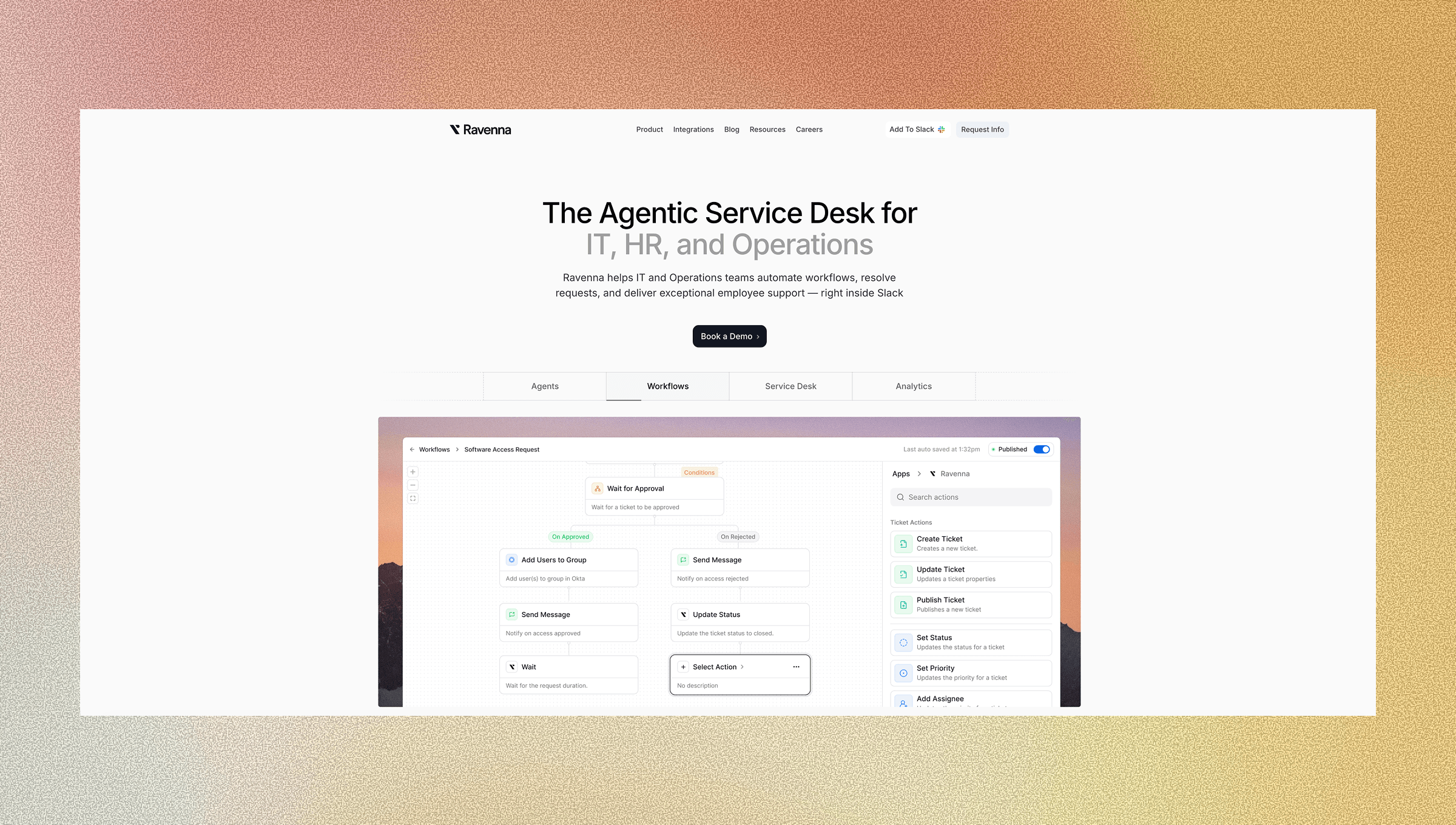
Ravenna handles the complete AWS access request lifecycle directly in Slack. When someone requests temporary AWS credentials, the AI Agent classifies the intent, routes the request through the right approval chains, and provisions access through IAM Identity Center without manual intervention. The workflow builder gives you visual control over conditional logic. Configure rules so engineering requests to development accounts auto-approve, while production access routes through security review. Set department-specific approval chains that adapt based on the requested permission set and the user's role. This helps teams automate access without losing policy control.
Ravenna integrates directly with IAM Identity Center to assign permission sets and enforce time-bound sessions. When approval completes, Ravenna calls IAM Identity Center APIs to grant the specified access level for the defined duration. Credentials expire on schedule, and the audit trail captures every step from request submission through automatic revocation.
Final Thoughts on Automated AWS Access Controls
The math on automating access control is straightforward: fewer hours spent on manual provisioning means more time for strategic work. Your security posture improves when credentials expire automatically, approvals happen without inbox delays, and audit trails capture every access decision. That helps streamline user access without weakening control. Time-bound permissions become the default instead of an exception you enforce manually.
To see this action, schedule a demo with us.
FAQ
How does just-in-time access reduce security risk compared to permanent credentials?
Just-in-time access shrinks your attack window from 365 days per year to hours or days, making compromised credentials worthless once they expire. This eliminates the perpetual exposure of standing permissions and makes unauthorized activity immediately visible when it occurs outside approved time windows.
What happens when temporary AWS credentials expire?
IAM Identity Center automatically invalidates the credentials at the scheduled expiration time without requiring manual intervention. The user loses access instantly, and the system logs the revocation in your audit trail for compliance review.
Can I set different approval requirements based on which AWS account someone requests?
Yes, conditional logic in workflow automation lets you route requests through different approval chains based on resource sensitivity. Development account access can auto-approve while production access routes through security review and department leads before provisioning credentials.
How long does it take to build an automated AWS access request workflow in Slack?
Most teams build and deploy their first workflow in under an hour using the visual workflow builder. You configure approval rules, connect IAM Identity Center, and set permission sets without writing code.
What audit information gets captured when someone receives temporary AWS access?
The system logs request submission time, approver identity, granted permission sets, AWS resources accessed during the session, and credential expiration timestamp. This creates an immutable record that maps every action to specific time-bounded access windows for compliance reporting and internal docs.



