

When your IT support falls behind, it shows up everywhere. Employees wait days for access to the tools they need. Onboarding drags because key workflows aren’t automated. Your IT team spends 30% of their time on password resets and device lockouts instead of higher-value work. This slows down core business operations. You may pay for managed services or consider full-time hires, but neither fixes the real bottleneck: too much repetitive work and not enough automation.
TLDR:
Small businesses pay $95-$295 per user monthly for IT support; remote roles average $52,143 annually.
You face five core challenges: cybersecurity gaps, SaaS sprawl, tight budgets, limited expertise, and scaling issues.
Break-fix works for minimal tech needs; MSPs offer proactive monitoring for predictable monthly costs.
California demands CCPA compliance; Texas offers lower IT costs without state income tax.
Ravenna automates high-volume IT requests in Slack, giving your IT team bandwidth for complex work that requires expertise.
What IT Support Means for Small Businesses in 2026
IT support covers the people, processes, and tools that keep your business running when tech breaks down. For small businesses, that scope is wide: troubleshooting hardware, managing software licenses, securing networks, handling user access, maintaining data backup, and supporting disaster recovery when you can't afford downtime. The stakes are higher without a large team to absorb the impact. A mid-size enterprise can survive a slow help desk. A 20-person company can't. Every unresolved issue is a disruption that costs time and money.
In 2026, IT support has expanded beyond break-fix. Small businesses now manage cloud-based IT infrastructure, remote endpoints, SaaS sprawl, and cybersecurity threats like ransomware, phishing, and data breaches simultaneously. The question is no longer “do we need IT support?” but “what kind, and how much?”
IT Support Salary Trends and Career Paths
According to data in PayScale, salaries in IT support vary more than most people expect. The average IT Support Specialist earns over $58,000 per year in 2026, but that number changes considerably based on experience, location, and whether the role is remote or on-site. Entry-level roles tell a different story. Those with less than one year of experience average around $46,135, which is a reasonable starting point given that many entry-level positions require no degree, just certifications and a willingness to learn.
The table below captures the salary by experience level as reported by PayScale.
Experience Level | Average Annual Salary |
Entry Level (< 1 year) | $46,135 |
Mid-Level (1-4 years) | ~$52,000 |
Senior IT Support | $70,000+ |
It's important to keep in mind, though, that geography matters. California and Texas are two of the highest-demand markets for IT support roles. Salaries in California trend above the national average due to cost of living, while Texas offers competitive pay with lower overhead costs, making it attractive for remote workers and employers alike.
For employers, these numbers are your benchmark. Underpaying IT staff in a tight labor market is a fast way to lose good people.
Remote IT Support Jobs and the Changing Workforce
Remote work reshaped IT support in ways that stuck. What started as a pandemic workaround became a permanent fixture, and the numbers back it up. As of early 2026, the average remote IT support technician earns $52,143 per year, roughly $25.07 an hour. That's lower than some on-site roles, but remote positions offset the gap through flexibility and access to a wider job market. An IT professional in a smaller city can now work for a company headquartered in San Francisco without relocating.
For small businesses, this shift cuts both ways. You can hire strong IT talent without being limited to your zip code. But managing a distributed workforce also means your IT support model has to work remotely, covering endpoints, access requests, and security across locations you can't walk through.
Types of IT Support Models for Small Businesses
Small businesses don't all need the same IT support structure. Three models dominate the market, including outsourced IT support, and picking the wrong one is an expensive mistake:
Break-fix support
Managed IT services (MSP)
Hybrid or co-managed IT
The right model depends on two things: how much downtime your business can actually absorb, and how predictable your IT budget needs to be. If unplanned outages are acceptable, break-fix is fine. If they're not, you're looking at managed services.
Break-Fix Support
You pay only when something breaks. No monthly retainer, no ongoing relationship. It sounds budget-friendly until you're waiting two days for a technician while your team sits idle. Break-fix works for very early-stage businesses with minimal tech dependencies and a higher tolerance for downtime.
Managed IT Services (MSP)
A managed service provider monitors and maintains your systems for a flat monthly fee. Coverage is proactive instead of reactive. Problems often get caught before they surface. The trade-off is cost: MSP contracts require commitment, and monthly spend adds up even in quieter months.
Hybrid or Co-Managed IT
You keep a small in-house IT team and supplement with an MSP for overflow, specialized support, or after-hours coverage. This model suits businesses that have grown past break-fix but aren't ready to outsource everything.
Regional IT Support Considerations: California, Texas, and Beyond
Location shapes your IT support options more than most small business owners expect.
California, particularly the Bay Area and LA, has the highest concentration of IT talent in the country. That drives up salaries and contractor rates, but it also means more vendors, more competition, and faster service availability. Texas cities like Austin, Dallas, and Houston have grown into serious tech hubs with strong IT talent pools and lower cost structures.
Outside major metros, the calculus changes. Rural and suburban businesses often face longer response times from local providers and thinner candidate pools for in-house hires. That's where remote IT support becomes less of a preference and more of a practical necessity:
California businesses face stricter data privacy requirements under CCPA, which affects data security and the security measures IT vendors must use when handling employee and customer data.
Texas has no state income tax, making it a draw for remote IT professionals and keeping contractor rates competitive.
Businesses outside tech hubs should lean toward MSPs or remote-first IT support to access qualified help without geography limiting their options.
How to Choose the Right IT Support Provider
Choosing an IT support provider on price alone is how businesses end up with slow response times and gaps in coverage they only notice during an outage. A few factors worth weighing before signing anything:
Response time guarantees: Know exactly what "24/7 support" means in their contract. Review service level agreements and whether it’s a live technician or a ticket queue.
Service scope: Confirm whether cybersecurity, cloud management, and vendor coordination are included or billed separately.
Scalability: Your provider should offer scalable support that handles 30 users and 80 users without a full renegotiation.
Industry fit: Healthcare and finance carry compliance requirements that not every MSP is equipped to meet.
Pricing transparency: Clear pricing models matter. Flat-fee structures are easier to budget than hourly arrangements with unclear scope boundaries.
Ask for references from businesses of your size, not their largest clients.
How Workflow Automation Changes IT Support Teams
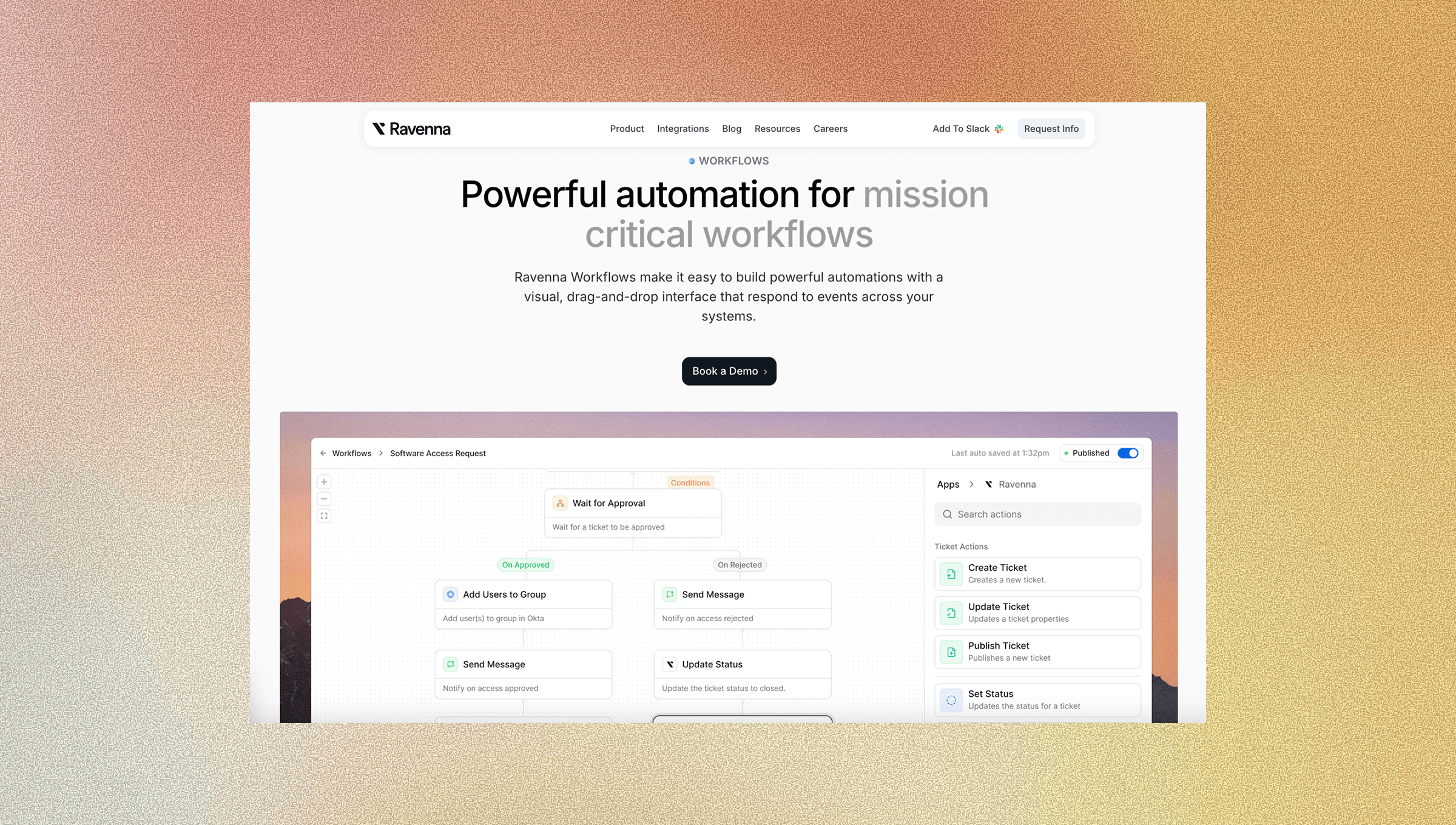
Routine requests consume IT time faster than any outage, which is why AI IT helpdesk software has become critical. Password resets, access provisioning, and onboarding tasks are low-complexity but high-volume. They crowd out work that requires expertise, making IT automation tools indispensable.
Ravenna automates those workflows end-to-end inside Slack. Employees submit requests where they already work through request automation platforms, and Ravenna's AI agents handle resolution autonomously by provisioning access through Okta, running onboarding sequences across BambooHR and Jamf, and resolving device lockouts without a technician in the loop.
Your IT staff gets their time back through self-service IT support in Slack. Augmented, not replaced.
Final Thoughts on IT Support for Small Businesses
Small businesses need IT support that works as hard as they do, and that means automating everything that doesn't require human judgment in a cost-effective way. Ravenna takes high-volume requests off your team's plate so they can focus on the technical work that actually requires expertise. The right support model gives you predictable costs, faster resolution times, and a team that isn't buried under routine tasks.
Reach out to us if you want to see how automation fits into your current setup.
FAQ
How much should a small business budget for IT support per employee?
Most small businesses pay between $95 and $295 per user per month for managed IT support, depending on coverage level and service scope. For a 30-person team, expect to budget $2,850 to $8,850 monthly, with higher tiers including cybersecurity monitoring and after-hours support.
What's the difference between break-fix and managed IT services?
Break-fix means you pay only when something breaks, with no monthly retainer but potentially long wait times during outages. Managed IT services charge a flat monthly fee for proactive monitoring and maintenance, catching problems before they surface and providing predictable costs.
Should small businesses hire remote IT support staff?
Remote IT support gives you access to talent beyond your local market, with average salaries around $52,143 annually. The trade-off is that your support model must function remotely across distributed endpoints and access requests, which requires workflow automation to work at scale.
How can workflow automation reduce IT workload for small teams?
Workflow automation handles high-volume, low-complexity requests like password resets, access provisioning, and onboarding tasks without manual intervention. Small IT teams typically spend 20-30% of their time on these routine requests, and automating them frees up bandwidth for complex problems that require expertise.
When should a small business switch from break-fix to managed IT support?
Switch when downtime starts costing more than the monthly MSP fee. If your team loses productivity waiting for break-fix technicians, or if you're managing cloud infrastructure and remote endpoints without dedicated IT staff, managed services become the more cost-effective option.



