

Device lockouts can cost your team $1,800 monthly in direct ticket resolution, and that's before you count the productivity loss when employees sit idle waiting for IT to respond across time zones. Most Jamf deployments pipe alerts into Slack, where they create notification noise that still requires manual follow-up for every single lockout. The infrastructure to turn those alerts into actual automated remediation has required custom code, API maintenance, and someone who knows how to debug webhook handlers at 2 AM when things break. Connecting Jamf and Slack to run unlock commands automatically, without building that middleware layer, means lockouts resolve themselves before the affected employee finishes typing their help request.
TLDR:
Device lockouts cost $40-90 per incident when combining IT time and lost productivity.
Remote work breaks traditional troubleshooting since lockouts happen across time zones.
Jamf webhooks require custom middleware to route device events into actionable Slack workflows.
Ravenna automates Jamf device unlocks directly in Slack without building or maintaining code.
Visual workflow builders beat code-based automation for device management you'll maintain for years.
What Device Lockouts Actually Cost IT Teams
Device lockouts look like simple tickets. Someone can't access their laptop, you unlock the account, ticket closed. But that view misses the compounding costs that make these requests one of the most expensive recurring issues IT teams face.
Start with the direct cost. The average ticket runs about $15 or more to resolve, which includes the agent's time, system overhead, and context switching. AD account lockouts rank among the top support calls helpdesk teams handle daily. In an organization with 500 employees, if just 5% experience a lockout each month, that's $4,500 annually in direct ticket costs alone.
The real damage, though, shows up in productivity loss. When an employee gets locked out, they stop working. The average resolution time for a lockout ticket is 15-30 minutes from initial report to restored access. Multiply that by employee hourly cost, and you're looking at $25-75 in lost productivity per incident, on top of the IT resolution cost.
Mac-heavy environments face a specific challenge. These lockouts often stem from account lockout policy configurations that don't account for how macOS handles credential caching differently than Windows. The same users get locked out repeatedly, creating a pattern where IT spends more time troubleshooting recurring issues than fixing the root cause.
Why "Have You Tried Restarting?" Doesn't Scale Anymore
The traditional break-fix model assumes synchronous communication. Employee reports issue, IT agent responds, walks through troubleshooting steps, problem solved. That worked when everyone sat in the same office and you could walk over to someone's desk. Remote work broke that assumption. An employee in New York gets locked out at 8 AM Eastern Time while your IT team in Portland hasn't started their day. Someone traveling internationally hits a lockout and can't access VPN to submit a ticket. The troubleshooting conversation that once took 10 minutes now spans hours across time zones.
Mac fleets managed through Jamf create another layer of friction. You can see device status and push commands remotely, but that requires an agent to log into Jamf, locate the device, verify the issue, and execute the fix. Each step introduces delay and requires human attention for what is often a repetitive, predictable task.
The real problem isn't that individual device lockouts are hard to fix. It's that they arrive in unpredictable bursts that pull your team away from projects that actually move the business forward. When you're spending 20-30% of your time on password resets and device unlocks, you're not improving security posture or deploying new tools.
The Hidden Complexity of Jamf Webhook Integration with Slack
Jamf Pro sends webhook notifications when device events occur, but getting those alerts into Slack requires infrastructure you'll need to build and maintain. Jamf Pro webhooks post JSON payloads to HTTP endpoints, which means your team must manage integrations tied to the Jamf Pro API. Jamf webhooks post JSON payloads to HTTP endpoints, so you need middleware between Jamf and Slack to receive, parse, and forward those messages. Most teams build this layer using AWS Lambda or similar serverless functions. You write code to catch the webhook, extract device data, format it for Slack's API, and post it to the correct channel. This approach works, but you're now maintaining custom code just to move notifications between systems.
Some teams, though, route Jamf alerts through email and use Slack's email integration to forward messages. That gets information into Slack, but this approach loses structured data and can't trigger actions based on specific device states. You get notification spam that still requires manual follow-up for every device lockout or compliance issue.
Building Event-Driven Device Management Workflows
Event-driven workflows start with a trigger. In Jamf Pro, that's typically a device state change on an Apple device: lockout detected, compliance violation, or security alert. Instead of routing every event to a generic Slack channel where it gets buried, you map specific triggers to specific actions based on device context and user attributes.
The routing layer decides what happens next. If a lockout occurs on a device assigned to an engineering manager, you might auto-escalate to IT leadership. For a standard employee device, the workflow sends a message directly to the affected user with self-service unlock instructions. Department, device type, and previous lockout history all become routing variables that determine the automation path.
Remediation steps run in sequence once routing completes. For a locked Mac, for example, this might mean:
Send Jamf unlock command,
Verify device responds,
Confirm user can authenticate,
Update ticket status to resolved.
Each step checks for success before proceeding. If the unlock command fails, the workflow branches to create an escalated ticket for manual review. Stakeholder notifications happen at decision points, not every step. The user gets notified when action is required from them. The IT team gets alerted only when automation can't resolve the issue.
Automation Patterns for Device Lockout Resolution
Lockout Scenario | Automation Sequence | Resolution Time | Fallback Action |
Password Lockout | Verify identity via Slack SSO → Send unlock command to Jamf → Confirm device response → Notify user | 30-60 seconds | Create escalated ticket with user context |
Certificate Expiration | Detect expired certificate → Push new certificate profile → Verify installation → Test connectivity | 2-3 minutes | Alert IT team with certificate details |
Profile Corruption | Remove corrupted profile → Deploy fresh profile → Verify acceptance → Test device connectivity | 3-5 minutes | Generate ticket with full diagnostic data |
MDM Enrollment Lapse | Send re-enrollment invitation → Monitor completion → Apply standard profiles → Confirm device compliance | 5-10 minutes | Schedule manual enrollment session with user |
Looking at these scenarios in more detail, password lockouts create a straightforward automation sequence. The user confirms their identity through Slack SSO for authentication, the workflow sends an unlock command to Jamf Pro, waits for confirmation, then notifies the user their device is ready. No ticket created, no agent involved.
Certificate expiration, though, presents a different challenge. The device can't authenticate to corporate resources, but users don't understand why. The workflow detects the expired certificate through Jamf status checks, pushes a new certificate profile, and verifies installation. The user receives a Slack message explaining the issue and confirming the fix, resolving confusion before they contact IT.
And profile corruption needs even more intervention. Devices report configuration errors while users experience broken email or VPN access. The workflow removes the corrupted profile, deploys a fresh copy, verifies acceptance, and tests connectivity. Failed steps trigger ticket creation with full diagnostic data.
Each pattern follows the same sequence: detect the issue, execute the fix, verify success, notify stakeholders. The variations lie in remediation steps and fallback logic when automation encounters scenarios requiring human review.
Moving from Notifications to Actions in Slack
Most Slack integrations just send alerts. Device locked, message posted, agent clicks over to Jamf. That's notification theater, not automation. Action-driven Slack threads, though, let agents run commands directly in conversation. When a lockout alert fires, the thread includes buttons: Unlock Device, View Details, Escalate. Click unlock, Jamf receives the command, device responds, thread updates with confirmation. The real benefit is that approval workflows stay in the same thread. User requests device wipe for lost hardware, manager approves with one click, Jamf executes remotely. No email chains, no portal logins. The entire workflow happens where your team already works.
Why Workflow Maintainability Matters More Than Speed
IT teams want solutions that work, and they want them quickly. Fixing device lockouts fast benefits everyone. It may seem that using AI to generate scripts is the fastest way to build these automations. While that approach can produce quick fixes, automation that breaks in six months costs more than automation that runs reliably for years. When you build device lockout workflows using generated code or scripts, you create technical debt that someone must maintain when things break. Code-based automation often fails when the original builder leaves. The next IT admin inherits scripts with unclear logic, hardcoded values, and undocumented dependencies. A simple change like adding a new device group requires debugging Python or JavaScript instead of adjusting workflow parameters.
On the other hand, using a platform that provides a visual workflow builder means that the logic behind the automation is transparent. Anyone on the IT team can open the workflow canvas, see the decision tree, and understand what happens when a device gets locked. You modify conditions by clicking dropdowns, not editing code. When Jamf updates their API or your team restructures departments, updates take minutes instead of hours spent decoding someone else's scripts.
It's important to remember that device lockout workflows change frequently. New hardware models need different remediation steps and security policies evolve. Visual workflows adapt to these changes without requiring engineering resources or worrying about breaking untested code paths.
How Ravenna Automates Device Management Without Middleware
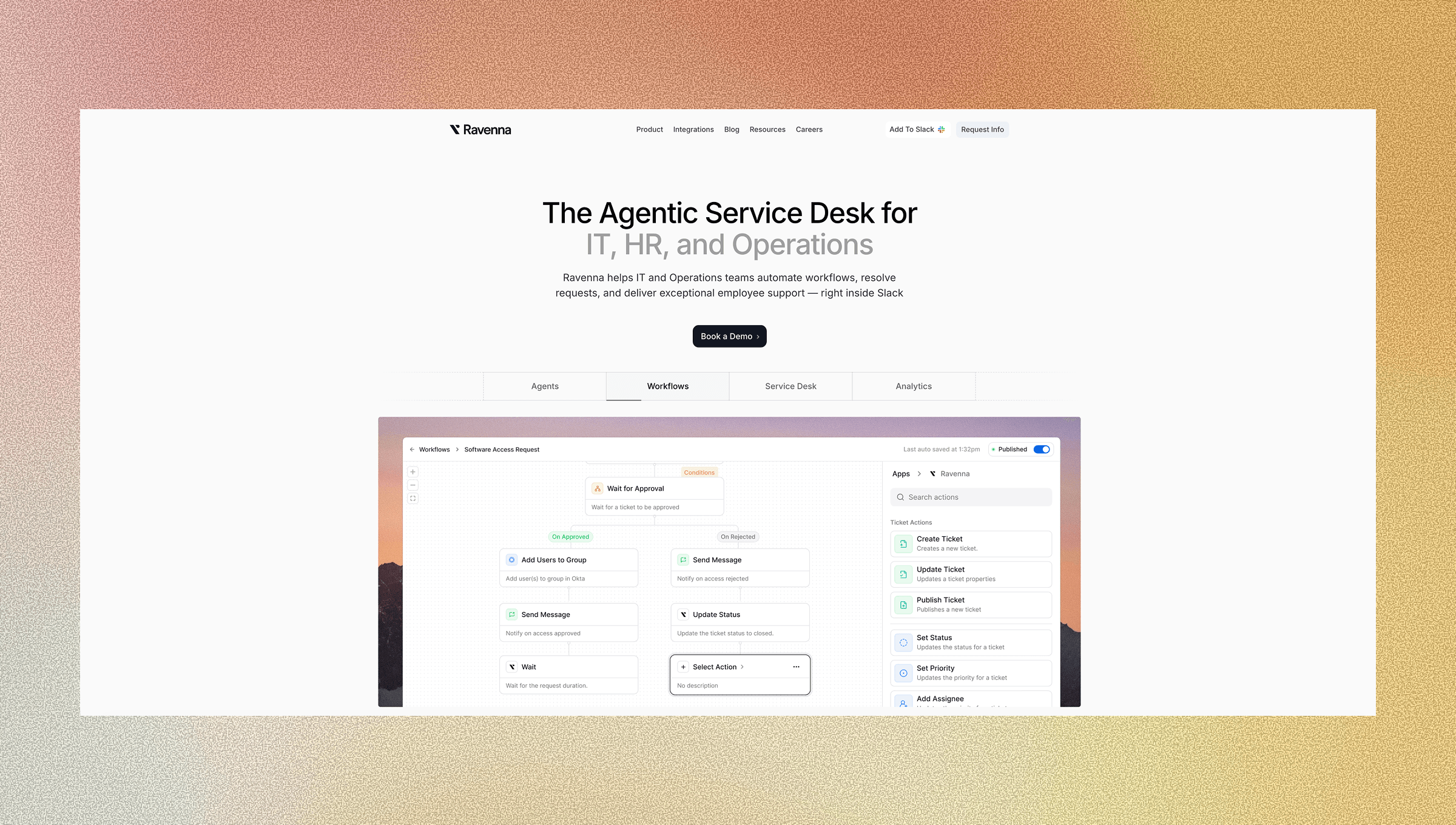
Ravenna connects directly to Jamf Pro and Kandji, both mobile device management platforms, receiving device events and executing remediation commands without building or maintaining middleware. When a device lockout occurs, the workflow runs entirely within Slack: Ravenna receives the webhook, routes based on your defined logic, sends unlock commands back to your MDM, and confirms resolution with the affected user.
The visual workflow builder provides a no-code interface to design device management automations without writing code. Drag nodes for conditions, actions, and approvals onto the canvas. Configure routing rules based on department, device type, or lockout history. When your MDM API changes or security policies shift, you update workflows by adjusting parameters, not debugging scripts.
Your team manages device lockouts where they already work in Slack, while the automation layer handles integration complexity behind the scenes. Device management becomes a workflow you configure once and refine over time, not infrastructure you maintain indefinitely.
Final Thoughts on Moving Beyond Break-Fix Device Management
The break-fix model for device lockouts doesn't work when your team operates across time zones and manages hundreds of macOS devices. Event-driven Jamf Pro and Slack integrations help streamline device management by resolving lockouts automatically. Building event-driven Jamf Slack integration workflows means lockouts get caught and resolved automatically, whether your IT team is online or not. You create these automations through visual builders that anyone on your team can understand and modify. Device management becomes a workflow you refine over time, not an endless stream of repetitive tickets that drain your budget and your team's focus.
FAQ
How much time can IT teams actually save by automating device lockouts?
Direct ticket resolution costs ($15 per ticket) combine with productivity losses ($25-75 per incident) to make device lockouts expensive recurring issues. In a 500-employee organization where 5% experience monthly lockouts, automation eliminates 300 annual tickets and recovers hundreds of hours previously spent on repetitive unlock commands.
Can Ravenna handle device lockouts across different MDM platforms?
Ravenna connects directly to Jamf and Kandji without requiring middleware, receiving device events and executing remediation commands through your existing MDM setup. The workflows adapt to different device types and management tools through configurable routing rules that you set once and adjust as needed.
What happens when the automated unlock command fails?
Ravenna workflows include verification steps after each action. If an unlock command doesn't succeed, the automation branches to create an escalated ticket with full diagnostic data for manual review. Your team gets alerted only when automation can't resolve the issue, not at every step along the way.
How do visual workflows compare to custom scripts for device management?
Visual workflows make logic transparent and maintainable. Anyone on your IT team can open the canvas, see the decision tree, and modify conditions without debugging code. When your MDM API changes or security policies shift, you update workflows by adjusting parameters instead of decoding scripts written by someone who may no longer be on the team.
Do employees need to leave Slack to verify their identity for device unlocks?
Ravenna uses Slack SSO for identity verification, keeping the entire workflow in Slack. From lockout notification to identity confirmation to device unlock, employees receive actionable messages with buttons to trigger remediation, and the thread updates with confirmation once their device responds.



