

When was the last time an employee voluntarily opened your JSM portal without being reminded? Your team already knows where support requests actually happen: Slack DMs, random channel mentions, and direct messages to whoever seems available. The ticketing system becomes documentation for work already done. A Slack-native helpdesk meets employees where they communicate, turning every request into a threaded conversation that resolves without portal logins or status checks.
TLDR:
JSM's portal-based design wastes up to 40% of productive time on context switching.
Slack-native automation executes workflows across your SaaS stack without creating tickets.
AI agents handle password resets, provisioning, and access requests without IT intervention.
Workflow automation frees 28% more staff capacity for strategic work versus manual execution.
Ravenna automates end-to-end workflows in Slack using visual builders without custom code.
Why IT Teams Are Moving Away from Jira Service Management in 2026
IT teams have outgrown what Jira Service Management (JSM), part of the broader Atlassian ecosystem, was designed to deliver:
The tool's complexity creates real friction.
Unpredictable costing and a complex pricing model, combined with a steep learning curve, drain budgets and force IT staff into ongoing configuration work.
Setting up workflows requires specialized knowledge most teams lack the time to build.
A Slack ticketing system offers a different approach than traditional tools like Zendesk or Freshservice. JSM speaks in ITSM terminology that doesn't match how employees think about their problems. Someone needing Salesforce access doesn't categorize their request into incident types. They want help, fast. The complex setup requiring technical skills forces your team to translate between employee needs and system logic.
Portal fatigue matters too. Employees refuse to log into another tool, check another interface, or track updates in yet another tab. They ask for help where they already communicate: Slack.
The Hidden Costs of Portal Fatigue and Context Switching
Every time an employee switches from Slack to a JSM portal, they lose time they won't get back. Research shows context switching consumes up to 40% of productive time. That's nearly two days per week spent navigating between tools instead of solving actual problems. The math gets worse when you track the full request lifecycle. An employee needs laptop help. They stop their work, open a browser, log into JSM, navigate to the right form, fill out fields that ask questions in ITSM language, submit the request, then switch back to Slack to continue working. Later, they check the portal and knowledge base for updates. Then again. Each check pulls them out of flow.
Your IT team experiences the same friction in reverse. Request automation platforms solve this by handling the entire lifecycle in one place. They field questions in Slack, ask employees to submit formal tickets in JSM, then bounce between Slack conversations and the JSM interface to provide updates. They're managing two parallel communication streams for a single request. Portal-based systems assume employees will adapt their behavior to match your tooling. They won't. When the friction gets high enough, they route around the system. They DM the IT manager directly. They ask for help in public channels. Your ticketing system becomes a formality that documents work after someone already solved it informally.
What to Look for in a Jira Service Management Alternative
As you consider a JSM alternative, consider three key criteria:
First, start with an assessment of where your employees already work. A true Slack-native alternative lives inside the messaging tool, not as a bot that creates links back to an external portal. The difference matters. Native integration means requests, updates, approvals, and resolutions all happen in threaded conversations. Bolted-on connections just notify employees to go somewhere else.
Second, look at automation depth, which separates real alternatives from rebranded ticketing systems. Look for solutions that execute workflows across your SaaS stack, not simply route tickets to queues. Can the system reset passwords in Okta? Provision software licenses in your service catalog? Support asset management across your app catalog? The right IT workflow automation tools execute these actions automatically. Can it add users to Google Groups? If the answer is "create a ticket for manual work," you're buying the same problem with different branding.
Third, setup and maintenance costs hide in the details. Ask how long workflow creation takes. Can non-technical team members build automations, or does every change require developer time? Solutions that rely on custom code or scripting create ongoing technical debt. Compare this to the best ITSM software solutions that focus on ease of configuration. Visual workflow builders with pre-built integrations let your team adapt quickly when business needs change.
Finally, measure success by tickets prevented, not tickets processed. The right alternative should reduce your queue volume by automating routine requests before they become tickets.
Workflow Automation vs Traditional Ticketing Systems
Traditional ticketing systems document work. Workflow automation performs it. The distinction determines whether your IT team spends their day executing repetitive tasks or building solutions to bigger problems.
Ticketing systems create structured records for incident management and change management. When someone requests Salesforce access, JSM logs the request, routes it to the right queue, tracks time to resolution, and closes the ticket when an IT agent manually provisions the license. The system organized the work, but a human still did every step.
Workflow automation, on the other hand, executes the steps. Teams weighing JSM vs ServiceNow, for example, often miss this distinction between documentation and execution. The same Salesforce service request triggers an automated sequence: verify the requester's department, check license availability, route to the appropriate manager for approval, provision access in Salesforce once approved, add the user to relevant distribution groups, and notify them when complete. No human intervention required unless the approval is denied.
The impact shows up in team capacity. Employees in organizations using automation believe they can handle 30% more work due to the time they reclaim from manual execution. Your IT team stops being the hands that type commands and becomes the architects who design systems that scale. An AI service desk makes this shift possible.
This is augmentation, not replacement. Automation handles the repetitive requests that flood your queue. Your team focuses on complex problems, infrastructure improvements, and strategic projects that need human judgment.
The Slack-Native Advantage for Internal Support
Slack-native support changes the adoption equation. When your helpdesk lives where employees already spend their day, training requirements disappear. There's no new interface to learn, no login credentials to remember, no separate system to check for updates. Employees ask for help the same way they ask colleagues questions. An AI chatbot in Slack handles these requests conversationally.
JSM requires employees to remember a separate URL, navigate unfamiliar interfaces, and check back later for status updates. Slack-native support, built through deep Slack integration, meets them in the tool they already have open instead of forcing them into Microsoft Teams or standalone portals. The request happens in a DM or channel thread. Updates arrive as messages. AI-native ITSM builds on this conversational foundation. Approvals happen with a button click. The entire lifecycle stays inside one conversation.
Real-time collaboration becomes the default, without relying on separate dashboards or external portals. Your IT team sees requests instantly, asks clarifying questions in-thread, and loops in other team members when needed. Employees watch their request progress without polling a ticket status page. The back-and-forth that used to span hours across email and portal comments now takes minutes in Slack threads.
How AI Agents Handle Routine IT Requests
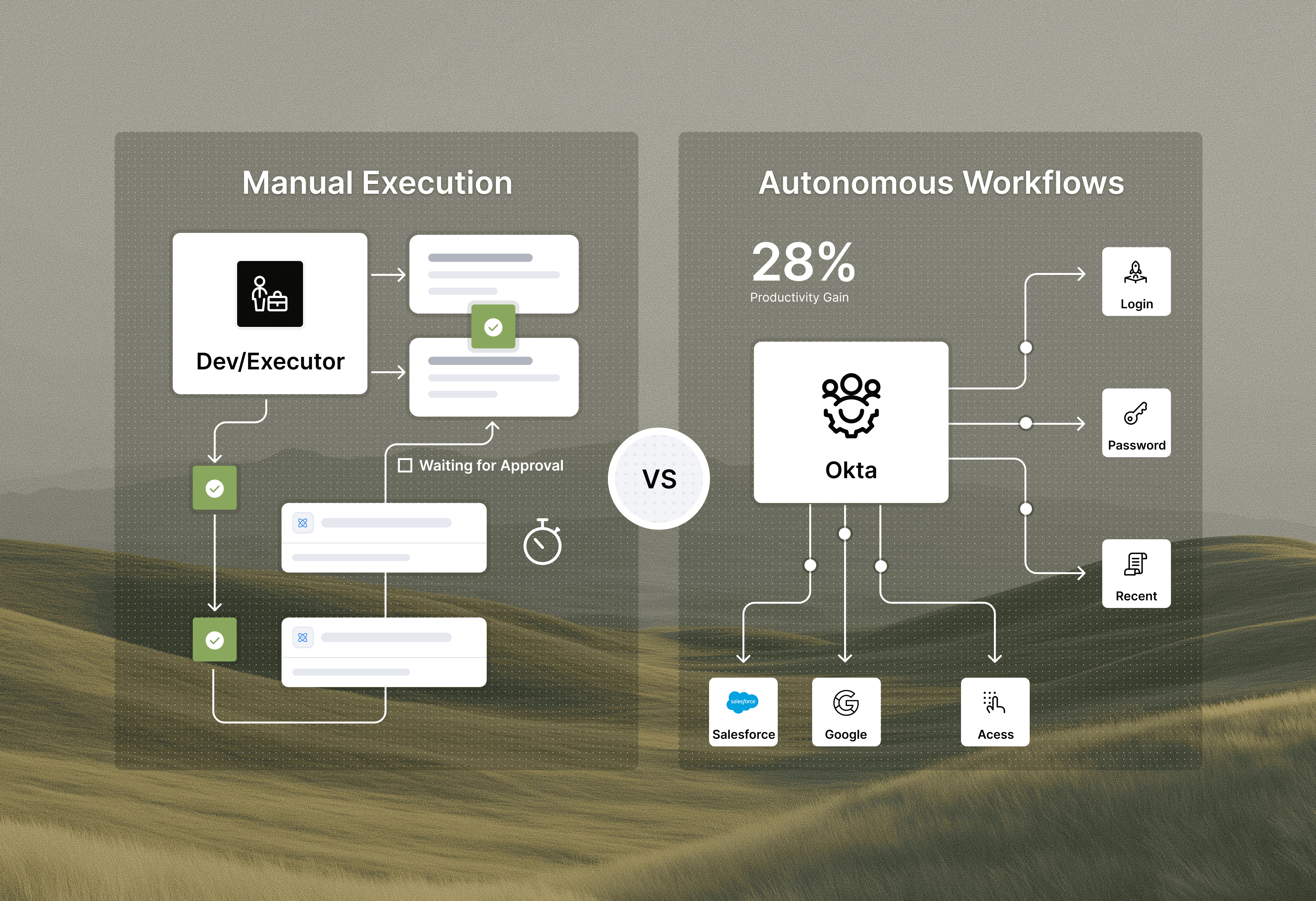
Early AI helpdesks and virtual agent tools retrieved knowledge from a knowledge base. They answered questions but left execution to humans. AI agents perform the actual work: resetting passwords in Okta, provisioning licenses, adding users to groups. This shift frees 28% more staff to focus on strategic projects instead of repetitive execution. Your team stops being hands typing commands and becomes architects designing autonomous workflows that handle requests without human touchpoints.
When an employee requests software access, for example, an AI agent does not simply suggest next steps or pull up documentation. It verifies entitlement policies, checks license availability, creates the account in your SaaS app, assigns the appropriate role, and confirms completion. All in Slack, all without IT involvement.
Ravenna: The Agentic Workflow Automation Layer for Slack
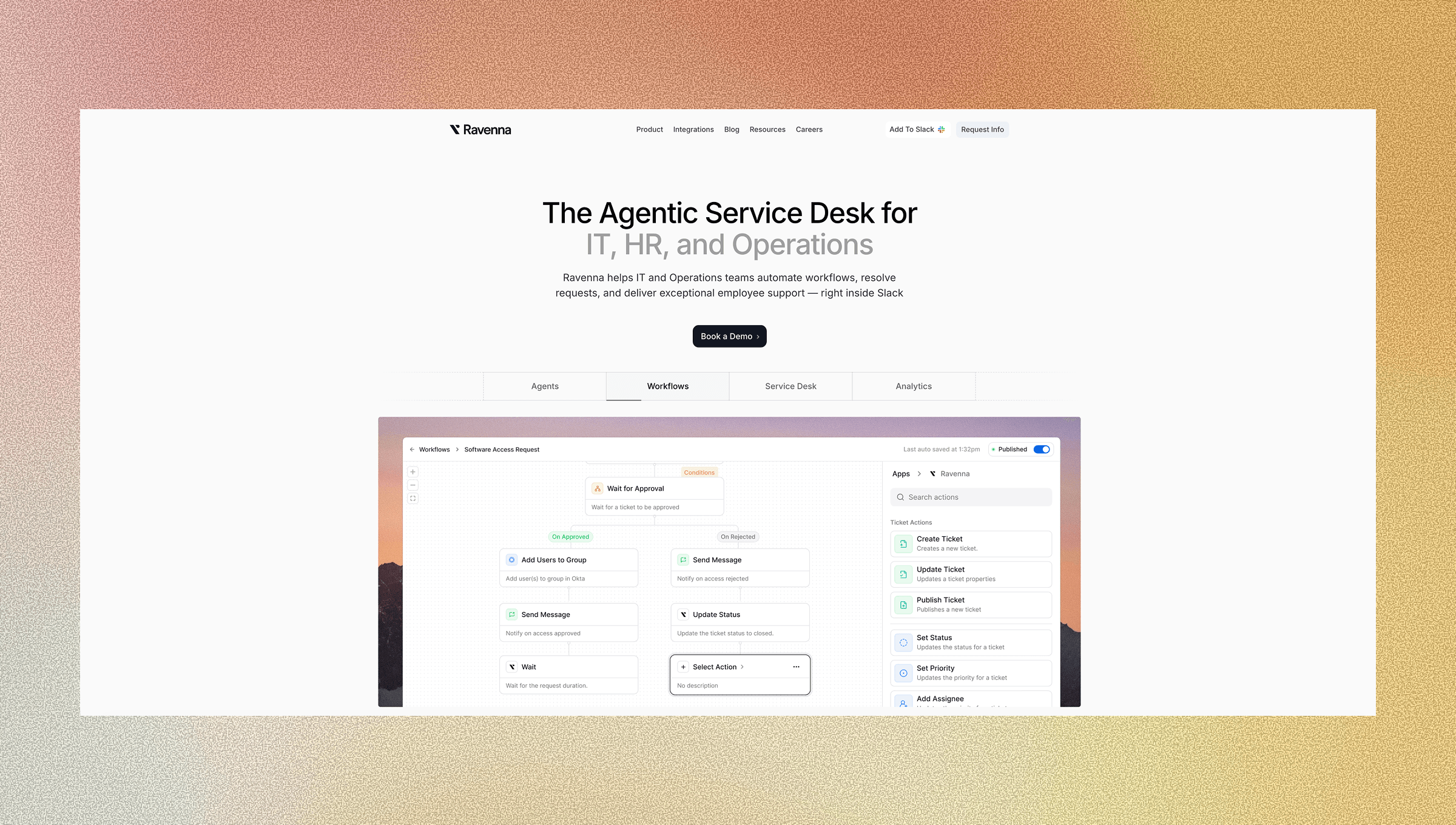
Ravenna lives natively in Slack as an AI-powered workflow automation layer that executes work across your entire SaaS stack. When someone requests a password reset, software access, or onboarding support, Ravenna Agents handle the complete workflow end-to-end without routing tickets to queues or waiting for manual intervention. The visual workflow builder lets you create automations in minutes using drag-and-drop integrations for your existing tools. Add conditional logic, set approval chains, and modify workflows on the fly when needs change. No custom code required. No developer dependencies.
The result? Password resets run automatically in Okta. Software provisioning completes without tickets. Access management happens instantly. Your IT team stops handling repetitive requests and focuses on work that requires their expertise and judgment.
This is how you augment your team. Automation handles volume. Your people handle complexity.
Final Thoughts on Augmenting Your IT Team
Ticketing systems document work, but workflow automation performs it. Ravenna Agents execute requests across your entire SaaS stack while your team focuses on complex problems that need human judgment. This is how you scale IT support without scaling headcount.
To see this action, schedule a demo with us.
FAQ
How does a Slack-native helpdesk reduce time spent on support requests?
By keeping all communication in Slack, you eliminate the time employees lose switching between tools. Research shows context switching consumes up to 40% of productive time. Requests, updates, and resolutions happen in the same threaded conversation where employees already work, cutting hours from the request lifecycle.
What's the difference between workflow automation and traditional ticketing systems?
Traditional ticketing systems document and route work that humans still perform manually, while workflow automation executes the actual tasks across your SaaS stack. Automation platforms handle password resets in Okta, provision software licenses, and manage access without human intervention, turning your IT team from task executors into workflow architects.
Can non-technical team members build automations without coding?
Yes. Visual workflow builders with drag-and-drop integrations let your team create and modify automations in minutes without writing code. You can add conditional logic, set approval chains, and adjust workflows when business needs change, no developer dependencies required.
When should I consider replacing JSM with a Slack-native alternative?
If your employees avoid using the JSM portal and instead DM IT staff directly, or if your team spends a lot of time translating between employee requests and ITSM terminology, a Slack-native alternative will immediately improve adoption and reduce manual work. Portal fatigue is a clear signal that your current system creates more friction than value.
How do AI agents differ from chatbots that answer questions?
AI agents perform actual work across your SaaS stack, not simply retrieve information. When someone requests software access, an AI agent verifies policies, checks license availability, provisions the account, assigns roles, and confirms completion, all without creating tickets for manual execution.



