

Most IT leaders assume low portal adoption means employees need more training on where to find help. The real issue is simpler: your team won’t leave Slack or Teams to open a ticket because context switching kills momentum. When you compare an AI co-worker vs AI assistant, the deciding factor isn’t how smart the AI is. It’s whether your service desk lives inside the tools people already use or forces them to go elsewhere for help. The best AI agents operate directly within existing workflows, not outside them.
TLDR:
Employees abandon support requests that require more than two steps or a context switch away from their workflow.
An AI co-worker operates inside Slack to execute tasks end-to-end, while an AI assistant just answers questions.
Agentic service desks need write access to your stack to provision access and close tickets without manual work.
Ravenna automates workflows across Okta, Google Workspace, and HRIS tools directly within Slack threads.
Where Employees Actually Work Matters More Than You Think
The channel where support requests land shapes whether those requests get resolved quickly or disappear into a queue. When employees have to leave their workflow to open a ticket, most of them skip it entirely. They find a workaround, ask a colleague, or just wait. On many of our demo calls, we hear employees abandon a support process if it requires more than two steps. An AI co-worker embedded in Slack or Teams removes that friction entirely. The request happens where the conversation is already happening. Approvals, status updates, and resolutions all surface in the same thread in real-time. No context switching, no portal login, no ticket number to track.
This is the core distinction between an AI co-worker vs AI assistant IT teams encounter. An assistant waits to be opened. A co-worker shows up where you are, takes action, and closes the loop without pulling anyone out of their work.
The Portal Fatigue Problem
Employees don't avoid IT portals because they're lazy. They avoid them because switching contexts to file a ticket adds friction to an already interrupted workday. By the time someone opens a separate portal, logs in, selects the right category, and waits for a response, they've already lost the thread of what they were doing.
This is the core tension between an AI co-worker vs AI assistant in IT: one meets employees where they work, the other asks them to go somewhere new. Workers switch between apps and tools dozens of times per day, and each switch carries a cognitive cost. A support system that adds yet another destination to that list will see low adoption regardless of how capable it is under the hood.
The organizations that see the highest IT support engagement are the ones that put support directly inside Slack, Teams, or whatever communication tool employees already live in. When asking for help takes the same effort as sending a message, employees actually ask for help.
What Makes a Service Desk "Agentic" vs Just Automated
"Automated" and "agentic" get used interchangeably, but they describe fundamentally different capabilities.
Traditional automation in service desks follows a script. If X, then Y. It can send an auto-reply, route a ticket to the right queue, or trigger a Jira issue. Useful, but brittle. The moment a request falls outside the predefined path, it stalls and waits for a human to intervene.
Agentic AI operates differently. It reads the request, identifies intent, determines what action is required, and executes across multiple systems to complete it. This is the core of agentic AI in modern service management. A request to provision software access gets treated as a task to finish: verify the requester's role, check license availability, route for approval if needed, and provision access automatically when approval clears.
This is where the distinction between an AI co-worker and an AI assistant in IT becomes clear. An AI assistant surfaces information or suggests next steps. An AI co-worker owns the task and sees it through. The difference, though, is scope, not speed. Traditional automation deflects tickets. Agentic systems resolve requests end-to-end, without a human in between.
Capability | AI Assistant | AI Co-Worker (Agentic) |
Primary Function | Answers questions and provides information to employees when asked | Owns and executes complete workflows from request intake through final resolution |
System Integration | Read-only access to surface data from connected tools like Okta and Google Workspace | Write access to provision accounts, update records, and trigger actions across ITSM, identity management, and HRIS platforms |
Where Work Happens | Requires users to open a portal or dedicated interface to interact | Lives inside Slack or Teams, where employees already work, with full workflow execution in-thread |
Request Handling | Deflects tickets by answering FAQs and routing to the appropriate queue for manual resolution | Completes multi-step tasks autonomously, including approvals, provisioning, and status updates without agent intervention |
Approval Workflows | Notifies that approval is required and provides information on who to contact | Identifies the correct approver from the organizational context, delivers an approval request in Slack, and auto-provisions on approval |
Context Switching | Adds another destination to the employee's workflow, requiring login and navigation | Eliminates context switching by meeting employees where they already communicate |
Resolution Ownership | Provides next steps or suggestions, then hands off to human agents to complete the work | Sees requests through to completion, updating all connected systems and closing the loop with the requester |
The Anatomy of Slack-Native Workflow Automation
There's a meaningful gap between "sends notifications to Slack" and "lives in Slack." Many service desk tools route alerts to a channel, which is a start. But the actual work still happens somewhere else, and that distinction matters more than it sounds. A truly Slack-native service desk keeps the entire workflow inside the thread using conversational AI and natural language interactions. When an employee requests software access, the AI agent collects context through conversation, identifies the right approver, and delivers the approval request directly in Slack. Once approved, provisioning fires automatically. The employee gets a confirmation in the same thread. Nobody left the channel.
That depth requires real integrations with the underlying systems. Think Okta, Google Workspace, and connected HRIS tools across your broader enterprise ecosystem. Without those integrations, Slack is just the doorbell. With them, it becomes the place where requests start, route, and resolve without a single context switch:
The AI agent gathers the necessary context upfront through conversation, so approvers get complete information instead of a vague ping they have to chase down.
Approvals happen where the approver already works, which means faster responses and fewer tickets stuck waiting in a queue.
Provisioning triggers automatically on approval, cutting out the manual handoff that typically adds hours or days to resolution time.
Why AI Helpdesks Fail Without Real Integration Depth
Most AI-powered helpdesk tools connect to your systems just enough to answer questions. That's where they stop. They can tell an employee that their software request requires manager approval, but they can't actually route that request, trigger the approval workflow, or update the ticket status when approval lands. That gap between answering and acting is where most AI co-worker vs AI assistant decisions get made. An AI assistant responds. An AI co-worker completes the work.
And the difference shows up in your metrics. When the AI can only answer, your agents still close every loop manually. Ticket volume drops a little, but resolution time barely moves.
What Real Integration Depth Looks Like
For an agentic service desk to act, it needs write access beyond read-only permissions across your stack. That includes orchestration across enterprise systems:
Connecting to your identity management system to actually provision access, instead of only confirming a request was received.
Writing back to your ITSM to update records, close tickets, and log actions without agent involvement.
Triggering downstream workflows in tools like Jira, Workday, or Okta when a request meets defined conditions.
Without that depth, the AI stays advisory. With it, the service desk lives where the work actually happens.
Slack Native Employee Experience vs Portal-Based Support
When your employees need IT help, they're already in Slack. They're not thinking about opening a separate portal, logging in, and submitting a form. The friction of that context switch is where resolution time dies. The difference between an AI co-worker and an AI assistant in IT comes down to where the work actually lives. An AI assistant waits for you to come to it. An AI co-worker meets employees where they already are, inside the tools they use every day.
The Case For Channel-Based Support: Why It Outperforms Portals
Portal-based support treats every request as a transaction. Slack-native support treats it as a conversation that can be resolved without anyone leaving their workflow, helping optimize IT support experiences.
Employees get help without switching contexts, which means faster acknowledgment and less friction between asking and resolving.
IT teams see requests in real time, with full conversation history, without waiting on ticket status updates from a separate system.
Automated triage happens inside the channel, so the right people and workflows get looped in immediately.
How Ravenna Automates Workflows Across Your Entire Stack
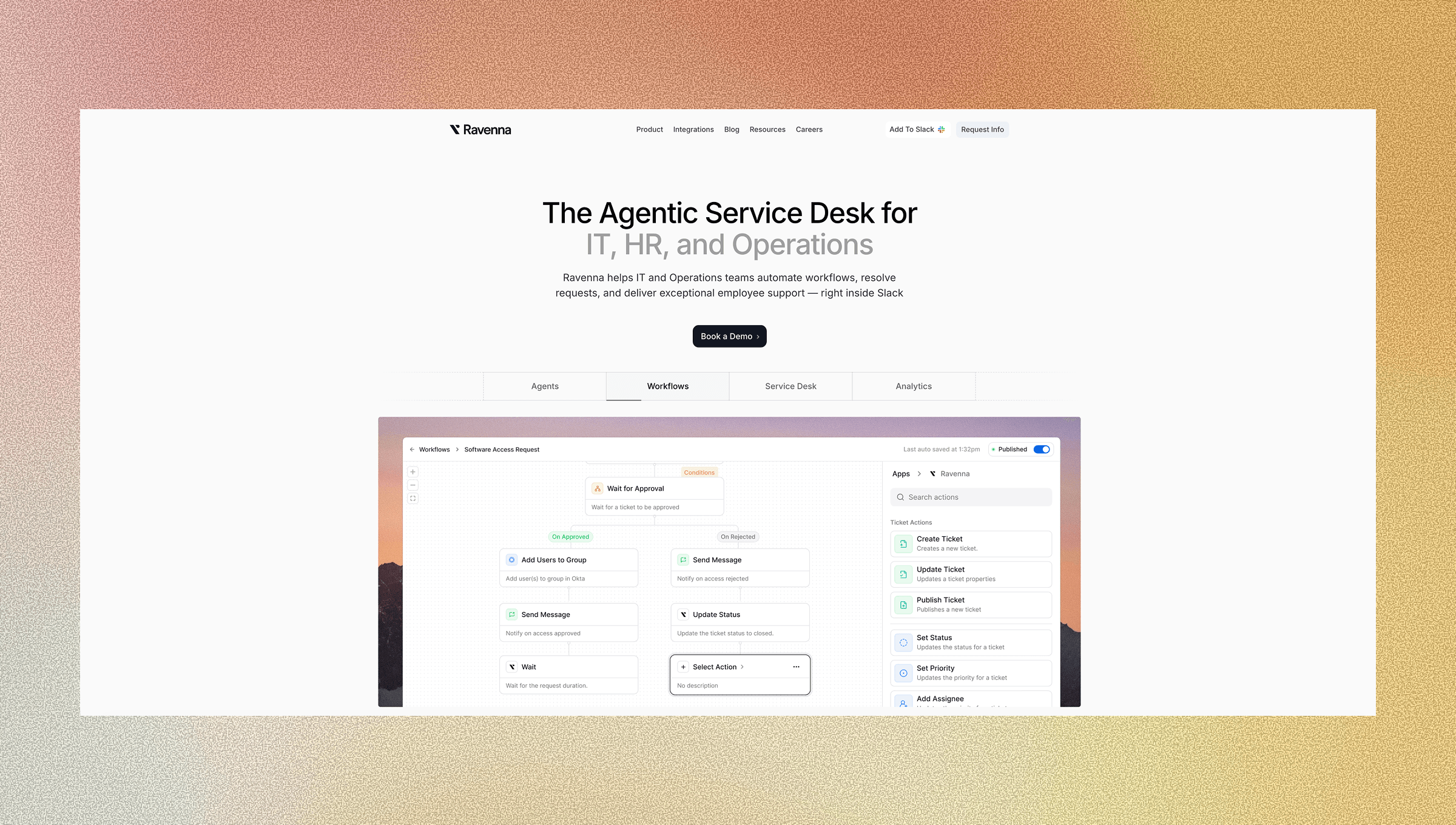
Ravenna sits inside Slack, which means every workflow it runs lives where your team already works. It functions as an AI-driven platform for workflow orchestration across tools. When someone submits a request, Ravenna's workflow automation immediately takes action instead of waiting for a human to pick it up. It pulls context from your connected systems, routes to the right responder, and executes resolution steps without manual coordination, streamlining complex workflows across your stack.
The difference between an AI assistant and an AI co-worker becomes clearest here. An assistant waits to be asked. A co-worker sees what needs to happen and does it. Ravenna functions as the latter, automatically provisioning access, updating records across tools, and closing the loop with the requester, all from within the conversation thread where the request originated.
Your IT team stays in the loop without being the bottleneck. Ravenna automates the repetitive, high-volume requests while escalating anything that genuinely needs human judgment. The result is faster resolution, less manual coordination, and an IT team augmented to focus on work that actually requires their expertise.
Final Thoughts on Selecting an AI Co-Worker Over an AI Assistant for IT
AI co-worker vs AI assistant comes down to scope, not capability, across modern AI platforms and agent platforms. Assistants surface information while co-workers own the task from start to finish. Ravenna automates workflows across your entire stack without pulling anyone out of Slack, which means requests get resolved where they start instead of bouncing between systems. Your team stops being the bottleneck for every routine request, and your employees get help without context switching. Get in touch if you're ready to see what that looks like in practice.
FAQ
What's the difference between an AI co-worker vs AI assistant IT platform?
An AI assistant surfaces information and suggests next steps, while an AI co-worker owns the entire task and executes it end-to-end. The real distinction is scope: assistants deflect tickets by answering questions, but co-workers resolve requests completely by taking action across multiple systems without requiring human intervention.
Can you run a service desk entirely from Slack without a separate portal?
Yes. A Slack-native service desk keeps the entire workflow inside the conversation thread, from request intake to approval routing to final provisioning, without requiring employees or IT teams to log into a separate portal. This requires deep integration with underlying systems like Okta, Google Workspace, and HRIS tools, going well beyond notification forwarding.
What does "agentic" actually mean for service desk automation?
Agentic automation reads a request, identifies intent, determines what action is required, and executes across multiple systems to complete it autonomously. These are core use cases of agentic AI in IT environments. Traditional automation follows predefined scripts (if X, then Y) and stalls when requests fall outside the path, whereas agentic systems adapt and complete multi-step workflows without human intervention.
Which AI assistant tools integrate best with ITSM platforms?
AI co-workers that have write access to your ITSM platform can update ticket status, close resolved requests, and trigger downstream workflows without manual intervention. Look for tools that connect to your identity management, HRIS, and collaboration platforms with bidirectional sync, going beyond read-only integrations that can surface information but can't take action.
How does an AI co-worker handle workflows that require approval?
An AI co-worker identifies the right approver based on organizational context from your HRIS, delivers the approval request directly in Slack or Teams where they already work, and automatically triggers provisioning once approval clears. The entire approval workflow happens in-thread without context switching or manual ticket updates.



