

For HR, IT, and operations teams alike, the recurring burden of small, manual employee requests like profile updates, pay stub inquiries, and time off approvals can drain productivity and distract from strategic work. In fact, recent research shows that over 70% of companies implementing employee self‑service portals saved 200+ hours per month from HR operations.
Employee self‑service software (ESS) directly addresses this by empowering staff to handle routine tasks themselves, reducing HR tickets and elevating data accuracy, all while improving the employee experience.
TL;DR
Employee self-service software centralizes HR tasks like profile updates, payroll access, benefits enrollment, and time-off requests in a secure portal or app. Employees complete routine actions themselves, reducing manual HR work and speeding approvals.
Track efficiency, accuracy, and adoption metrics to prove ROI. HR ticket reduction, faster approvals, fewer payroll errors, and higher employee satisfaction show the tangible value of self-service automation.
Focus on the tools employees use daily: profile management, payroll and benefits self-service, PTO requests, searchable knowledge bases, notifications, e-signatures, mobile access, and security controls. Strong admin governance ensures adoption scales safely.
Select a platform based on scalability, integrations, design, compliance, and admin ease. Shortlist vendors, pilot real employee tasks, and track adoption and deflection rates to build a data-driven business case.
What is Employee Self-Service Software?
Employee self-service software (ESS) is a secure web or mobile portal where employees update personal details, view pay and benefits, request time off, and find policies, without filing HR tickets. The right ESS software reduces HR admin, improves data accuracy, and gives staff 24/7 access to routine tasks.
Employee self-service software (ESS) centralizes everyday HR tasks such as profile changes, payroll documents, benefits enrollment, time-off, and policy answers, so employees can support themselves while HR gains visibility and control.
Core capabilities of employee self-service software:
Profile & Directory: Update address, emergency contacts, tax status; searchable people directory.
Payroll Self-Service: Pay stubs, tax forms (e.g., W-2), direct-deposit changes.
Benefits Enrollment & Changes: Plan details, open enrollment, life-event updates.
Time & Attendance: PTO balances, leave requests/approvals, calendars.
Documents & e-Signatures: Policies, acknowledgements, contracts, compliance forms.
Knowledge/FAQs: Searchable HR policy answers with version control.
Request Forms: Name changes, equipment, schedule changes, corrections.
Next, here’s how employee self-service software works day-to-day and why adoption rises when UX is simple and mobile-first.
How Employee Self-Service Software Works
Modern employee self-service (ESS) software centralizes HR tasks by connecting systems like HRIS, payroll, time tracking, identity management, and internal knowledge in one unified platform. Instead of routing simple questions or updates through HR, employees can manage their own information, request approvals, and complete everyday tasks directly. This automation shortens response times, reduces manual workload, and improves the overall employee experience.
The Five-Step Flow:
Access: Employees sign in via web or mobile app using SSO (Okta/Microsoft Entra/Google).
Update: Make changes to profile, banking, and tax information with field validation.
Request: Submit time off or other change requests using guided forms.
Approve: Manager (or HR) approves in an auditable workflow with reminders.
Record: The system writes back to HRIS/payroll and sends confirmations.
To ensure adoption at scale, prioritize mobile-friendly design, role-based dashboards (for employees, managers, and HR), accessibility (WCAG), and multi-language support as these factors are key for global ESS deployment.
With the workflow in place, HR leaders can start quantifying the impact of self-service HR automation through measurable gains in efficiency, data accuracy, and employee satisfaction.
Benefits of Employee Self‑Service Software
Measuring the impact of employee self-service software is key to building a strong business case for HR automation. These metrics help quantify efficiency gains, accuracy improvements, and overall employee experience.
Core metrics to track:
HR Ticket Reduction: % drop in HR requests for profile/payroll/benefits.
Formula: (baseline monthly HR tickets − current) ÷ baseline.
Time Saved per Request: minutes saved × monthly volume → hours saved.
Data Accuracy: % fewer payroll corrections and bounced deposits.
Cycle Times: Time to approve time-off and time to update details.
Adoption: % of employees logging in monthly and mobile usage rate.
Engagement Proxy: quick CSAT/emoji rating after common tasks.
When you convert these improvements into dollar value using fully loaded HR cost per hour and rework or error costs, you get a clear, defensible ROI for employee self-service software. This data-driven approach helps leaders demonstrate how ESS tools reduce manual HR effort, improve accuracy, and free up time for higher-value work.
Key Features to Prioritize
The best employee self-service (ESS) software makes routine HR tasks effortless for employees while giving admins the control they need to scale securely. Prioritize features that employees use every week before expanding to deeper automation or integrations.
Core features to look for:
Core HR Profile & Directory: Self-updates with approvals and audit trails; privacy controls on directory fields.
Payroll & Benefits Self-Service: On-demand pay stubs/tax forms, benefits comparisons, open enrollment, and direct-deposit updates.
Time & Attendance: Balances, requests, shared calendars, and configurable accrual rules.
Documents & e-Signatures: Central policy library, acknowledgment receipts, and e-sign for forms and contracts.
Knowledge & FAQs: Policy answers with search, versioning, and “Was this helpful?” feedback for continuous improvement.
Notifications & Reminders: Email/mobile pushes, overdue nudges for approvals, and change confirmations.
Mobile App Quality: Biometrics, offline reads for documents, and parity with web features.
Security & Compliance: SSO, RBAC, SOC 2/ISO options, GDPR tooling, and complete audit trails.
Integrations: HRIS/payroll/LMS/IDP connectors; optional iPaaS (Zapier/Workato/Power Automate) for edge workflows.
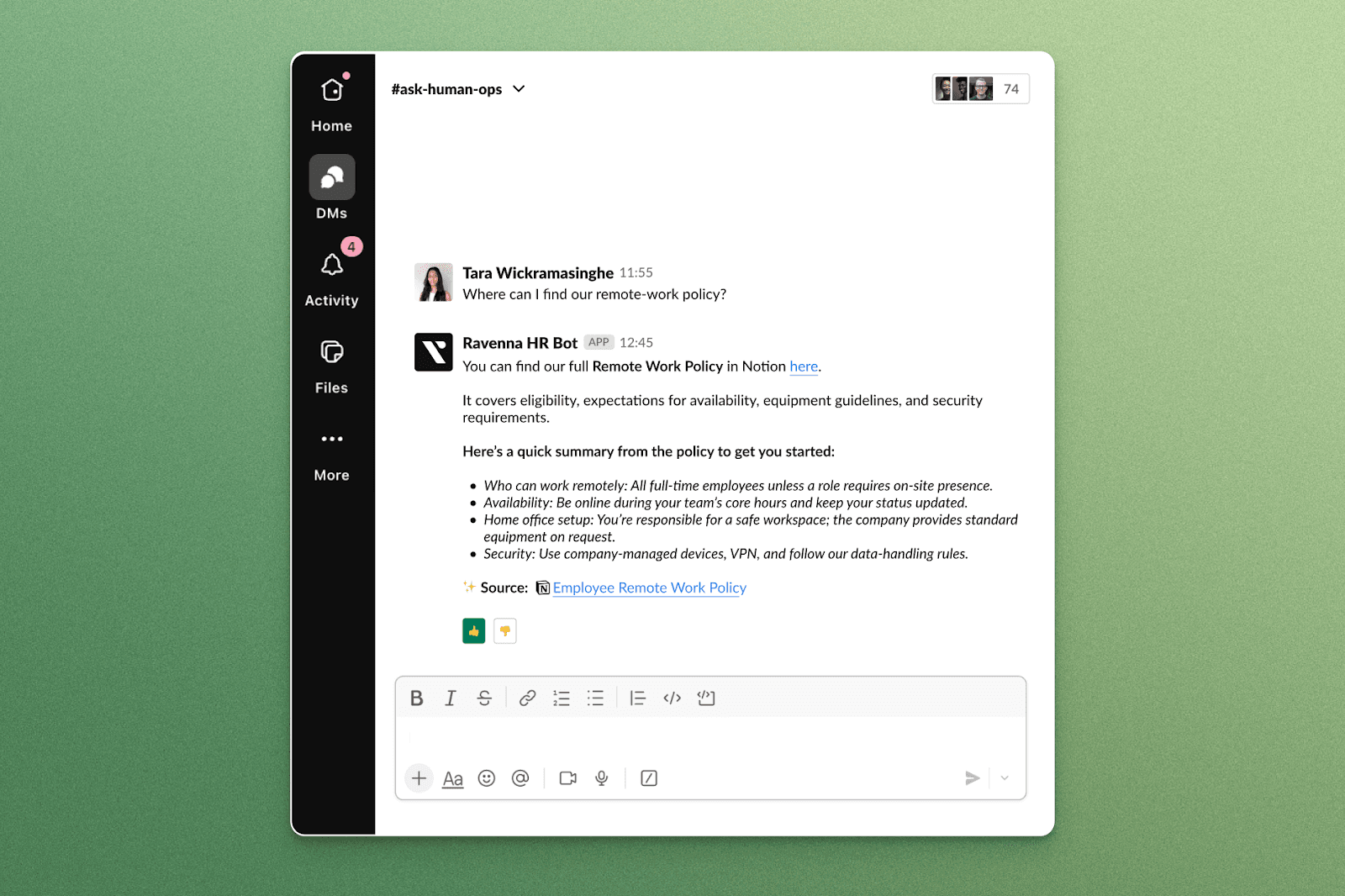
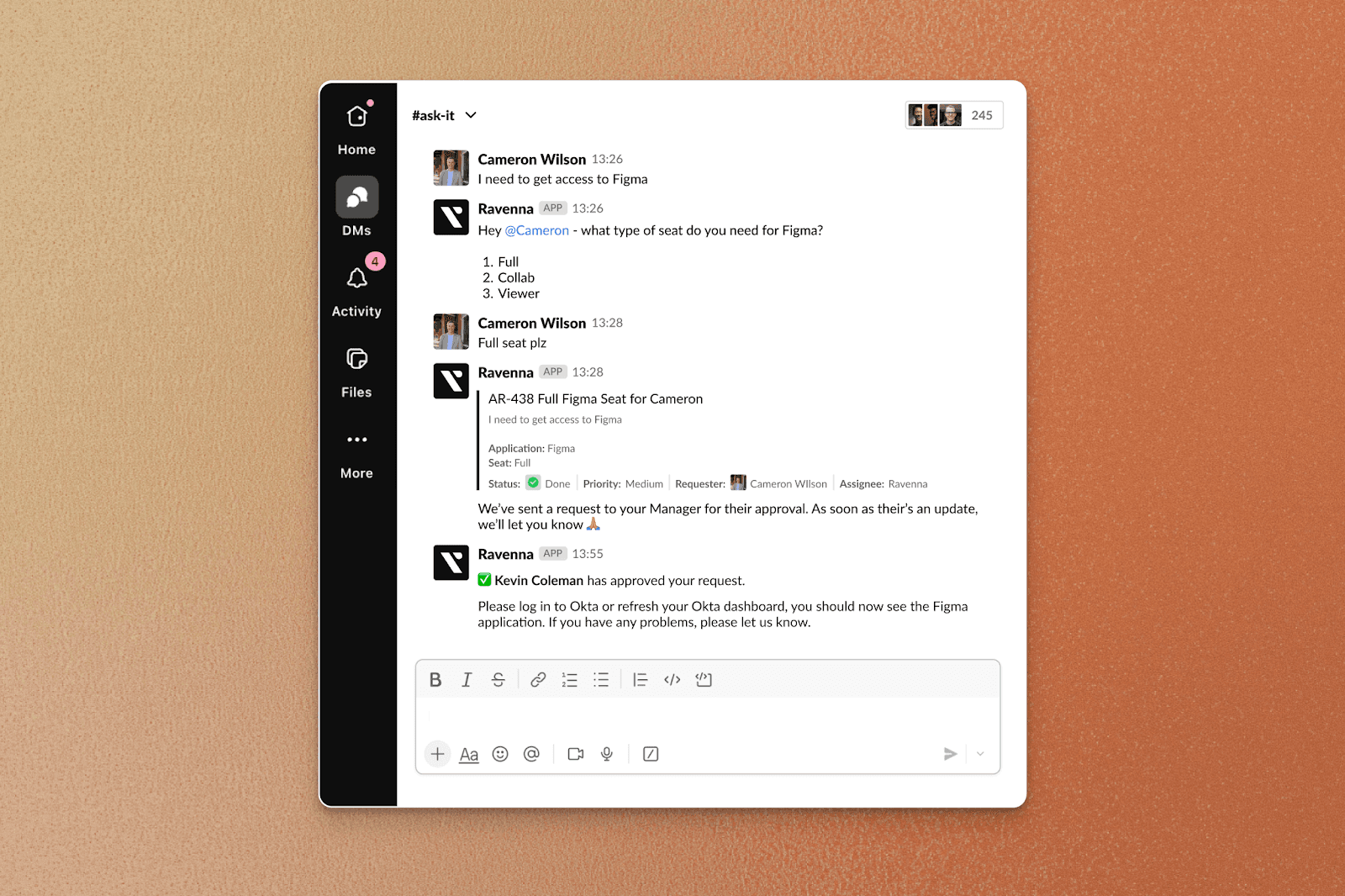
Choose an ESS platform that covers roughly 80% of your team’s daily use cases out of the box, minimizes training time, and maintains strong admin governance. That balance of usability and control is what drives lasting adoption.
Choosing the Right Employee Self-Service Software for Your Enterprise
When selecting the right employee self-service (ESS) software, you need to consider scalability, security, and how easily employees can get work done without HR intervention. Use these criteria to compare vendors objectively and find a platform that fits your enterprise's needs.
Key evaluation criteria:
Scalability & Regions: Headcount growth to 2-5×, localization, and data residency.
User Experience: Task completion in <60 seconds, true mobile parity.
Integration Depth: Native connectors, open APIs, webhooks, HRIS/payroll first.
Security/Compliance: SSO, SCIM, data residency, full audit exports.
Admin Effort: Configuration over code; role/field rules, workflow builder.
Reporting: Adoption, cycle times, error rates, exportable logs.
Total Cost: License + implementation + admin time (TCO), not just list price.
Turn the criteria into a simple scorecard and review it with HR, IT, and Finance for consensus.
You can bring this condensed checklist to every ESS demo and aim for 12-15 yes/no items to stay focused.
Buyer’s Checklist
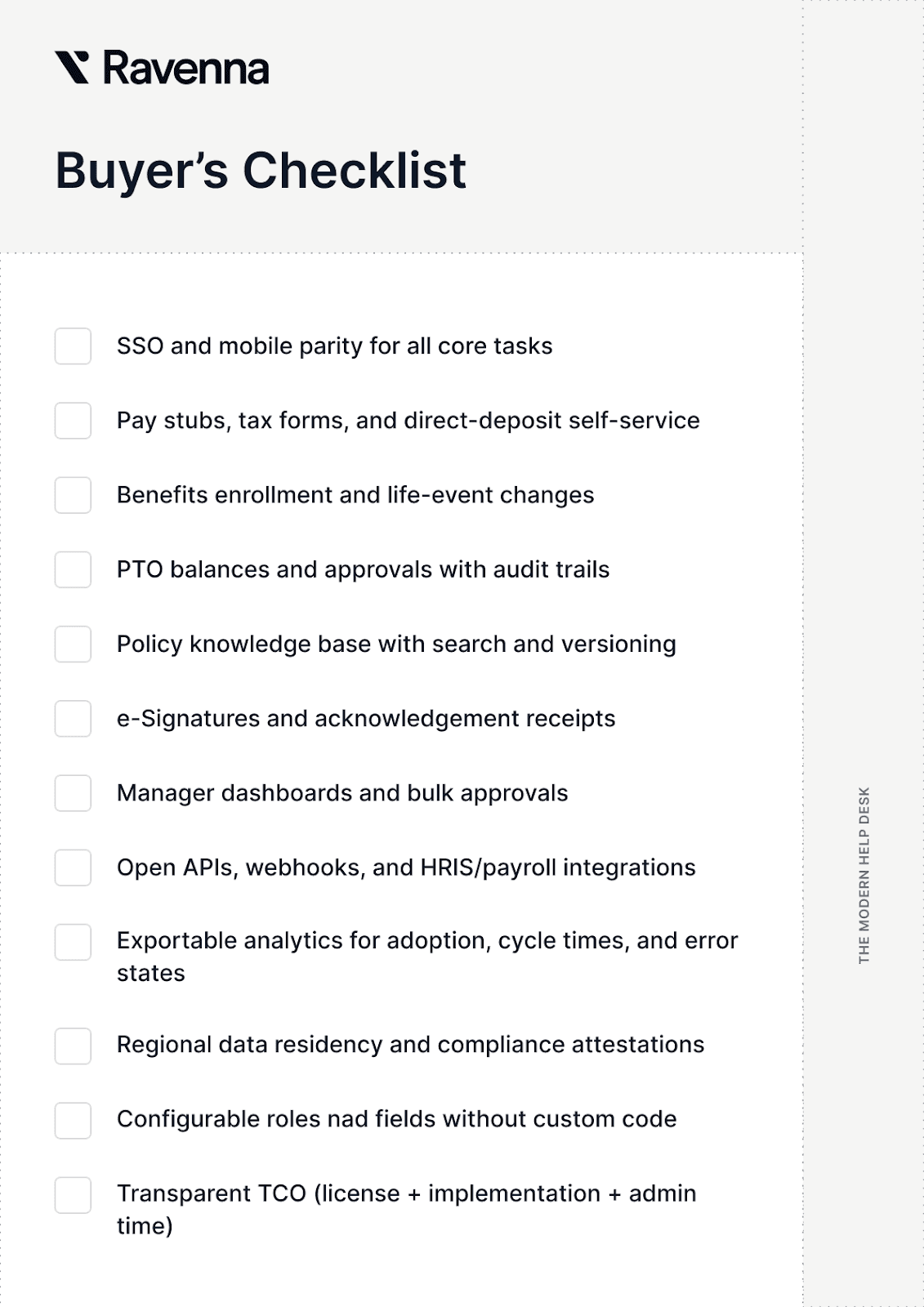
Once you’ve scored vendors against this checklist, share the results with HR, IT, and Finance alongside your projected ROI and adoption targets. A shared, data-driven scorecard helps your organization choose an ESS platform that scales securely and delivers measurable value fast.
Top Employee Self-Service Software (2025)
The best employee self-service software (ESS) depends on your company’s size, HR tech stack, and regional needs. Below are the leading ESS platforms in 2025, each with unique strengths, limitations, and ideal use cases. Use this as a directional guide when shortlisting HRIS or ESS solutions that fit your workflow and scalability goals.
Vendor | Best for | Standout strengths | Watch-outs |
Ravenna | Global enterprises using Slack heavily | Slack-first front door for internal requests, surfaces policy answers and routes to HRIS, complements an ESS portal | Not an HRIS/payroll suite. Deploy as a chat front-door alongside ESS |
Workday | Global enterprises | Unified HR/Payroll/Finance, robust analytics, strong global support | Cost/complexity, partner-led implementations |
SAP SuccessFactors | Large, talent-heavy orgs | Performance/talent depth, global scale | Steeper admin learning curve |
ADP Workforce Now | Mid-large US companies | Payroll leadership, compliance tooling | UX varies by module |
UKG Pro | Shift-heavy orgs with complex time | Time & workforce management | Enterprise-leaning rollout |
Rippling | SMB–mid-market tech-forward | Unified HR + IT device/app management | Rapid growth, vet enterprise fit and data residency |
Gusto | SMB (US) | Simple payroll/benefits, clear pricing | Limited enterprise features |
BambooHR | SMB-mid-market | Clean UX, people data | Payroll depth varies by region |
Personio | EU SMB-mid-market | EU compliance, HR core | Payroll coverage differs by country |
Zoho People | Budget-friendly | Price/value, broad ecosystem | Enterprise depth and integrations |
Paycom | US mid-market | Payroll + ESS adoption tooling | Pricing/contractuals |
(Optional) Moveworks | Enterprise AI self-service layer | NLP + deflection across tools | Not an HRIS/ESS core |
(Optional) Zendesk Guide | Knowledge-first self-service | Strong KB/portal features | Not HRIS/Payroll |
If your workforce primarily operates in Slack, a chat-based front door like Ravenna can enhance self-service by bringing HR answers directly into conversations, routing complex requests to your HRIS, and complementing your core ESS portal.
See it in action: Schedule a demo with Ravenna to experience how Slack-native self-service can streamline HR requests, reduce ticket volume, and keep your existing ESS and HRIS tools connected.
As for your next step, shortlist 3-4 employee self-service platforms, schedule demos with identical test scripts, and evaluate real-world scenarios like pay-stub downloads, PTO requests, address changes, and policy searches. This ensures an apples-to-apples comparison and a clear business case for your ESS investment.
Implementation in 4 Phases
A structured rollout plan is key to successful employee self-service (ESS) software implementation. Instead of launching everything at once, break it into clear, measurable phases that align HR, IT, and business users. This phased approach reduces errors, improves data accuracy, and drives faster employee adoption, especially in large or distributed teams.
Phase 1 - Plan: scope, owners, success metrics, data audit.
Phase 2 - Configure & migrate: RBAC, SSO, integrations, pilot groups, data cleanse.
Phase 3 - Train & launch: quick-start videos, FAQs, in-app tours, phased go-live.
Phase 4 - Optimize: dashboard reviews, quarterly cleanup, fill knowledge gaps, add modules.
Within 90 days, aim for 80%+ monthly active users and strong engagement on mobile and web. Regular quarterly reviews help sustain momentum and keep your ESS system aligned with evolving business needs.
Final Thoughts
Employee self-service software centralizes everyday HR tasks so employees help themselves while HR focuses on higher-value work like talent, analytics, and employee experience.
Pick ESS tools employees will actually use (especially on mobile), measure adoption and cycle times, and iterate monthly. If your teams work in Slack, consider a chat front-door to boost self-service and route requests cleanly into your HRIS, complementary to your ESS.
FAQs
What is employee self-service (ESS) software?
A secure portal/app where employees handle routine HR tasks such as profile changes, pay/benefits, time-off, and policy answers without filing tickets.
What features should ESS include?
Profile updates, payroll/benefits self-service, time-off requests, documents with e-sign, a searchable knowledge base, mobile apps, and integrations.
How does ESS improve HR efficiency?
It deflects routine inquiries, speeds approvals, and improves data quality, cutting HR tickets and cycle time while increasing employee satisfaction.
Is ESS secure for payroll and benefits?
Yes. Look for SSO, RBAC, encryption, compliance attestations (e.g., SOC 2/ISO), and full audit trails.
What’s the difference between an ESS portal and an HRIS?
HRIS is the system of record; the employee self-service portal is the front-end employees use to view/change data and complete tasks.
How long does ESS implementation take?
Varies by size and integrations. Many teams pilot in weeks using phased rollout, then expand modules over a quarter.



